


YouTube Scriptwriting: Step-by-Step Guide, Template & AI Prompts (2026)
A simple guide to YouTube scriptwriting steps, a template, AI tips, and common mistake creators can avoid to engage their audience.
Your YouTube scriptwriting process determines how your video content will perform.
A YouTube video script shapes how you will hook the viewers in the first 30 seconds, keep them engaged throughout the video and motivate them to do something, like subscribe to your channel or sign up for a newsletter.
It also helps video editors choose the right visuals, special effects, viral-worthy moments (for distribution) and emotional cues for the presenter.
This article defines YouTube scriptwriting and its significance, explains the approach to it, provides a step-by-step guide, a template, AI integration tips and common mistakes.
Key Takeaways
- A script is a blueprint that maps out your hook, talking points, CTA, emotional cues, and visual notes. It helps recording and editing move faster.
- Nail one core value per video. Every script should promise one specific outcome (“plan your day in 10 minutes”) instead of a vague theme (“productivity tips”). One idea per video keeps viewers focused.
- The first 15–30 seconds decide everything. Open with a question, bold claim, or surprising stat, then immediately tell viewers what they’ll get by staying.
- Write as you talk. Conversational language is warm and will keep your audience engaged. Read the script out loud before recording to catch awkward phrasing, emotionality, filler, and pacing issues.
- Aim for ~170 words per minute. That’s the sweet spot for English YouTube. For a 10-minute video, plan 1,300–1,600 words to leave room for pauses and non-speaking segments.
- Use AI to speed up your video production process. Turn existing articles or webinars into first-draft scripts, expand ideas into outlines, sharpen hooks and CTAs, and generate titles, descriptions, and chapter timestamps.
- AI can also help repurpose completed videos by converting them into short clips and social posts.
What is YouTube Scriptwriting and Why Does it Matter
YouTube scriptwriting is a process that produces a detailed blueprint of a particular video. It contains every bit of information, such as the title, length, hook, intro, talking points, conclusion, CTA, emotional cues and editing/visual suggestions.
A YouTube video script makes it easy for creators and marketers to stay on topic, remove fluff, be engaging and record & edit the video faster. Teams can also use a script to spot errors or irrelevant sections to improve the overall content’s quality.
A typical YouTube script can be in different formats, depending on what you want. In some cases, you can write the full word-for-word script. If you are an experienced creator, a set of bullet points or a slide deck can be enough.
Basically, regardless of the format or level of detail, the script should help you visualize the final video and make the downstream video production stages like recording and editing quicker.
YouTube Scriptwriting in Six Steps
The six steps below will help you write scripts faster that are on-brand, topically relevant and will attract and retain your audience.
1. Define the Core Value
The core value is the key takeaway of your YouTube video. Usually for brands, it is telling the viewer to do something and providing valid justification.
For example, a YouTube video describing Distribution.ai’s video repurposing feature can have the core value: Distribution.ai helps busy marketers repurpose YouTube videos into short clips and text-based posts in under a minute, saving hours every week.
In the above example, the core value nudges the viewers (busy marketers) to try Distribution.ai because it can save them hours while producing a week’s worth of content.
Ask yourself:
- What problem is this video solving?
- What positive change am I promising?
If your outcome is vague, the video will feel unfocused.
For instance, instead of selecting a broad topic like “Tips for productivity”, use something like “A 3-step system to plan your day in under 10 minutes.” The former topic is too vague to target a particular segment of the audience who would find the underlying message relevant.
2. Conduct Content Research
The next step is to watch other videos on the same topic and read similar articles that rank high on the SERPs or are visible in AI search results.
It will provide insights into what the target audience is expecting from a video on such a topic and how they react to it in the comments.
Also, check conversations and discussions on platforms like Reddit. You can capture the trending opinions and information when writing YouTube scripts. Insights from this phase can
Incorporate relevant pointers and sections to make the video more comprehensive and relevant.
3. Outline Your Script as Bullets
From this step, you start writing the script for your YouTube video.
Use this YouTube scripting structure to create a solid outline with all the key bullet points:
- Hook (first 5–15 seconds): Open with a question, contrast, or clear promise. For example, “Most people lose viewers in the first 20 seconds. Here’s how to avoid that.”
- Setup: Briefly explain why this topic matters. Keep it under 3–4 lines.
- Key Points (3–5 max): Break the teaching/story into small, digestible segments. Each point should answer: What should they understand here?
- Visual Notes: Add cues for B-roll, screen text, or examples as bullet points under each main point. This makes the video feel dynamic even if you’re filming a simple talking-head style video.
- Call to Action: End with a contextual CTA. For example, “Follow for more tips” or “If you want part two, comment ‘script breakdown’ and I’ll make it.”
After you list all the points, give it another look. It will allow you to see if the pointers flow naturally. Sometimes, you will find some opportunities for improvement where you may add/remove sections and move things up or down to structure the video better.
Towards the end of the video, you can include a “quick recap” section to reinforce the value shared. It can also strengthen the CTA, as the viewer will be reminded of the core value right before.
Additionally, keep in mind that the visual notes are ultimately decided in the editing phase. Here, you can certainly add them if you know what they’ll be, but try not to stress over it if you are feeling blank.
4. Start With a Strong Hook
Start your YouTube video script with a strong, intriguing opener (a question, a startling fact, a promise or a teaser) to grab attention in the first few seconds. The first 15–30 seconds are the most important because this is when your viewers decide if they will keep watching.
For example, if the topic is “5 productivity hacks,” you might begin, “What if I told you one habit could double your output?”
This kind of hook promises value and keeps viewers watching. For YouTube Shorts, you need to make the hook even more immediate. But for longer videos, an 8–20 second intro works.
5. Make it Conversational
Your YouTube script should sound as if you are talking to a friend. Use words and phrases as you’d normally use in a day-to-day conversation with someone you know.
For instance, if you or your brand is upbeat and informal, the script should be too. As Alan Spicer, a YouTube Growth Specialist, advises, write with the speaker’s “voice” in mind. This helps the delivery feel more natural, and it resonates well with the audience.
6. Read it Out Loud
Reading it aloud simulates the process of recording the video, which enables you to spot awkward phrasing, irrelevant sentences, filler words, tonal variations and pacing issues in your own voice.
You can also discover other opportunities for improvement, like whether a takeaway requires an example or explanation. Over time, this quality control step will also help you be more conversational during the writing process, reducing editing overhead down the line.
YouTube Video Script Template You Can Use Today
You can use the general YouTube script template below to accelerate your scriptwriting process for your next video:
| Segment | What to cover |
|---|---|
| Cold open/hook (0:00–0:15) |
|
| Intro/promise (00:15–0:45) |
|
| Main content | Point 1 — [Section title]
Point 2 — [Section title] |
| Core value |
|
| Call to action |
|
| Outro/conclusion |
|
How AI Can Help with YouTube Script Writing?
AI tools can help you write and enhance your YouTube scripts without manual work. Below are some ways you can use AI platforms to improve your YouTube scripts:
1. Write Scripts From Existing Assets
Long-form assets like articles, guides, whitepapers, webinars and sales documents can be converted into engaging YouTube scripts. AI can scan these content pieces to extract the core value and produce a script in that context.
While you can use general-purpose AI chatbots like Claude and ChatGPT, it is always better to use dedicated platforms that are designed for transforming one content format into another.
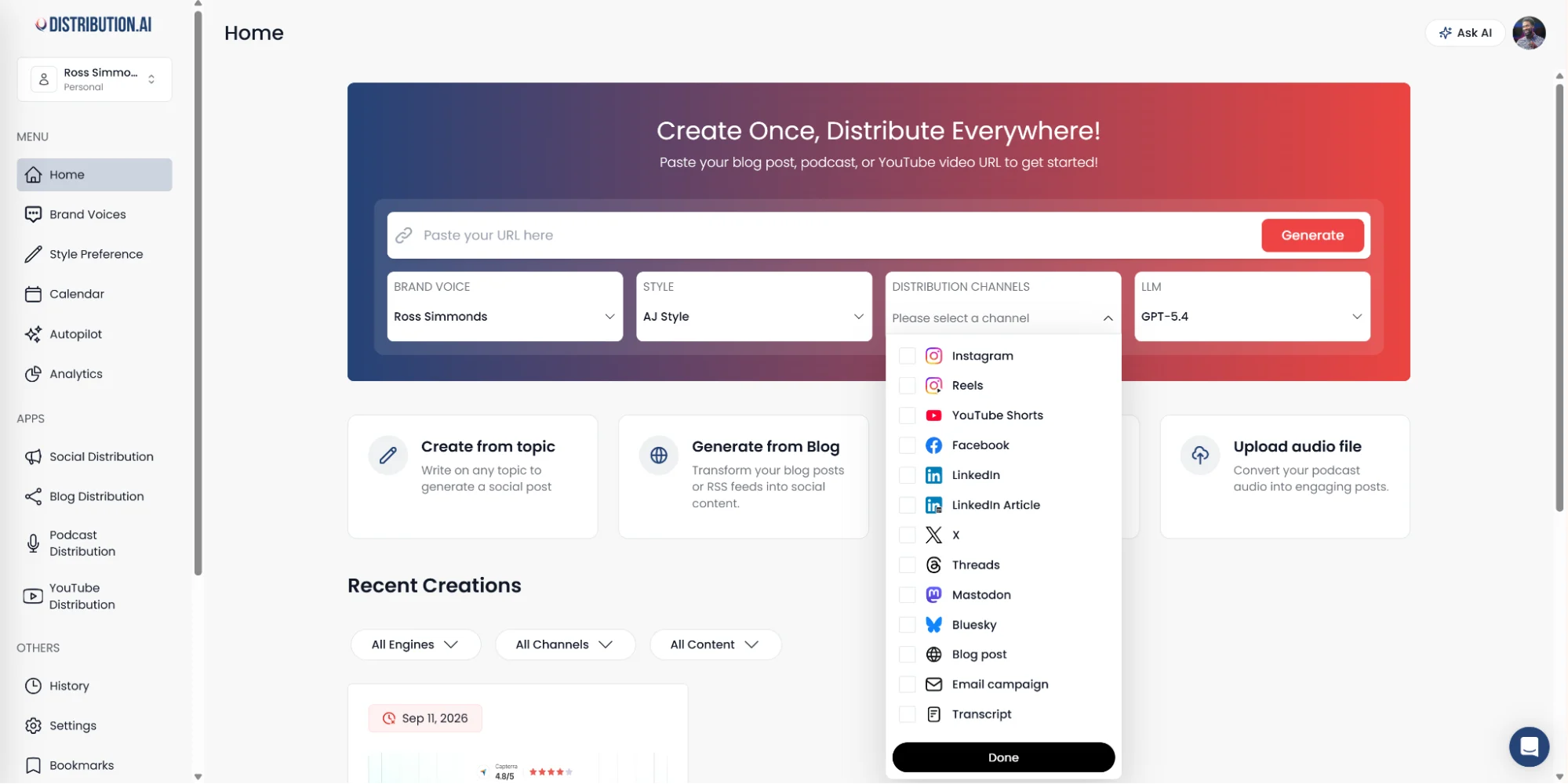
Distribution.ai’s AI content repurposing feature does that to write scripts in your brand’s tone and style. You can then optimize this draft to polish the YouTube video script before sending it off to production.
Paste the link to an existing asset or upload a file, then select “Transcript” or “YouTube Shorts” from the dropdown.
2. Convert Ideas Into Video Outlines
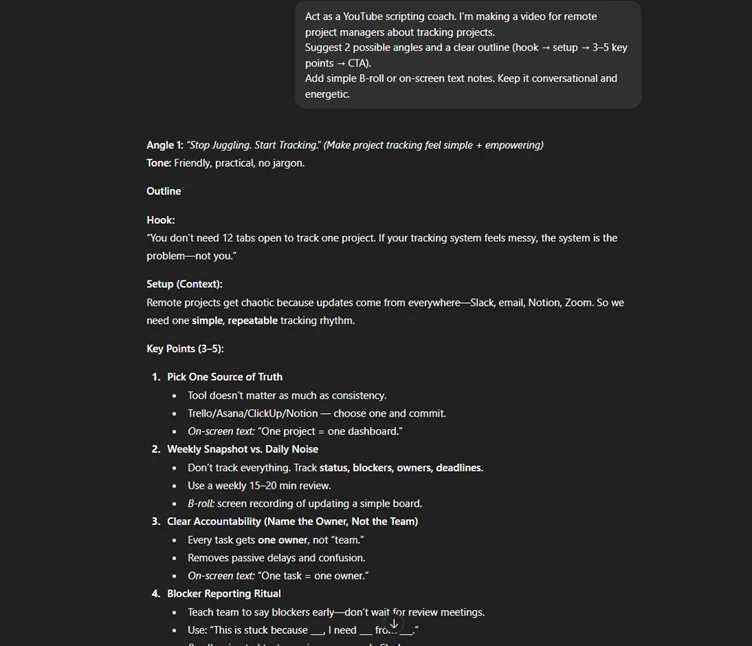
A video idea or a core value can be expanded into a complete outline. This gives you more creative control because the full script will be written by you. Furthermore, it’s easier to edit and tweak the outline using conversational AI chatbots like ChatGPT.
3. Enhance Your Existing Script
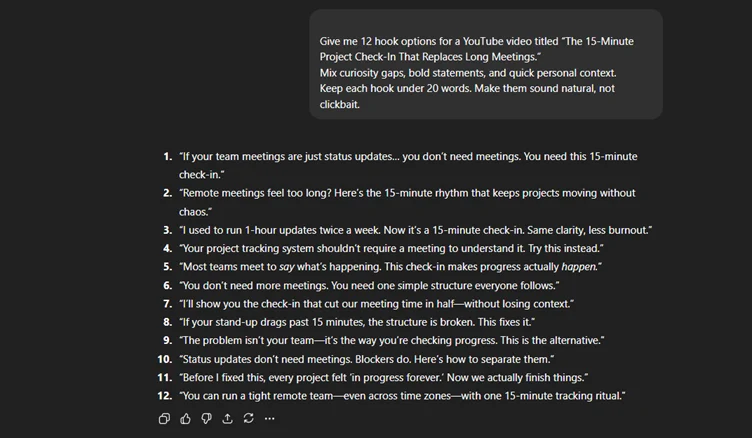
If you already have a complete, strong script, you can feed it to AI to identify areas for improvement in terms of content, emotionality, language, tone and CTA. For instance, you can ask AI for different hooks for the intro or a variety of closing statements for boosting subscription rates.
You can provide your brand’s documents to align it with your current marketing goals effectively.
4. Generate Meta Details for YouTube
Title, description, video summary and timestamps for chapters increase your content’s visibility on YouTube and organic search. AI platforms can analyze your videos or scripts to produce these details instantly, saving you from manual work.

Common Mistakes to Avoid During YouTube Scriptwriting
The following oversights can creep in when writing your next YouTube video’s script:
- Sounding smart instead of being clear: Focus on getting the core value across as simply and effectively as possible. This can sometimes mean shifting away from overly polished or professional language, jargon, complex words and technical terms.
- Stuffing many ideas into one video: Multiple ideas spread the attention of your viewers and confuse them about what to do next. It also forces them to prioritize each talking point in their head, which can make them fatigued.
- No pacing or breathing space: Constantly providing information without taking a pause can overwhelm your viewers. Taking a pause once in a while can help your audience process all the information. You can also take more time when explaining complex concepts, data and frameworks.
- Speaking too fast or too slow: The average speaking rate for English on YouTube is about 170 words per minute. Try your best to stay within +/- 10 WPM of that number to keep your viewers engaged throughout the length.
- Explaining the “what” without the “why”: If you want your audience to do something, such as sign up for a product or book a demo, you have to mention the advantages. It will support the action and motivate them to take it on their own.
- Monotonous emotional presentation: Simply presenting the information will make the video sound robotic and impersonal. You can fix it by adding cues in your script like “appear excited” and “lean in and smile.” It will make the video appear as a friendly conversation, improving engagement.
Grow Your YouTube Channel With Distribution.ai
Distribution.ai can help you grow your YouTube channel in two ways.
First, it can generate first drafts of video scripts from existing long-form content that you can enhance without writing them from scratch. It will maximize the ROI of existing digital assets that have already proven their value.
Second, after a video is created, Distribution.ai can convert it into multiple short-form content pieces like short clips and social media posts. You can share these repurposed pieces with your audience on various channels without spending hours every week.
You can schedule the social media content directly using the built-in calendar and track its performance through the unified dashboard.
Frequently Asked Questions
How do I write a script to retain viewer attention?
Open with a hook that captures their attention instantly. You can share a stat or a shocking fact to achieve this effect. Then, in the next 30 seconds, tell them what the video covers. This will set an expectation of a reward in the viewers’ mind, encouraging them to watch your content attentively.
How do I optimize my script for YouTube SEO?
A good script supports discoverability by naturally incorporating phrases your audience already searches for. Use topic-specific language in your intro and reinforce the core idea throughout the video. You can do this by focusing on clarity. If your explanations are clear, your audience prefers to watch it, which will boost your video’s visibility on YouTube and organic search.
What script structure works best for educational videos?
For teaching-focused videos, you can follow: Hook → Context → Explanation → Example → Takeaway. To make the video more engaging, you can mention suggestions for B-roll clips, visual elements, sound effects and captions.
How long should a 10-minute YouTube script be?
The average speaking speed in English YouTube videos is 170 WPM, which translates to 1700 words in 10-minutes. However, you need to factor in intermittent pauses, special effects, transitions and non-speaking portions. A healthy word count for a 10-minute YouTube video script can be within 1300–1600 words.

Promote, repurpose & distribute your content with AI
Write 10x faster, engage your audience, & never struggle with the blank page again.
Start 15-Day Free Trial
Frequently Asked Questions
Author

Promote, repurpose & distribute your content with AI
Start 15-Day Free Trial