What Does a Social Media Manager Do in 2026?
See what a social media manager does, from content planning and community management to analytics, reporting, and driving measurable business outcomes online.
 By
Social media managers shape how a brand shows up across social channels. They plan content, coordinate publishing, manage community interactions, and track whether social activity is supporting goals such as awareness, website traffic, leads, or product launches.
The role has expanded as brands publish across more platforms and formats. Social media managers may now oversee short-form video, content repurposing, reporting, community management, and AI-assisted workflows alongside day-to-day publishing.
This guide explains what a social media manager does in 2026, the responsibilities they own, the skills employers look for, how performance is measured, and where AI fits into the workflow.
What Does a Social Media Manager Do?
The role covers the work behind each social channel, from planning what to publish to checking how that content performed and what should change next.
1. Social Strategy And Content Planning
Each channel needs a clear purpose. The social media manager sets the goal first, then decides who the content is for and what belongs on that platform. A clear social media strategy keeps those decisions tied to the brand’s audience and wider business goals.
Content planning turns that strategy into a calendar the team can use. One practical model is to set 3–4 content pillars aligned with business themes, then build the calendar around those pillars, campaign work, product launches, timely posts, and recurring brand content. Startup Jobs uses the same 3–4 pillar approach in its social media manager guidance.
Social audits and competitor research also help shape the plan. They give the manager a clearer view of what the brand has already covered, where competitors are active, and where there is room to try something different.
2. Content Creation And Repurposing
Content is a large part of the social media manager role. In Jobscan’s analysis of social media manager skills, “Content” appears in 58% of job descriptions.
The work starts with the marketing priorities already on the table. A product launch needs social content around it. A new blog, podcast, or video can also be turned into posts for different platforms instead of being shared once and forgotten.
A good content repurposing workflow for social media helps the manager get more use from existing content while changing the format and copy to fit each channel. When a post needs design or video support, the manager briefs the creative team or external partner and checks that the finished asset fits the brand’s identity.
3. Scheduling And Publishing Across Multiple Platforms
Once content is approved, the social media manager schedules posts and keeps the calendar moving. Each platform needs its own treatment, so caption length, creative format, links, and calls to action are adjusted for the channel.
A social media plan also helps keep product launches and ongoing organic content from competing for the same space. It gives the team a clear view of what is going live and when.
Algorithm changes or a new channel can force the plan to change. The manager checks whether the opportunity fits the audience and brand goals before adding more work to the calendar. The same test applies to trends. A trend is worth jumping on when it fits the brand and gives the audience something relevant.
4. Community Management
Community management starts when people respond to the content. Comments, direct messages, mentions, and user-generated content all need attention.
Those conversations shape the brand’s online presence too. Repeated questions can point to gaps in the content, while recurring reactions give marketing teams a better sense of what people care about.
A clear community management strategy also helps the team decide how to handle replies, feedback, moderation, and issues that need to be passed to another team.
5. Tracking Social Media Metrics And Campaign Performance
Analytics is part of the job too. Jobscan found that analytics appears in 40% of the social media manager job descriptions in its analysis.
The right social media metrics and KPIs depend on the goal behind the content. Reach and impressions can help track brand visibility. For lead generation or traffic-focused campaigns, clicks, website traffic, sign-ups, and conversions carry more weight.
The manager compares campaign performance across formats and channels, then uses those results to adjust the social strategy. Strong posts can be repeated or expanded. Weak results can point to a problem with the topic, format, channel, or timing.
6. Working With Marketing Teams And External Partners
Product launches and larger campaigns usually involve people outside the social team. The social media manager works with designers, writers, paid media teams, and other specialists to get the right social assets ready.
Deadlines and briefs need to stay clear across the people involved. When external partners are part of the campaign, the manager gives them enough brand and campaign context to produce work that fits the brief.
Paid social can also fall under the social media manager role. In that setup, the manager handles campaign setup and budget tracking, then reviews performance alongside the organic work.
What Skills Does a Social Media Manager Need in 2026?
The role has become broader as social teams take on more channels and more types of content. The skills below cover what a social media manager needs to handle that work well.
1. Communication And Writing
Social media managers write captions, replies, campaign copy, and briefs for other people on the team. The tone needs to stay consistent with the brand, even when the format changes from a LinkedIn post to an Instagram caption or customer reply.
Clear communication also makes collaboration easier. Designers, video editors, writers, and external partners need briefs they can actually work from.
2. Creative And Visual Judgment
Good social content starts with choosing the right format for the idea. A topic could work better as a short video, carousel, graphic, or text-led post depending on the channel and audience.
Short-form video editing is useful here too. Even when someone else handles the final edit, the social media manager should know which clips, hooks, and formats fit the platform.
3. Analytical Skills
Analytics helps the manager understand why content performed the way it did. Engagement, website traffic, follower growth, leads, and sign-ups all tell a different part of the story.
The useful part comes after reporting. Performance data should influence what gets repeated, changed, or dropped from the content plan.
4. Platform Knowledge
Each platform works differently. Instagram puts more weight on visual formats, LinkedIn has its own content patterns, and short-form video behaves differently again across Reels, TikTok, and YouTube Shorts.
Algorithm changes also affect how content reaches people. Keeping up with those changes helps the manager adjust formats and publishing decisions without chasing every update.
5. AI Skills
AI now handles parts of the social workflow that used to take a lot of manual effort. Social media managers can use it to create first drafts, repurpose existing content, and adapt source material for different platforms.
The skill is knowing what to keep and what needs editing. Brand voice, campaign context, and the quality of the final post still need a human decision before anything goes live.
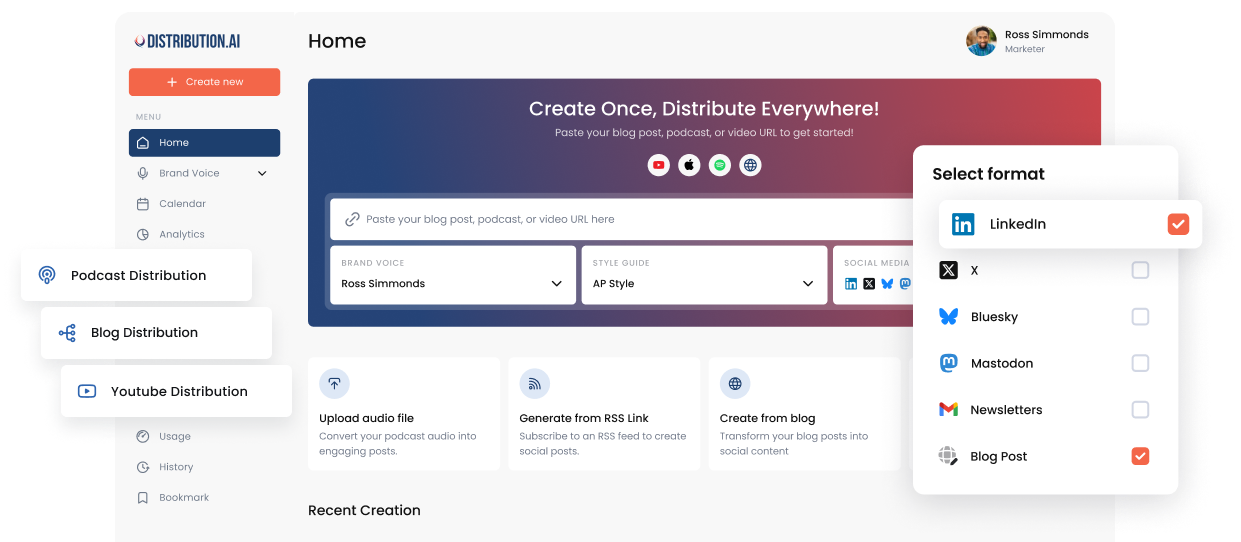
For example, Distribution.ai can turn an existing blog, podcast, or video into social content for multiple platforms, giving the manager drafts to review instead of rebuilding each post from scratch. Our guide to AI in social media covers where AI fits across the wider social workflow.
How Social Media Managers Use AI
AI can take some of the repetitive work out of social media management.
It can help with content repurposing, draft creation, testing ideas, social listening, and performance analysis. The social media manager still reviews the output and decides how it fits the wider strategy.
1. Repurpose Existing Content
Blogs, podcasts, webinars, and long-form videos often contain several ideas that can be reused on social media. AI can turn that source material into draft posts for different platforms, which reduces the amount of manual rewriting involved.
Distribution.ai is built around this workflow. It turns existing blogs, podcasts, and videos into channel-ready social content that can be reviewed, edited, approved, and scheduled from the same workflow.
2. Create Content Variations For Testing
AI can quickly create different versions of a hook, caption, or post angle. Social media managers can use those variations when testing which message gets a stronger response from the audience.
The performance data still needs context. A stronger result could come from the topic, creative, timing, audience, or the copy itself, so the manager needs to look beyond a single winning variation.
3. Improve Posting Decisions
Historical engagement data can help social teams make better decisions about when to publish. AI can spot patterns in past performance and suggest time windows when the audience has been more active or responsive.
Timing is only one part of performance. The quality of the post, the format, and how relevant it is to the audience still have a much bigger influence on the result.
4. Monitor Sentiment And Community Activity
AI can help sort large volumes of comments, mentions, and conversations by topic or sentiment. That makes it easier to spot a sudden rise in negative feedback, repeated customer questions, or a topic gaining attention.
The social media manager still needs to read the conversation before deciding what to do. A spike in negative comments could signal a real issue, or it could come from a single post reaching a much larger audience than usual.
5. Find Patterns In Performance Data
AI can also help social media managers review large amounts of performance data and find patterns across topics, formats, and channels. Those patterns can point to content that deserves another run or areas where the current approach needs work.
This is most useful when the insight changes what happens next. The manager can use the findings to adjust the content plan, test a different format, or shift attention to a channel that is producing stronger business outcomes.
Tools Social Media Managers Use in 2026
A social media manager usually works across a few different tools to create content, publish it, track results, and keep the team organised. The setup depends on the size of the team and how much of the work sits with the social manager.
1. Content Creation And Short-Form Video
For quick production work, social teams often use a mix of design and video tools:
- Canva for graphics, carousels, and simple visual assets.
- Adobe Express for lightweight design and resizing content for different platforms.
- CapCut for short-form video, captions, and quick edits.
- Adobe Photoshop or Premiere Pro when the creative needs more detailed design or video work.
The social media manager does not need to handle every edit personally, but they should know what each format needs before it goes live.
2. Content Repurposing And Distribution
Distribution.ai helps social media managers turn content the business has already created into posts for different channels. A blog, podcast, YouTube video, uploaded video, or draft can become new social content without rebuilding every post from the beginning.
The platform creates channel-ready content for LinkedIn, Instagram, Facebook, X, Threads, Bluesky, and Mastodon. Social media managers can use a saved brand voice, set writing preferences, edit the output, and work with their team before anything is published.
Long-form video can also be turned into Instagram Reels and YouTube Shorts. This gives the social team more ways to use one source asset across different social formats.
3. Scheduling And Publishing
Buffer, Later, Hootsuite, and Sprout Social are common choices for teams that mainly need a social calendar and publishing tools.
Distribution.ai also includes scheduling as part of its wider content workflow.
A social media manager can move from source content to social drafts, team approval, and scheduled posts without moving the work into a separate publishing tool.
4. Analytics And Reporting
Native analytics from Instagram, LinkedIn, YouTube, Facebook, and other platforms show how content is performing inside each network. Google Analytics helps connect social traffic with activity on the website, including sign-ups and conversions.
Distribution.ai also brings social performance into its analytics dashboard. Social media managers can review impressions, engagement, link clicks, engagement rate, audience growth, and top-performing posts alongside the content they are distributing.
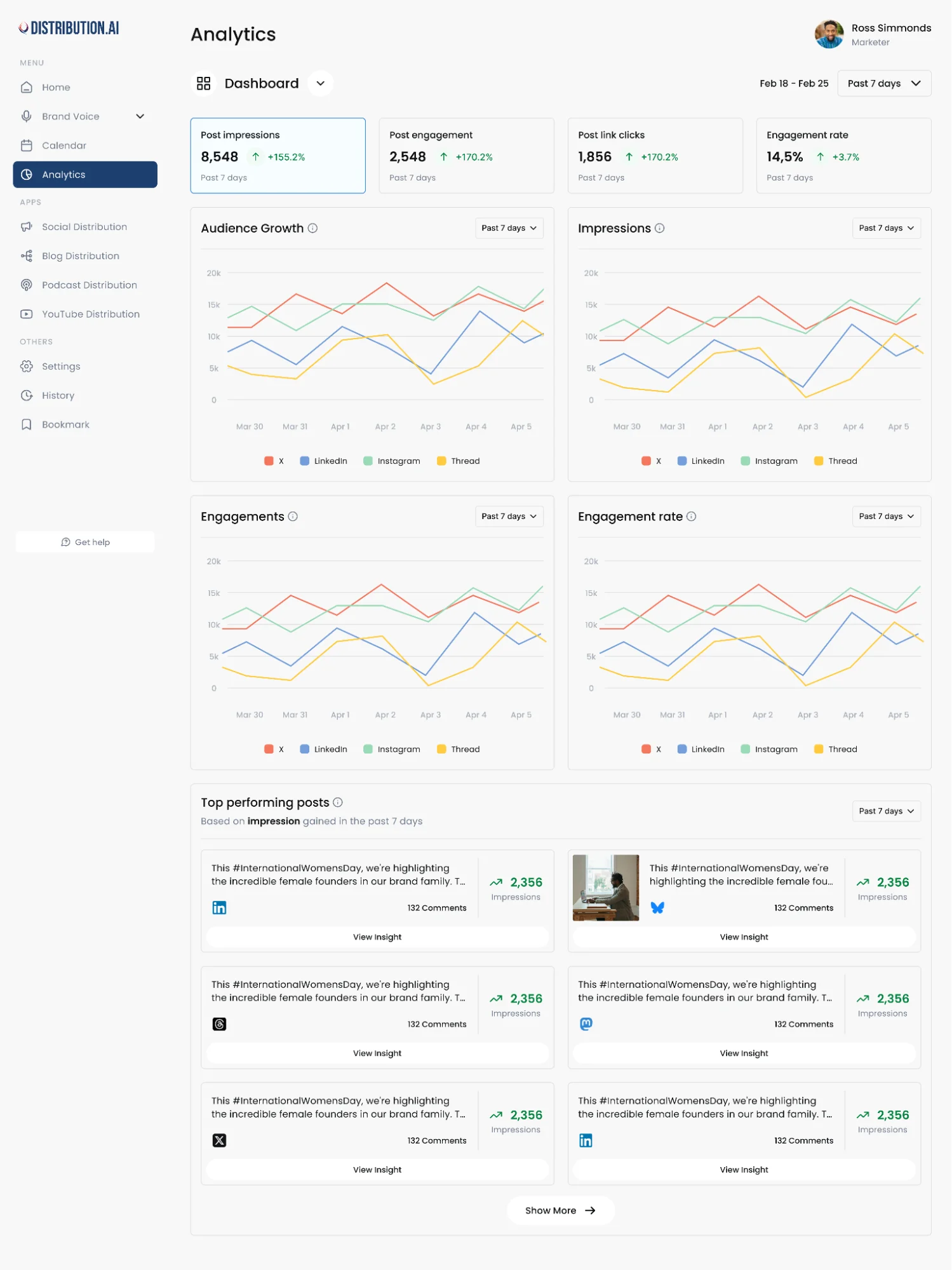
That makes it easier to see which content is getting a response and use those results when planning the next batch of posts.
5. Social Listening And Community Monitoring
Brandwatch and Mention are useful for following conversations happening outside the brand’s own posts. They can help teams track brand mentions, customer feedback, industry discussions, and changes in sentiment.
Native platform notifications cover the direct side of community management, including comments, tags, and messages. These conversations can surface customer questions or topics the content team should respond to.
6. Project Management And Approvals
When several people are involved in social content, project management tools help keep production moving. Common options include:
- Asana for campaign tasks and deadlines
- ClickUp for content production and team workflows
- Notion for briefs, calendars, and shared planning
- Trello for simpler board-based workflows
Distribution.ai already includes a team approval workflow for the content created inside the platform.
A separate project management tool is still useful when the social work is part of a larger campaign involving design, SEO, paid media, or other teams.
What Should You Look for When Hiring a Social Media Manager?
A good hire should fit the way your team already creates and distributes content. Start with the channels they will manage, the source content they can work from, and the business goals social needs to support.
1. Match the Role to Your Content Workflow
If your team regularly publishes blogs, podcasts, webinars, or videos, look for someone who knows how to turn that source material into social content.
They should understand how to plan the calendar, repurpose strong ideas, and adapt them for different platforms without making every post feel like a copy of the original.
2. Look for Strong Content Judgment
A polished portfolio only tells part of the story. Ask candidates why they chose a certain format, how they changed an idea for another platform, and what they would do differently after seeing the results.
This gives hiring managers a better view of how the person thinks about content instead of judging them only by follower growth or a few high-performing posts.
3. Check Their Platform Knowledge
The ideal candidate should know the platforms your brand actually uses. A team focused on LinkedIn needs a different skill set from one producing large volumes of Reels, Shorts, or other short-form video.
Good platform knowledge also includes knowing when a format or channel is worth testing and when it adds work without helping the wider strategy.
4. See How They Use Performance Data
A social media manager should be comfortable reading social media metrics and connecting them back to the goal of the campaign. That could mean looking at engagement quality, website traffic, lead generation, sign-ups, or other business outcomes.
Ask how they have used performance data to change a content plan or improve a campaign. The answer should show that reporting leads to decisions, not just another dashboard.
5. Look for AI And Repurposing Skills
AI is becoming part of the social content workflow, so candidates should know how to use it without handing over editorial judgment. That includes creating first drafts, repurposing existing content, and adapting source material for multiple platforms.
For content-heavy marketing teams, this can make a real difference. Someone who knows how to get more social output from the content you already produce will usually be more useful than someone who treats every post as a brand-new project.
6. Check How They Work With The Wider Team
Social media managers often depend on writers, designers, video editors, and external partners to get campaigns live. Clear briefs, useful feedback, and reliable follow-through make that work easier to manage.
If you are hiring remotely, set expectations early around approvals, deadlines, and urgent community issues so the social workflow does not slow down once the person joins.
Get More From the Content You Already Create
A social media manager should not have to rebuild every post from scratch. If your team already publishes blogs, podcasts, videos, or other long-form content, there is usually more social content sitting inside those assets than you are using.
Distribution.ai helps turn that existing content into channel-ready posts that can be edited, approved, scheduled, and tracked from one workflow. That gives social teams a faster way to keep the calendar moving without lowering the quality bar.
Frequently Asked Questions
1. What Skills Are Required for a Social Media Manager?
Social media managers need strong writing, content planning, platform knowledge, creative judgment, and analytical skills. They also need to understand community management, short-form video, campaign performance, and how to adapt content for different platforms.
AI and content repurposing skills are becoming more useful as teams look for ways to produce more social content from the work they already create.
2. Do I Need a Degree to Be a Social Media Manager?
A degree is not always required. Employers often care more about relevant experience, a strong portfolio, platform knowledge, and evidence that you can plan content and improve performance.
Degrees in marketing, communications, journalism, or a related field can help, but hands-on social media experience can carry just as much weight.
3. Is Social Media Manager a High-Paying Job?
Social media management can become a well-paid career, especially as the role moves into strategy, team leadership, paid social, analytics, or broader content marketing. Pay varies by location, company size, experience, and the scope of the role.
Senior social media managers and social leads usually earn more than entry-level coordinators who focus mainly on publishing and community tasks.
4. Is Being a Social Media Manager Stressful?
It can be. Social media moves quickly, and managers often deal with tight publishing schedules, campaign deadlines, community issues, and last-minute changes. Managing several platforms at once can add to the workload.
Clear workflows, realistic content calendars, approval processes, and better use of automation can make the role easier to manage.
Author

Promote, repurpose & distribute your content with AI
Start 15-Day Free Trial