


13 Best Social Media Management Tools [Features + Pricing]
Discover the best social media management tools for small businesses with a detailed breakdown covering pros, cons, features, and pricing.
You’ve got a blog to publish, three reels to post across TikTok, Instagram, and YouTube, and you don’t want to reuse the same content everywhere.
Sounds familiar?
That’s daily life for creators and agencies trying to stay digitally visible with consistent posting.
However, writing new content tailored to each social platform is time-consuming and taxing. Imagine brainstorming content ideas for LinkedIn, TikTok, Instagram, and YouTube 5x a week and then creating the content based on audience preferences. It could take hours, if not days.
This is where you need social media management tools. They help you create valuable content in a smarter, more cost-effective way.
We’ve compiled a list of the 13 best social media management tools, breaking down their key features, limitations, and pricing. Explore and find the right fit for your workflow.
Key Takeaways
Best for getting started without overthinking tools:
Buffer and SocialBee are the easiest entry points. Low upfront cost and simple scheduling make them ideal early on, but Buffer’s per-channel pricing can creep up as you add accounts.
Best balance of price and functionality for growing teams:
SocialPilot, Vista Social, and Sendible offer the strongest middle ground. You get multi-account management, approvals, and collaboration without jumping into expensive per-seat pricing.
Best for content repurposing and output volume:
Distribution AI is built for turning one piece of content into many. It starts at a low monthly price, but costs scale with how much content you generate, so it’s best evaluated based on output, not just subscription cost.
Best for analytics, reporting, and automation depth:
Hootsuite, Sprout Social, and Agorapulse go deeper on reporting, inbox management, and automation. You pay more, but you get structured workflows and visibility that smaller tools don’t offer.
Best for budget-conscious scaling:
Metricool and RecurPost keep costs low while still covering scheduling and basic analytics. They’re good options if you want to delay moving into higher-priced tools.
What Are Social Media Management Tools?
Social media management tools are designed to simplify and automate tasks across various social media platforms. These tools enable you to plan and schedule posts, track engagement, analyze performance metrics, and manage multiple accounts from one centralized platform.
Key features of social media management tools include:
- Planning and scheduling content in bulk across different social networks
- Automatically publishing posts at scheduled times
- Comprehensive content management from creation to publication
- Reporting and analytics to evaluate the performance of your social media content
Best Social Media Management Tools for Small Businesses
Before we discuss the tools in detail, here’s a sneak peek at the main highlights of each tool:
| Tool | Best For | Free Trial/ Paid Plan | Starting At |
|---|---|---|---|
| Distribution AI | Small to mid-sized teams, creators, agencies that want to auto-repurpose long-form content into high-performing, platform-optimized posts | 15-day free trial | $19/ month |
| SocialPilot | Small to mid-sized teams managing client accounts with collaboration needs | 14-day free trial | $30/month |
| Vista Social | Agencies and social managers handling multiple client profiles + review monitoring | 14-day free trial | $39/month |
| RecurPost | Solopreneurs and content creators relying on evergreen content recycling | 14-day free trial | $9/month |
| Hootsuite | Large teams managing content volume, inboxes, and campaigns with automation | 30-day free trial | $149/month |
| Sprout Social | Enterprise and agency teams needing deep analytics and social CRM | 30-day free trial | $199/user/month |
| Sendible | Agencies and growing teams managing structured workflows and content volumes | 14-day free trial | $29/month |
| Buffer | Creators, freelancers, and small businesses needing easy scheduling and basic analytics | Free plan | $6/month/channel |
| Metricool | Small businesses and freelancers needing scheduling, analytics, and reporting | Free plan | $22/month |
| Agorapulse | Agency and brand teams managing multiple accounts + deep reporting | 30-day free trial | $79/user/month |
| Rella | Creators and small teams streamlining content planning and feedback | 14-day free trial | $25/user/month |
| Statusbrew | Growing teams needing inbox management, reporting, and workflows | 14-day free trial | $69/month |
| SocialBee | Small teams, solopreneurs organizing content with category-based scheduling | 14-day free trial | $29/month |
1. Distribution AI (All-in-one content distribution and social media management tool)
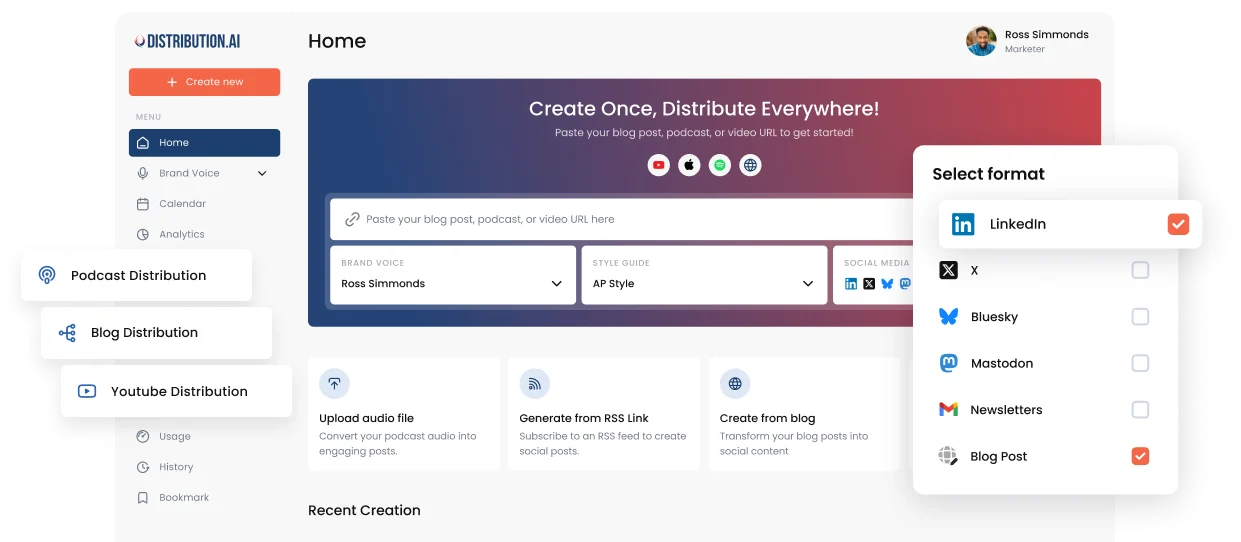
Ideal for: Small and mid-sized teams, creators, and agencies who want to transform long-form content (such as blogs, videos, or podcasts) into effective social media posts.
Distribution AI streamlines the most time-consuming aspect of social media: brainstorming ideas and manually crafting content.
Simply provide a blog, podcast, or video link, and Distribution AI will automatically generate dozens of optimized posts for each platform, such as LinkedIn carousels, Facebook posts, X threads, Instagram reels, captions, and more.
It also auto-schedules posts for the best times, supports custom templates, and quickly creates platform-specific variations. Additionally, you can generate AI images, infographics for your social posts, and A/B test multiple versions to determine which performs best with your audience.
If you’re a small team managing a large amount of content, Distribution AI can help you achieve high-quality results quickly, ensuring your distribution strategy is top-notch.
Key features:
- Multi-platform content scheduling: Schedule and publish content across all social channels from one centralised dashboard.
- Content performance tracking: Monitor post performance with real-time analytics on reach, engagement, and other key metrics, so you can quickly spot what’s working and adjust your strategy as platform trends shift.
- Multi-format blog repurposing: Create social posts from blog excerpts, repurpose podcasts, blogs into email newsletters, and auto-generate visual content for social channels and presentations.
- AI-powered snippet generator: Auto-create quotes, carousels, tweets, threads, and video clips from long-form content.
- Smart scheduler: Schedule posts at the best times and in waves across time zones.
- AI content creation: Generate high-quality, engagement posts with captions that align with your brand’s voice.
- AI image generator: Create quality images and graphics for social media to boost engagement.
- A/B testing: Generate multiple versions of the same post to test and determine what resonates best with the audience.
Pros:
- Easy to use
- Responsive customer support
- Efficient automations
Cons:
- May be expensive for solo users
Pricing:
Distribution AI offers a 15-day free trial, with paid plans starting at $19/month with no user limitations. You can choose any one service, including YouTube, Blog Content, or Podcast Distribution, based on your needs, or bundle two or three services.
- Creator: $44.92/month ($539, billed annually)
- Pro: $91.58/month ($1099, billed annually)
- Business: $307.42 ($3689, billed annually)
Verdict:
Distribution AI stands out for its efficient AI-powered content distribution and repurposing engine. It replaces hours of manual work with automated, brand-aligned content creation and scheduling, making it ideal for small teams who regularly publish content and are looking for tools to do the heavy lifting.
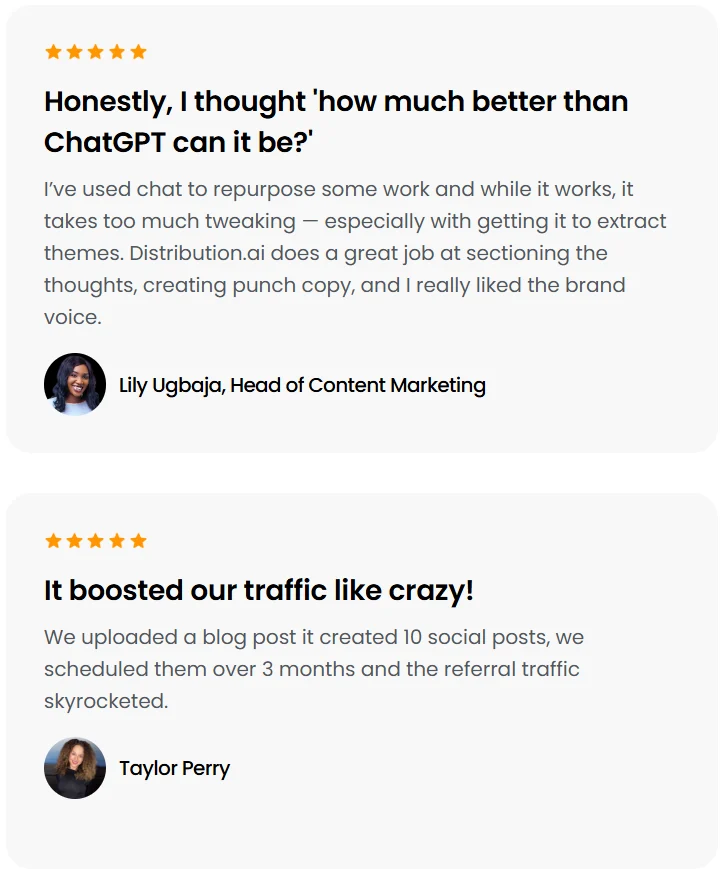
Here’s what the customers say 👇
2. SocialPilot (Centralized social media management with review management)
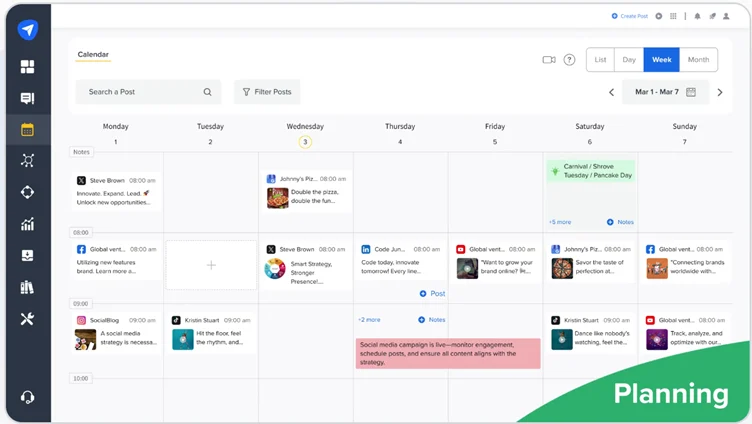
Best for: Small to mid-sized teams, agencies managing multiple client accounts, looking for collaboration capabilities.
SocialPilot streamlines content scheduling across platforms like LinkedIn, Instagram, Facebook, Pinterest, and TikTok. You can bulk-schedule posts, collaborate on calendars, and manage approval workflows. Its client management module helps you organize multiple brands without switching accounts.
One standout feature is the built-in content curation tool. It suggests trending topics, helping you stay relevant without the need for constant inspiration searches. It also offers a white label feature that allows agencies to rebrand platforms with brand logos, colors, and other elements.
Key features:
- Content management: Discover and create content, get AI-powered suggestions, and reuse best posts for multiple social networks.
- Automated review management: Monitor and respond to Facebook and Google Business reviews.
- Engagement tracking: Track mentions, comments, messages, and content performance across networks and generate shareable reports.
- Team collaboration tools: Streamline content feedback, reviews, and approvals, and collaborate on drafts to ensure seamless content preparation.
Pros:
- Makes managing multiple accounts easy with efficient posting
- Has templates tailored to each social network
Cons:
- Extra charges for using the tool’s native features, like tagging or the collab tool
- Posting for personal social media accounts involves several steps, unlike professional/business accounts
Pricing:
Offers a 14-day free trial. The paid plans start at $30/month—limited to 1 user and 7 social media accounts. The advanced plans include:
- Standard: $50/month (3 users, 15 accounts)
- Premium: $100/month (6 users, 25 accounts)
- Ultimate: $200/month (Unlimited users, 50 accounts)
Verdict:
SocialPilot is a good choice for marketing agencies that work with multiple clients and manage multiple social accounts. However, it is crucial to consider the tool’s pricing for your scaling needs, as it has additional charges for several built-in tools.
3. Vista Social (Automated scheduling with reputation management)
Best for: Marketing agencies, social media managers managing multiple client profiles across networks.
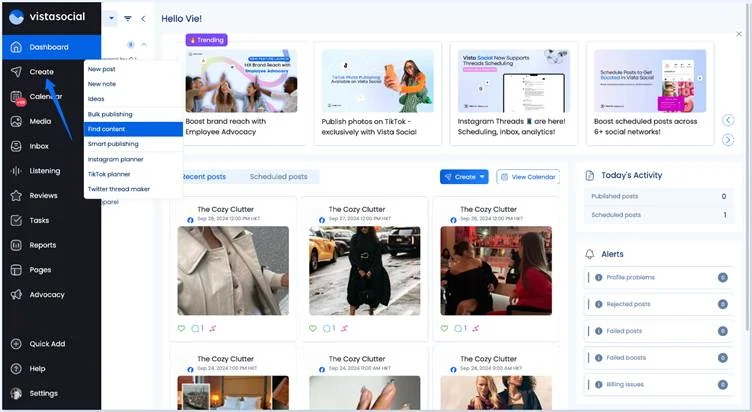
Vista Social’s social media management suite covers scheduling and publishing, inbox management, review monitoring, and analytics—all from a single, centralized dashboard.
You can work with teams on content, automate approvals, schedule posts in bulk, and create customized reports for every client. You can also centralize messaging, respond to comments from a single inbox, and monitor brand mentions.
The feature we liked the most? Reputation management. It enables you to respond to Google, Yelp, and Facebook reviews, helping improve customer satisfaction.
Key features:
- DM Automations: Auto-reply to comments and direct messages on all major social platforms—send links, answer questions, collect leads, and close sales automatically.
- AI-powered publishing: Generate captions, add fact-checked stats, bulk upload posts, design with built-in Canva integration, and reach a global audience with text translation.
- Vista Page: Create a customizable link in bio and landing pages for your brand to drive traffic from social networks.
- Find content: Discover trending content, news, images, GIFs, and videos in one place, including ideas sourced from Instagram hashtags to help you plan posts around what’s resonating now.
Pros:
- Seamless scheduling
- Reasonable pricing, given the features and number of profiles
Cons:
- Steep learning curve
- Limited reporting
Pricing:
Vista Social offers a 14-day free trial. The paid plans include:
- Standard: $39/month (8 social profiles, 1 user)
- Professional: $79/month (15 social profiles, 5 users)
- Advanced: $149/month (30 social profiles, 10 users)
- Enterprise: Custom (80+ social profiles, 25+ users)
Verdict:
Vista Social stands out with its social listening capabilities and reputation management features that most competitors don’t offer at this price point. While the platform has a steep learning curve, it’s a good option for agencies and enterprises looking for features beyond scheduling.
4. RecurPost (Automated content recycling with AI image generator)
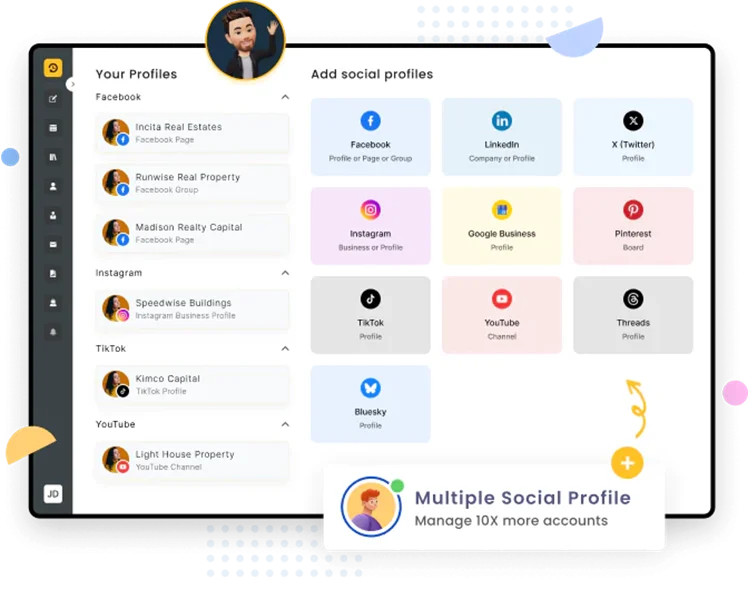
Best for: Small businesses, solopreneurs, content creators managing multiple accounts, and those heavily relying on repurposing content.
RecurPost simplifies content management by allowing you to organize posts into content libraries. It automatically recycles content across platforms, eliminating the need to create new content from scratch repeatedly.
The platform supports reporting and offers insights into content visibility, audience behavior, and post performance. It also uses RSS feeds to help you schedule posts from various websites and add published content directly from websites to the RecurPost library.
RecurPost supports Google My Business posting, which is a plus for local businesses aiming to stay active across multiple channels.
Key features:
- Team workspace: Collaborate on content, coordinate efforts to streamline social media marketing.
- Content recycling: Auto-republish high-performing content to boost and maintain engagement across accounts.
- AI image generator: Create custom AI images for your social media posts with a text-to-image generator.
- Platform optimizer: Create multiple versions of a single post, tailored to each social media platform.
Pros:
- Active customer support team
- Easy scheduling and publishing
Cons:
- The dashboard can be confusing; it could be more intuitive.
- Limited customization in reporting
Pricing:
14-day free trial. The Starter plan costs $9/month, including 2 social profiles (Extra $4 each) and 10 daily posts. The business plans include:
- Personal: $25/month with 5 profiles, 20 posts
- Agency: $79/month with 20 profiles, 80 posts
- Enterprise: Custom pricing
Verdict:
RecurPost is known for its automated content recycling. It’s useful for maintaining consistency and is therefore suitable for solo creators and small teams trying to build a social presence across multiple platforms.
5. Hootsuite (Advanced automations with AI assistant)
Best for: Scaling and enterprise teams requiring robust scheduling and advanced automations.
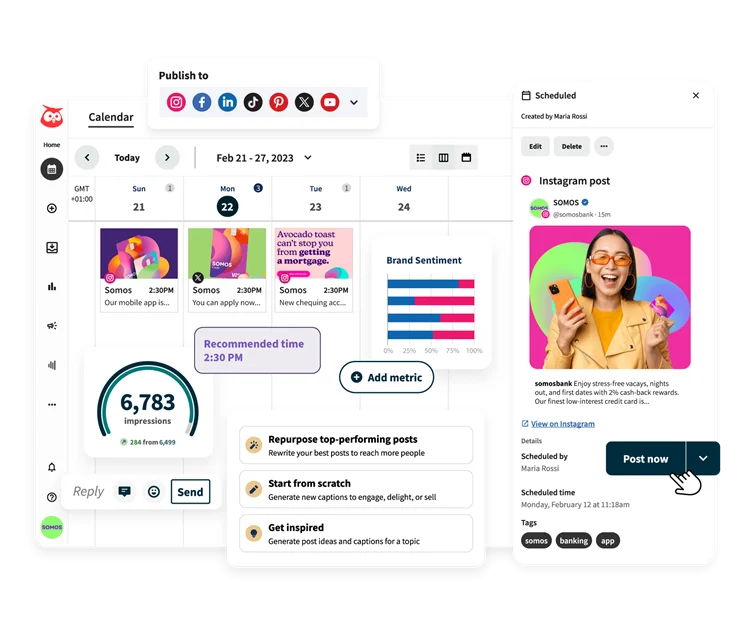
Hootsuite is built for managing multiple brand accounts and handling high content volume with ease. You can automate Instagram DMs for faster replies, engage across platforms from a single inbox, and collaborate with your team on scheduling and approvals. Its AI Assistant helps you generate and publish posts that drive engagement, reducing manual work.
You also get built-in social listening and benchmarking to see how your brand stacks up against competitors. It offers social CRM to track conversations and customer insights. For large teams managing campaigns, content calendars, and strategy across channels, Hootsuite brings everything together in one place.
Key features:
- OwlyGPT: Pull data from real-time social conversations, discover latest trends, and generate captions and images to create content that resonates.
- Advertising dashboard: Convert top-performing posts into paid ads, set smart triggers to boost content, and track conversions in real time automatically.
- Smart calendar and planner: Discover the best times to post on different platforms, generate post ideas, create content, and schedule posts at the right time to boost engagement.
- Analytics: Track engagement rate, post reach, profile impressions across Facebook, Instagram, TikTok, X, LinkedIn, Pinterest, YouTube, and Threads.
Pros:
- Easy to use with centralized management and bulk scheduler
- Comprehensive, professional reports with interactive graphs
Cons:
- Analytics features have a steep learning curve
- The mobile app is clunky and lacks features
Pricing:
Hootsuite has a 30-day free trial, and its basic paid plan costs $149/user/month with up to 5 social accounts. The premium plans with unlimited accounts include:
- Advanced: $39/user/month
- Enterprise: Custom pricing
Verdict:
Hootsuite, with its AI-powered OwlyGPT, can automate several processes—from responses to reporting and content creation. While the software offers plans for individuals and small teams, the advanced features are locked behind high-priced tiers. Also, it has more robust features for medium to large businesses, making it an ideal choice for complex needs.
6. Sprout Social (Enterprise social media management with social listening)
Best for: Agencies and enterprise teams that need unified workflows, in-depth reporting, and cross-functional collaboration.
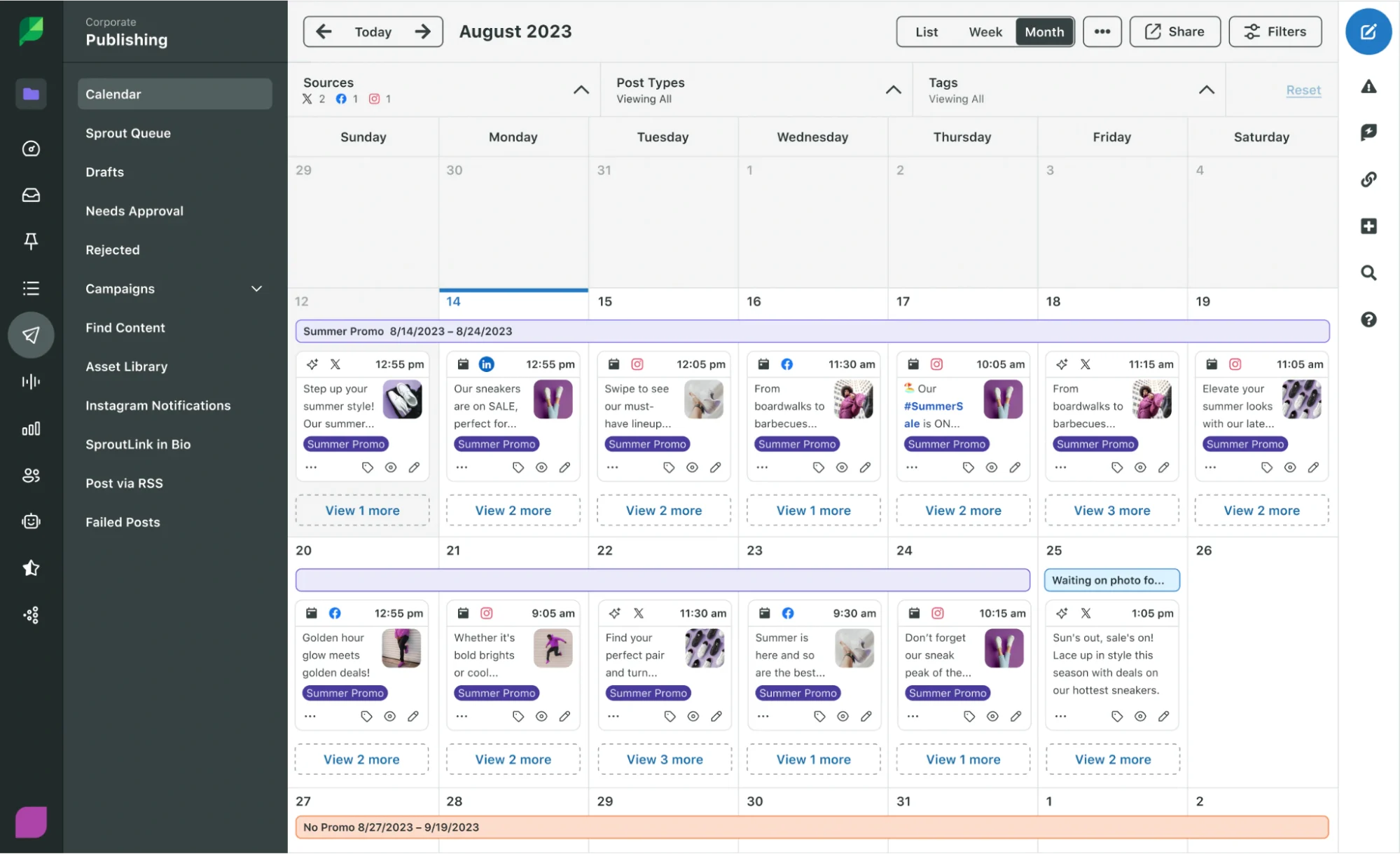
Managing multiple clients or large-scale campaigns? Sprout Social can help you bring structure to scattered workflows. It combines scheduling, inbox management, analytics, and social listening in one interface, so you don’t have to switch between multiple tools.
You can monitor mentions, reply across platforms from a single inbox, and create presentation-ready reports with real-time insights. Its competitor analysis and sentiment tracking also help you refine your social media strategy based on audience preferences and reactions.
Any standout feature? Sprout Social’s message spike alert system. It helps you manage a developing crisis quickly by sending notifications when the message volume becomes unusually high.
Key features:
- Bot builder: Create automated chatbots to address queries faster on Facebook and X even outside business hours.
- Social media listening: Monitor audience preferences, conduct sentiment analysis, capture audience reactions, and ensure brand health with this premium feature.
- Analytics: Create custom reports with interactive charts and graphs that visually display metrics and compare timeframes to analyze performance.
- Employee advocacy: Make it easy for employees to share pre-approved brand content on their personal social media accounts, expanding reach and saving on ad costs.
Pros:
- Clean, intuitive interface with easy scheduling
- Deep analytics with detailed performance and review reports
Cons:
- Sometimes, profiles get disconnected due to software glitches, disrupting workflows
- Steep pricing with no free plan for small businesses
Pricing:
30-day free trial. The standard plan starts at $199/seat/month with 5 social profiles, and the advanced plans with no account limits include:
- Professional: $299/seat/month
- Advanced: $399/seat/month
- Enterprise: Custom pricing
Verdict:
Sprout Social is an AI-powered, feature-rich platform that offers a plethora of features—from a unified inbox to premium analytics. However, with its steep pricing and advanced features, it is not the best social media management platform for small businesses.
7. Sendible (Integrated social media campaign management)
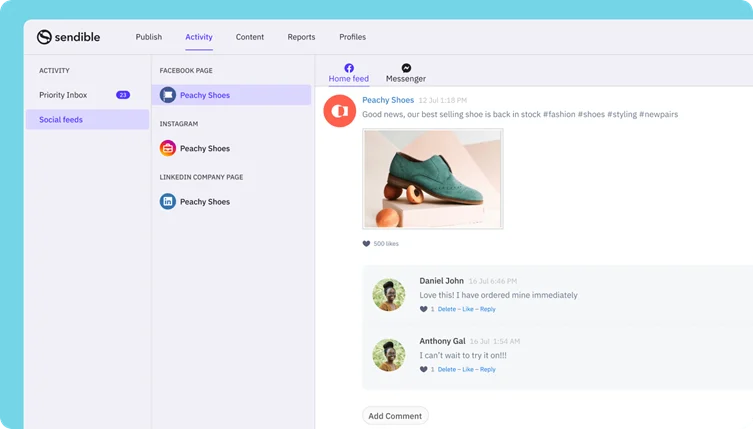
Best for: Agencies and growing teams dealing with large content volumes and building structured workflows.
Sendible offers a full-featured social media management software with automatic publishing, a priority inbox, analytics, campaign management, and an image editor. It helps you navigate large content volumes, saves drafts, automates publishing, and manages content library access permissions to prevent mishaps.
A thing we found the most unique? Sendible’s share button. You can add a custom button to your website, blog, or CMS so your team can directly share the published content across multiple social platforms.
Additionally, Sendible integrates with Google Analytics, Canva, Dropbox, and other platforms, enhancing its functionality and creating an integrated social media ecosystem.
Key features:
- Smart compose box: Customize and optimize content for different social media platforms from one place.
- Custom tags: Create brand-specific URLs, hashtags, texts, and CTAs to tailor your posts to the likes of your audience, while communicating the right message.
- Campaign management: Create social media campaigns, group your posts under them, and automate publishing with Smart Queues.
- Content library: Organize and line up content, save best-performing hashtags and posts to remove content blocks, and ensure better management.
Pros:
- Makes multiple account management easy
- Helpful support team
Cons:
- The basic plan is limited to one user, and the difference between pricing tiers is high.
- Doesn’t support scheduling Instagram stories with interactive elements like stickers
Pricing:
Sendible offers a 14-day free trial. Its basic Creator plan starts at $29/month with a limit of 1 user/calendar and 6 social profiles. The advanced plans include:
- Traction: $89/month
- Scale: $199/month
- Advanced: $299/month
- Enterprise: $750/month
Verdict:
Sendible is a toolkit for agencies and social media managers using AI to balance content planning, engagement, and reporting. It’s budget-friendly compared to enterprise platforms and scalable. Hence, it is a wise choice for those needing structured workflows and client transparency.
8. Buffer (Automated scheduling and publishing with basic reporting)
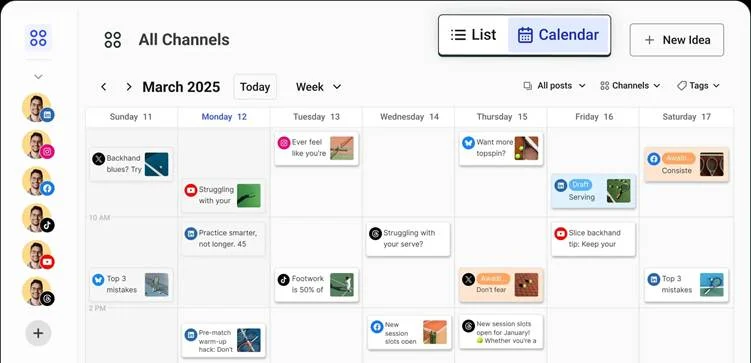
Best for: Creators, freelancers, and small businesses that want an intuitive platform to plan, schedule, and engage without complexity.
Buffer’s minimalistic social media management tool allows you to queue content for Instagram, Facebook, LinkedIn, X, Pinterest, etc., with a drag-and-drop calendar. You can reuse top posts, auto-add first comments, and monitor basic engagement metrics. Its browser extension and mobile app allow on-the-go scheduling.
The platform’s engagement feature brings all your comments into a unified view, so you can reply faster without switching apps. Buffer also supports campaign tracking and offers basic analytics for reviewing content performance.
Key features:
- AI assistant: Generate content, repurpose, and rewrite copies tailored for each social media platform.
- Start page: Create custom start pages for your social profiles with brand colors, themes, and layouts. Embed links, videos, products, forms, photos, and more.
- Publishing: Plan content, schedule, and auto-publish across LinkedIn, X, Facebook, Google Business Profile, Mastodon, Bluesky, and more.
- Analytics: Build on-brand reports with chosen data, get deeper insights into engagement, audience demographics, to refine content strategy.
Pros:
- Affordable pricing
- Post customization based on platform audience
Cons:
- No native bulk posting feature; it requires third-party tool integration.
- It can be glitchy at times, requiring you to resend posts manually.
Pricing:
Buffer has a free forever plan with up to 3 channels, 10 posts per channel, and 1 user account. Its paid plans include:
- Essentials: $6/month/channel (1 user account, unlimited posts)
- Team: $12/month/channel (Unlimited user accounts and posts)
- Custom pricing for more than 10 channels
Verdict:
Buffer is a user-friendly, cost-effective scheduling tool that covers the essentials—automatic content management, scheduling, publishing, and basic analytics. It’s best suited for solo users with its free plan and small teams on a budget. However, its features fall short for mid-market businesses and scaling teams.
9. Metricool (Social media planning and competitor analysis)
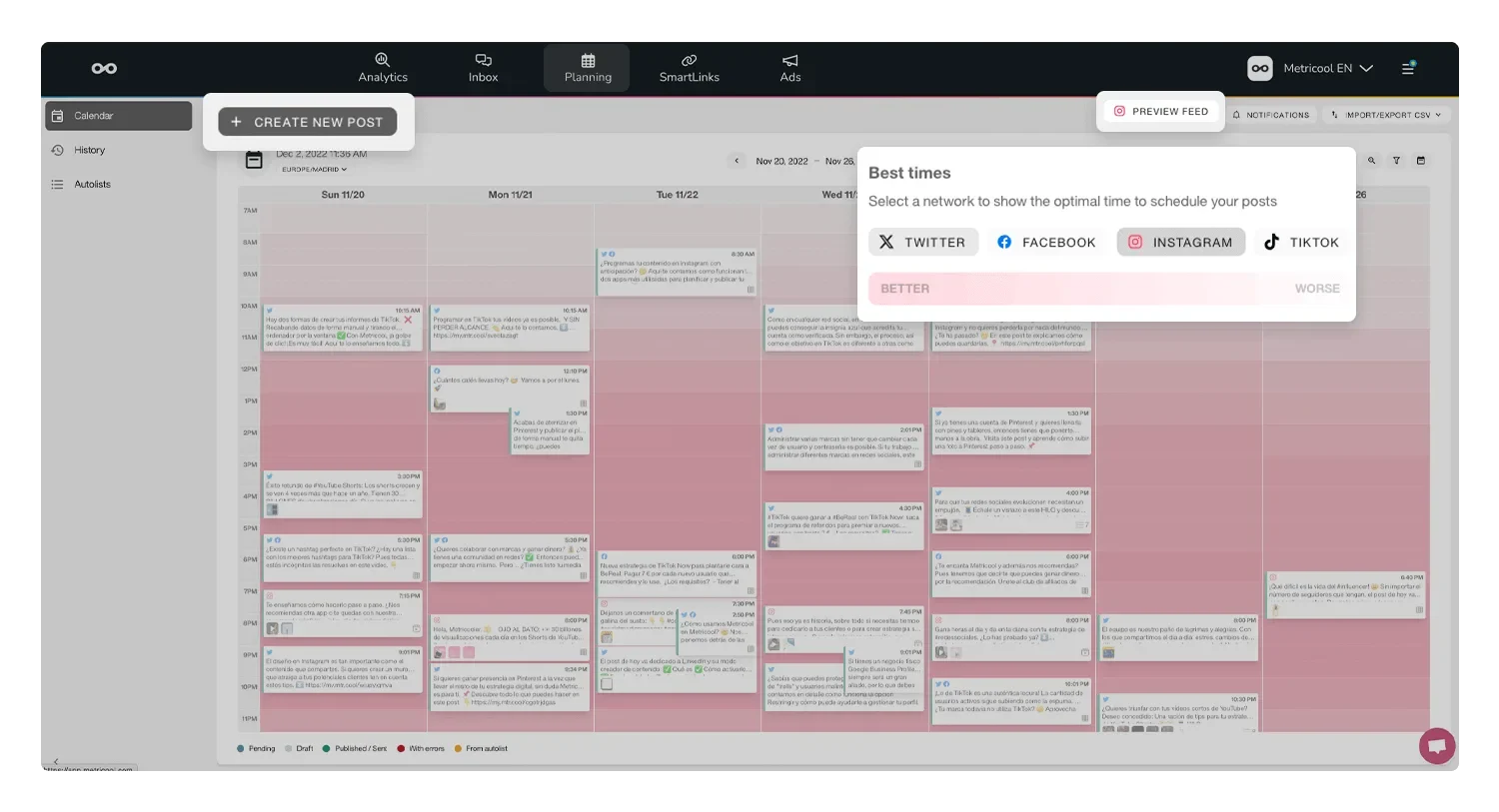
Best for: Small businesses and freelancers seeking affordable posting, analytics, and Canva integration.
Metricool allows you to schedule across major platforms, including LinkedIn, X, Facebook, Twitch, TikTok, and more. It lets you view essential analytics for each social network, analyze competitor feeds, and monitor hashtag performance.
You can collaborate with clients on draft approvals, exchange feedback, and streamline the overall workflow. You can also centralize communications and leverage AI assistance to generate social posts.
The best part is that you can integrate Google Looker Studio with Metricool, taking analytics one step ahead. This integration enables you to build custom dashboards and gain valuable insights into your social media marketing strategy.
Key features:
- Competitor analysis: Monitor growth, post count, and top posts of your competitors in a single dashboard.
- Approval system: Provide client access to speed up approvals and feedback to save multiple back-and-forth.
- Hashtag tracker: Track hashtags, measure their impact on your social performance, and create hashtags and keywords reports for custom periods.
- Reporting: Create professional reports on selected social networks or conduct an in-depth analysis of a single platform to measure content performance.
Pros:
- Easy to use
- Comprehensive analytics resources for measuring social media performance
Cons:
- Poor customer support
- According to some users, Metricool has an unfair auto-renewal system for paid plans.
Pricing:
Metricool offers a free plan that includes analytics access, 3 months of historical data, 50 pieces of content per month, and management of all social accounts. The paid plans include:
- Starter: $22/month
- Advanced: $54/month
- Custom pricing (starting from 50 brands)
Verdict:
Metricool is best suited for creators and small teams with a budget. Its basic reporting, hashtag tracking, and scheduling make it a good choice. However, it’s not the best for content creation and communications management.
10. Rella (Collaborative content management)
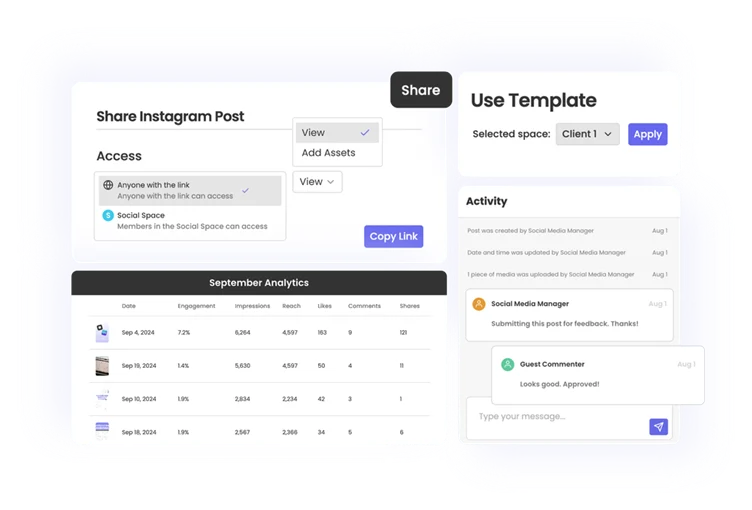
Best for: Creators, social media managers, and small teams streamlining content planning and project management.
Rella is built around content planning, scheduling, and calendar management. It claims to offer the best of both worlds, combining content automation and project management.
While the tool streamlines content workflow with shareable calendars, auto-posting, and Canva integration, it also has social spaces to manage your projects and clients. Like project management tools, you can add tasks, change statuses, share links with clients, and collaborate on content.
You can also onboard clients with Rella using customized workflows and shared spaces to upload client assets, provide feedback, and even send content approval links.
Key features:
- Kanban boards: Preview post details, schedules, and monitor statuses to ensure deadlines are met.
- Social media collaboration: Share posts, invite team members and clients to shared spaces for content collaboration and feedback.
- Analytics and reporting: Track performance on each social platform and monitor engagement metrics.
- Feed planner: Enhance Instagram distribution by planning your visual content for the feed before posting to ensure a clean aesthetic.
Pros:
- Has an app for easy access on mobile devices
- Platform-specific analytics
Cons:
- Limited features and integrations
- Basic analytics
Pricing:
Offers a 14-day free trial. The paid plans start at $25/member/month with access to projects, analytics, content approvals, and more. The premium plans include:
- Rella Premium: $35/member/month
- Rella Premium Plus: $60/member/month
Verdict:
Rella is a clean tool with basic content planning, scheduling, and project management features. Although it lacks in-depth analytics and a social inbox, it’s well-suited for solo users and small teams handling a limited set of clients.
11. Statusbrew (Communications management and in-depth reporting)
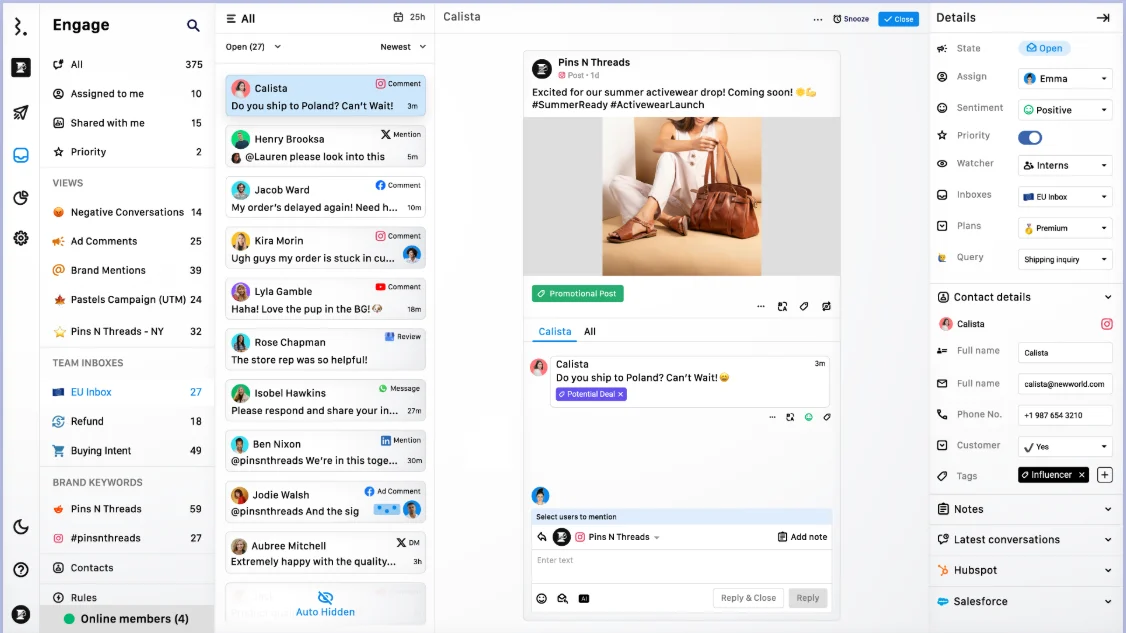
Best for: Growing teams, agencies, and enterprises looking to control analytics, workflows, and social inbox in one place
Statusbrew is similar to Sprout Social and Hootsuite, but available at a comparatively low price point. It offers automated publishing, reporting, and bulk scheduling, and gives you the data to track the results of your social media efforts.
Beyond content planning and scheduling, it excels at communications management. You can create rules to auto-route inbox messages based on priority. Mention team members in threads, and trigger auto-replies for FAQs, saving time while staying responsive.
Overall, the tool is great if all you’re looking for is advanced features, structured workflows, and deeper analytics. However, it comes with a steep learning curve.
Key features:
- Unified inbox: Consolidate conversations for all supported platforms, organize using tags, and assign messages to team members.
- Reporting: Use 20+ built-in reporting templates and create custom dashboards using the metric library.
- BrewLink: Change your Instagram bio into clickable grids that mirror your posts, each with a unique link.
- AI composer: generate captions, hashtags, and content ideas with an AI-powered composer
Pros:
- Bulk scheduling posts across social platforms is easy
- Interactive reporting
Cons:
- Initial setup can be overwhelming
- It has a steep learning curve, as setting up custom reports and automation rules is complex.
Pricing:
Statusbrew offers a 14-day free trial. The paid plans start at $69/month with 2 users, 5 social profiles, and the premium plans include:
- Standard: $129/month (billed annually)
- Premium: $229/month (billed annually)
- Enterprise: Custom pricing
Verdict:
Statusbrew offers in-depth reporting, conversation management, and team assignment tools that make it especially useful for agencies and fast-growing companies. While it comes with complex automations and a steep learning curve, it streamlines content planning and provides clarity for operations-focused teams.
12. Agorapulse (Full-stack social media workspace)
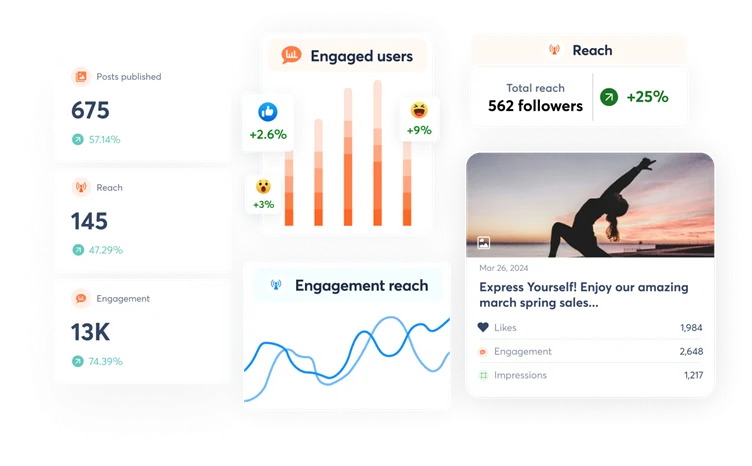
Best for: Scaling agency and brand teams managing multiple social channels.
Agorapulse brings publishing, engagement, reporting, and team collaboration under a single roof. It offers a centralized dashboard for consolidated reporting, communication, and performance monitoring—ideal for managing multiple brands or clients.
It supports all major social platforms and offers a Link in Bio tool that enables you to create a custom mini-website on social profiles, turning followers into customers.
The best part? Agora’s comprehensive analytics. You get detailed, presentation-ready reports, ROI tracking, and funnel-level insights. It also integrates with Google Analytics to show how your social campaigns are driving conversions.
Key features:
- Multi-platform scheduling: Schedule and auto-publish content (videos, reels, stories, etc.) on Instagram, Facebook, LinkedIn, X, and other platforms.
- Team collaboration: Share notes, set up workflows, track action items, assign content for approval, and leverage shared calendars.
- Social listening: Monitor brand mentions, track sentiments across user conversations, and analyze the data to generate new content ideas.
- In-depth analytics: Get custom reports on chosen metrics, track competitors, monitor engagement, views, statistics for replies, etc.
Pros:
- User-friendly inbox layout
- Has a mobile app to support social media management on the go
Cons:
- Expensive, and most new features are locked behind high-priced plans
- Sometimes, scheduled posts across LinkedIn, Facebook, and Instagram don’t get published due to system errors
Pricing:
Agorapulse offers a 30-day free trial for each plan. The basic plan starts at $79 per user per month, offering unlimited posts and scheduling features. The premium plans include:
- Professional: $119/user/month (billed annually)
- Advanced: $149/user/month (billed annually)
- Custom pricing
Each plan supports 10 social profiles, and $10/month per additional social profile.
Verdict:
Agorapulse centralizes scheduling, collaboration, and reporting, making it easier for teams to manage multiple social accounts. It comes with a unified inbox, custom reporting, and AI social media writing that doesn’t require enterprise-level investment. While the interface feels dated to some users, its powerful features make it a smart choice for scaling teams.
13. SocialBee (Category-based scheduling)
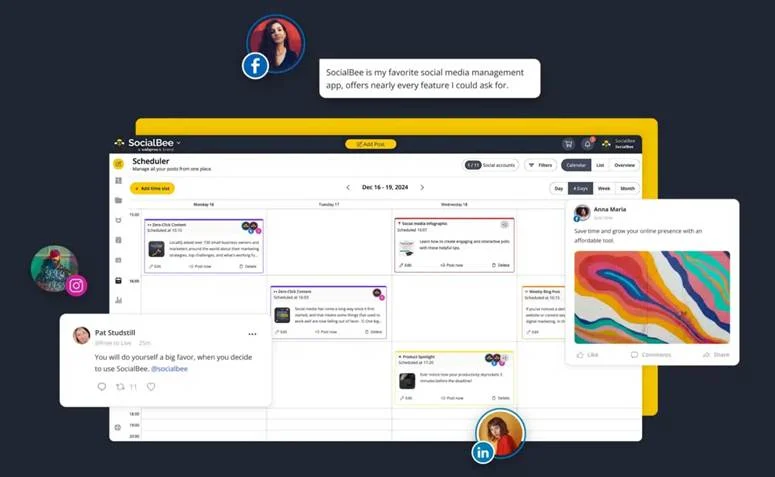
Best for: Small agencies, creators, and solopreneurs looking for an organized and repeatable posting workflow.
SocialBee structures content. You can organize and plan different content types across YouTube, TikTok, Instagram, LinkedIn, and other integrated platforms. However, you can also post on social platforms that aren’t directly integrated, such as Telegram or Mastodon.
What stands out is SocialBee’s scheduling system. You can organize posts into categories—like memes, promos, blogs, or user-generated content (UGC)—and automatically rotate them across platforms. You can even create evergreen posting sequences to recycle posts.
The tool also offers engagement tracking. However, it doesn’t support in-depth analytics, making it ideal for solopreneurs and small teams requiring managing and scheduling features.
Key features:
- AI Copilot: Get personalized strategy recommendations to optimize your content planning
- Performance analysis: Auto-analyze past content performance to identify the best times to post on various social channels.
- Universal posting: Schedule content on platforms that aren’t integrated, such as Reddit, Telegram, Quora, and Facebook groups.
- Social inbox: Manage mentions, comments, and messages in real time.
Pros:
- Easy to plan and organize content
- Responsive customer support
Cons:
- No drag-and-drop functionality to reorder posts
- Expensive entry plans—may be pricey for solopreneurs and small teams
Pricing:
14-day free trial. Paid plans start at $29/month, which supports up to 5 social profiles, 1 user, and analytics up to 3 months of data. Advanced plans include:
- Accelerate: $49/month
- Pro: $99/month
Verdict:
SocialBee is a collaborative social media management tool that organizes content and helps you stay consistent without much manual effort. While it lacks advanced analytics, its lightweight engagement tracking, affordable pricing, and scheduling features make it a top pick for creators and small teams.
What Makes a Good Social Media Management Tool?
Apart from factors like budget, team size, and business needs, you must look for the following features when selecting the best social media management tools for your business:
Advanced scheduling and publishing
Choose a tool that offers flexible scheduling options, allowing you to plan content for weeks or months. Look for features such as bulk scheduling, optimal posting time recommendations, and the ability to schedule different content types (images, videos, carousels, and stories) across multiple platforms simultaneously. The best tools also provide queue management and auto-posting capabilities to maintain consistent posting schedules.
Multi-platform integration
Select a social media management platform that connects with all major networks where your audience is active—Facebook, Instagram, Twitter, LinkedIn, TikTok, Pinterest, and other networks, so you won’t need to switch tools as you scale.
Robust analytics and reporting
Get a tool that offers comprehensive social media analytics, providing valuable insights to help you make informed, data-driven decisions. The platform should track key metrics, such as engagement rates, reach, impressions, and conversions, across all connected accounts.
If you’re a scaling team or agency, look for customizable reporting features that let you track specific metrics and create branded reports for stakeholders.
Team collaboration features
Pick a platform that offers collaboration features, especially if you have a team or plan to scale from a solopreneur. The platform should enable collaboration on content, calendars, approval workflows, granular permission controls, and client management features. Additionally, look for centralized communication capabilities with features such as comment assignment.
Bonus: Scalable pricing structure
Consider platforms with a scalable pricing structure that stays affordable even as your needs grow. Whether it’s adding new team members, connecting new accounts, or increasing the number of posts per day, your tool must be able to accommodate these changes. Calculating the long-term costs will help you determine whether the tool can grow without breaking your budget.
Trends and Innovations in Social Media Management
- AI is moving beyond caption writing. The newest tools now help with repurposing long-form content, generating platform-specific posts, creating images, testing variations, and automating scheduling workflows. Distribution AI, Buffer, Hootsuite, and others already reflect this shift.
- Smarter analytics are becoming a bigger differentiator. Social media tools are no longer just for publishing, they increasingly help teams track reach, engagement, conversions, competitor activity, and platform performance in real time so they can make faster decisions
- Unified workflows are becoming standard. More tools now combine scheduling, approvals, collaboration, inbox management, and reporting in one workspace, which is especially useful for agencies and growing teams managing multiple stakeholders.
- Trend discovery is now built into the workflow. Some platforms are helping teams stay relevant with trending-topic suggestions, hashtag-based content discovery, real-time conversations, and social listening features baked into the product.
- Platform support is expanding. Social media management tools are increasingly adding support for newer and niche platforms like Threads, Mastodon, Bluesky, Reddit, and Telegram, giving teams more flexibility as audience behavior shifts across networks.
- Content repurposing is becoming a core use case. Instead of creating every post from scratch, teams are leaning on tools that can turn blogs, videos, and podcasts into multiple ready-to-publish assets, helping them keep up with content demands across channels.
- The next wave will be deeper automation and better cross-platform execution. As tools keep improving, the biggest advantage will go to platforms that make content creation, scheduling, analytics, and collaboration feel more connected in one workflow.
Which Tool Would You Choose?
When it comes to choosing the best social media management tool, there’s no one-size-fits-all. For some, a simple scheduler like Buffer works great. For others, managing multiple brands and accounts calls for advanced tools like SocialPilot, Sprout Social, or Hootsuite.
But if you’re a lean team trying to maximize content reach across platforms and looking for an all-in-one, user-friendly tool, consider Distribution AI. The tool’s AI-powered repurposing saves you the time spent on brainstorming new content ideas. It mines your assets, such as blogs, videos, and podcasts, to create multiple ready-to-publish social media posts. Hence, you can post more in less time without compromising on quality.
So, if you’re looking to scale your social media marketing efforts, explore Distribution AI.
Frequently Asked Questions
1. Which AI tools are best for social media management?
The best AI social media management tool depends on what you need most: scheduling, analytics, collaboration, or content creation. If you want an easy-to-use tool for repurposing long-form content into platform-specific posts, Distribution AI is one of the strongest options. Tools like Vista Social and Buffer are also useful for teams that prioritize scheduling, publishing, and lightweight workflow management.
2. What are the best tools for scheduling social media posts?
Many social media management tools let you schedule posts in advance, but the best choice depends on how much automation you need. Buffer is a simple option for basic scheduling, while Distribution AI is better if you also want AI-assisted repurposing, platform-specific post generation, and multi-platform publishing from one workflow. The best tools also support bulk scheduling, queue management, and optimal timing recommendations.
3. Can social media management tools handle multiple accounts?
Yes, most social media management tools are built to manage multiple social accounts from one dashboard. The main difference is in how many profiles, users, and workspaces each plan supports. Some affordable tools limit users or accounts on entry plans, while platforms like Distribution AI are more attractive for lean teams because they combine content generation, repurposing, and publishing without adding complexity.
4. Do social media management tools offer analytics and reporting?
Yes, most tools include analytics, but the depth varies a lot. Basic tools usually cover engagement, reach, and post performance, while more advanced platforms offer customizable reports, competitor tracking, and deeper campaign insights. If reporting is a major priority, choose a tool with analytics that match your team size and decision-making needs.
5. Are collaboration features included in social media management tools?
Many tools offer collaboration features, but they are often stronger on higher-tier plans. Depending on the platform, collaboration can include approval workflows, shared calendars, client access, permissions, comments, and team assignments. If multiple stakeholders need to review or approve content, make sure collaboration is included in the plan you choose.
6. Which social media platforms do these tools usually support?
Most leading social media management tools support major platforms like Instagram, Facebook, LinkedIn, X, TikTok, Pinterest, and YouTube. Some tools also support extra channels such as Google Business Profile, Mastodon, Reddit, or Telegram. The right option depends on where your audience is active and whether you need broad multi-platform support as you scale.
7. Are social media management tools secure?
Reputable social media management tools generally use standard account security measures and permission controls, but security features vary by platform and plan. Before choosing a tool, check whether it offers role-based permissions, secure account connections, and safeguards for teams managing multiple brands or clients. If compliance or account access control matters to your business, this should be part of your evaluation. The article itself highlights permission controls and client management as important considerations.
8. What is the most cost-effective social media management tool for small teams?
The most cost-effective tool depends on whether you only need scheduling or want help creating content too. Buffer is affordable for simple scheduling, while Distribution AI can be more cost-effective for lean teams that want to turn blogs, videos, or podcasts into ready-to-publish posts faster and reduce manual work. When comparing tools, look beyond the starting price and consider user limits, account limits, and how much work the platform actually saves.
9. Is Hootsuite worth it for a small business owner?
Hootsuite is a strong option for larger teams that need advanced automations, inbox management, and deeper reporting. For many small business owners, though, it may be more than they need in both price and complexity. If you want a lighter, easier workflow focused on content creation, scheduling, and repurposing, a tool like Distribution AI or Buffer may be a better fit.

Promote, repurpose & distribute your content with AI
Write 10x faster, engage your audience, & never struggle with the blank page again.
Start 15-Day Free Trial
Frequently Asked Questions
Author

Promote, repurpose & distribute your content with AI
Start 15-Day Free Trial