


Social Media Automation 101: How to Save 5+ Hours Every Week?
Learn why you need and how to build social media automation workflows for scaling your marketing efforts in 2026.
According to the 2025 Sprout Social Index report, 94% of social practitioners say they feel they have to be “chronically online” to do their jobs.
And if you have managed multiple social media accounts, you can relate to that.
Now, marketers are expected to publish social media posts across multiple platforms, manage community engagement, watch brand sentiment, report to leadership and somehow still have ideas left for upcoming campaigns.
While it seems possible, you can definitely pull it off by automating your social media campaign workflow.
In this guide, let’s look at how you can automate tasks in your social media marketing process to claw that time back.
What is Social Media Automation?
Social media automation is the use of specialized tools, AI, rules and workflows to accelerate the repeatable parts of social media marketing.
Some of those repeatable parts include tasks like creating post variations, scheduling content, routing replies, tracking brand mentions and pulling together performance reports for your social media strategy.
In practice, that looks like:
- A blog post is automatically turned into platform-specific posts for LinkedIn, X, Threads or Instagram
- Content gets queued up and published at predefined times across your social accounts
- Common inbound comments or DMs trigger a guided response flow
- Brand mentions get flagged automatically when sentiment drops or conversation spikes
- Weekly social media reporting gets generated without anyone exporting data from five dashboards
Remember that social media automation works best on repeatable tasks that follow a set of simple rules. For instance, you schedule content on a weekly basis and you pick a slot to publish a piece based on when your audience is most active.
Your social media marketers should still own positioning, campaign ideas, brand voice, escalation decisions, trend analysis and sensitive customer conversations.
Why You Need Social Media Automation in 2026
Handling everything from content ideation to social media publishing is a lot to hold together.
It becomes even more challenging if you are managing multiple social media accounts across channels.
1. Save Time on Repetitive Execution
Scheduling, reformatting, report exports and manual queue management eat hours. These are the tasks that are delegated with an SOP or a template.
With automation, you can run that SOP or work through the template at scale, increasing output without expanding your team.
For example, let’s say you create LinkedIn engagement reports every month. You probably have a format for the report where you plug in the numbers. An automated social media reporting tool can take your report template and do it for you.
2. Maintain Consistency Across Channels
Creating content and scheduling posts for different social media platforms can get messy. You may focus too much on one channel while ignoring others. It can happen because there can be new priorities, or you might have limited bandwidth.
Automation platforms help you keep a predictable publishing cadence and close those visibility gaps with AI features.
These solutions can support and accelerate your creative efforts by, for instance, performing market research and generating ideas from your brand’s perspective.
3. Repurpose More Content Without Reinventing Everything
The real social media marketing challenge is constantly creating fresh, channel-ready content.
Fortunately, if you already have long-form assets, like articles, podcast episodes, webinars, case studies or founder posts, you are halfway there.

You can use automation tools to take those existing pieces that already performed well and produce several platform-specific versions for multiple social accounts without starting from scratch.
4. Respond Faster Without Treating Every Interaction the Same
You can automate social media replies to respond to comments, DMs, reviews and escalations faster, which translates to a better audience experience and fewer leads or customer questions going cold.
AI-powered conversational agents can drive conversations on your behalf, especially if they are general queries. You can also train these chatbots to capture leads when they detect purchase intent.
At the same time, when context, emotion, complaint or brand risk is involved, a human should take over the conversation.
5. Improve Visibility into What Is Actually Working
You can compare channel performance and spot your best content formats without switching between multiple platform-native dashboards that only provide basic analytics.
Automation tools can be connected to all of your social media accounts to fetch the analytics to give you actionable insights. For instance, these platforms will look at which posts and formats perform better to help you scale your efforts in a targeted manner.
What Social Media Tasks You Should Automate First (With Time Savings)
You can get much better results when you start with the obvious wins instead of trying to automate the entire social function at once. Here are five tasks that can be your first automation targets.
1. Content Scheduling and Publishing
Social media scheduling is a recurring action item that can be easily measured in terms of time required, allowing you to quantify the time saved accurately.
You can automate it to push content out in every posting window without being online 24/7 with a social media management tool.
A helpful tip to make this process easier is to lock in the same slots for recurring content types, such as founder posts, customer stories, product tips and webinar promos.
Time saved: Roughly 2–4 hours per week for most teams.
2. Content Repurposing
Content repurposing turns long-form content into shorter, channel-native formats, generates multiple hook variations from the same source, and adapts the same core message for different audience intent across LinkedIn, X, Instagram, Threads, newsletters and beyond.
And you probably know from experience that it can be challenging, to say the least.
A better approach is to use a dedicated content repurposing platform like Distribution.ai that has AI agents that convert existing assets into multiple social media posts.
You can paste a link to an existing blog post or YouTube video, and the platform will produce platform-native, short-form content pieces in under a minute.
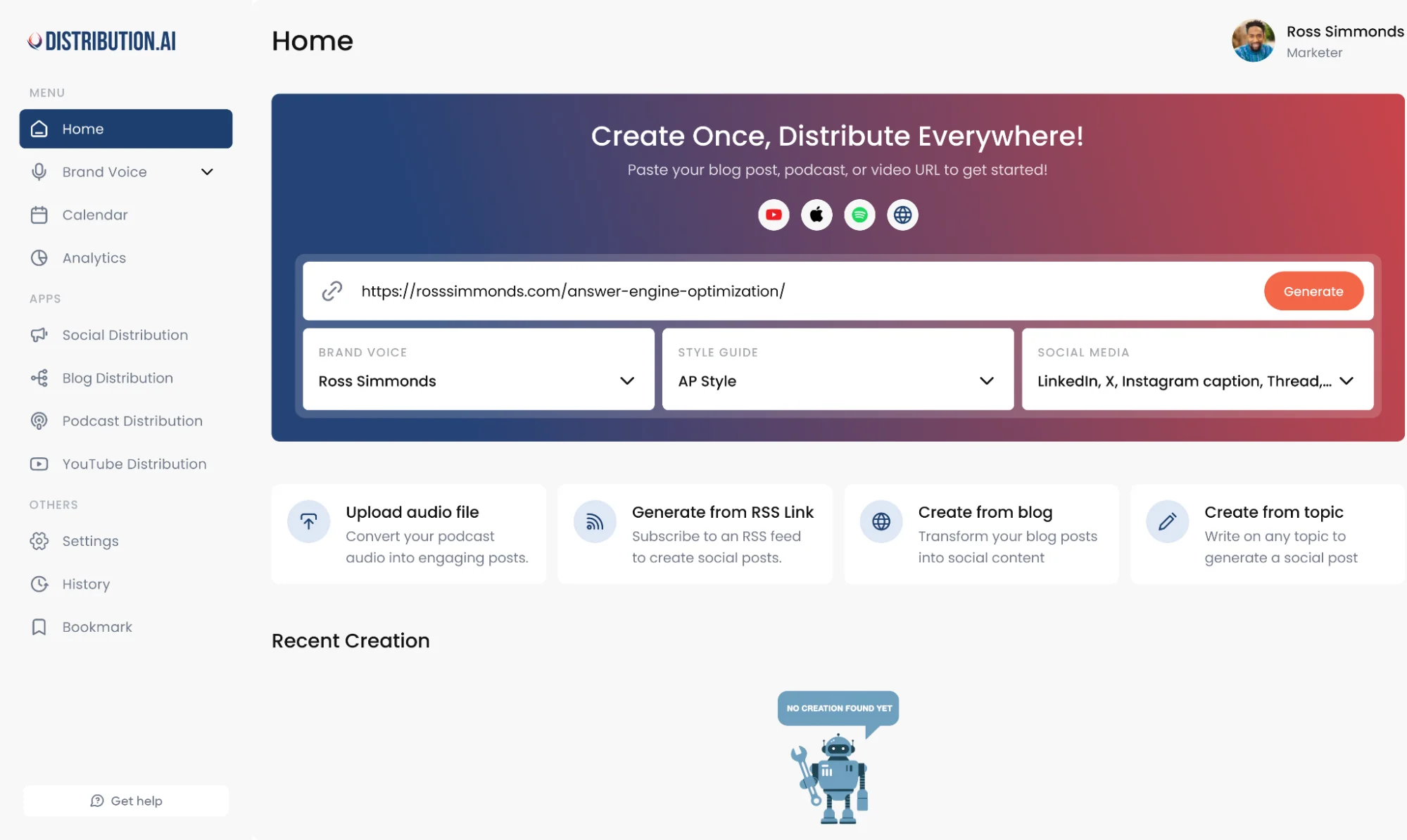
It also lets you personalize the tone and style so the AI-written draft will be closer to what you’d normally say.
Keep in mind that your marketing team still needs to review AI’s outputs to ensure the core message resonates with your audience and sounds like your brand.
Time saved: Often 5–8 hours per week if you publish across multiple platforms.
3. Replying to Comments and DMs
You can automate common queries like FAQs and comments that trigger a DM with a resource or link.
For example, if you end a post with “DM me your ‘SCALE’ and I will send the template,” automation tools can run the entire workflow for you. It involves looking for the specific keyword in the message, uploading the details to your CRM and sending them the resource.
Moreover, functions like capturing a support ticket or a lead’s details can be automated through conversational agents.
However, even when you manage multiple platforms, certain interactions still need to stay human.
Complaint handling, nuanced sales questions, customer frustration, public criticism and anything where empathy or judgment are critical need your direct intervention.
Time saved: Around 2–4 hours per week, depending on how much inbound volume you get.
4. Social Listening and Brand Monitoring
Social media listening tracks brand mentions, competitor mentions, product keywords, executive names, campaign hashtags and emerging industry themes. These insights help you determine how you should plan your next month’s content calendar.
While tools will help you capture the “what” beyond owned channels, you need to use your own experience to interpret the “why” behind audience behavior.
Humans should still interpret the “why” behind audience sentiment, decide whether a trend is worth jumping on, and handle escalation and public response calls.
Time saved: About 1–2 hours per week, plus huge gains in reaction time when something breaks.
5. Reporting and Analytics
You can automate recurring reports for weekly and monthly campaign reviews, bring channel metrics together in one place instead of exporting platform by platform, and benchmark content by format, posting time, campaign and channel.
These deep analytics capabilities will surface what needs to be scaled and why.
Time saved: 1–2 hours per week, and more during campaign wrap-ups.
4 Must-Have Social Media Automation Tools in 2026
Here are the best social media automation tools that will help you with the above tasks in a measurable way.
1. Distribution.ai
Distribution.ai is built for the biggest bottleneck in social: turning source content into channel-ready posts and moving them through a publishable workflow.
It takes one piece of content, such as a blog post from your website, a podcast episode from an RSS feed, a YouTube video or a PDF, and automatically generates multiple channel-ready assets.
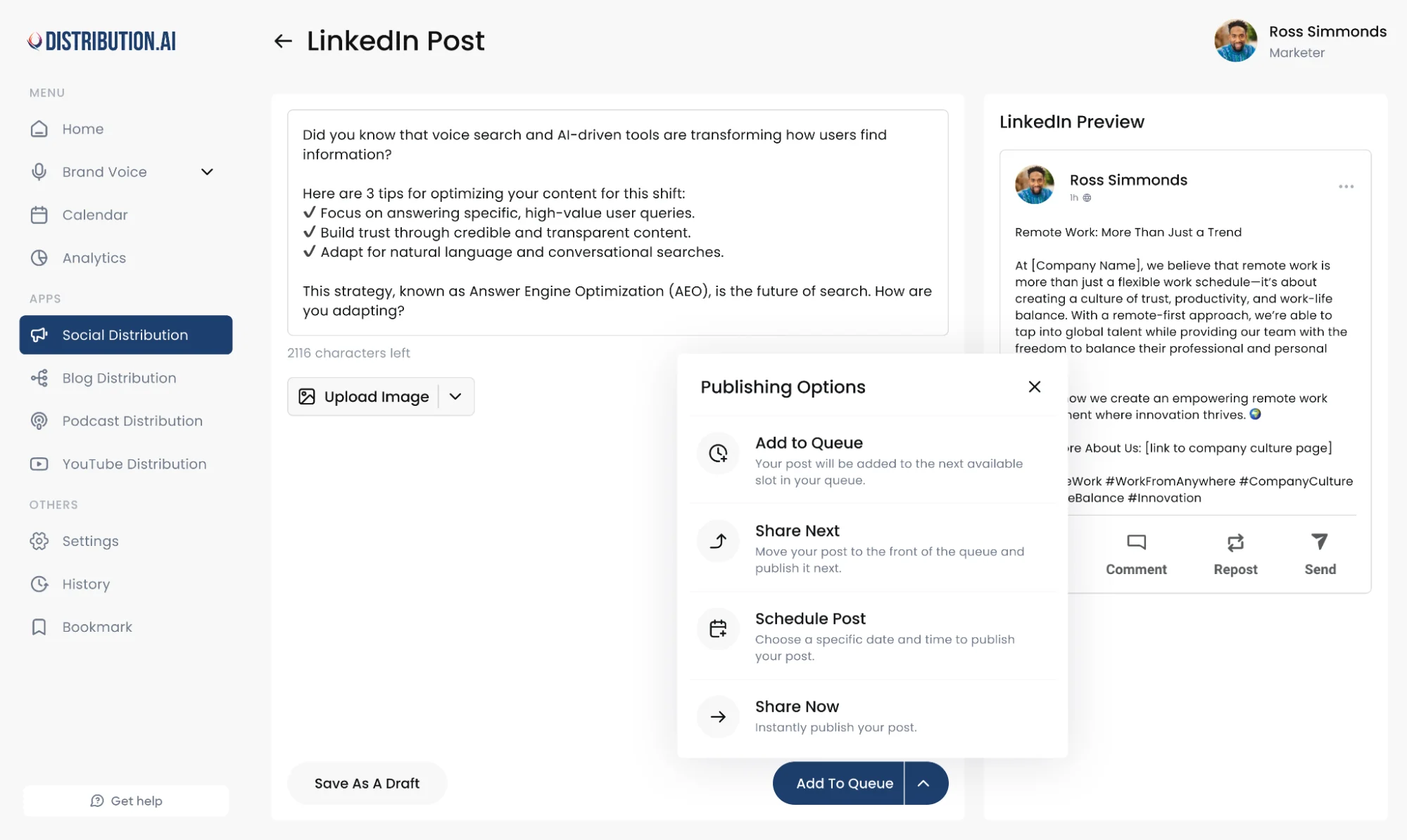
You can customize brand voice and pick output styles per platform to ensure they stay relevant for your audience.
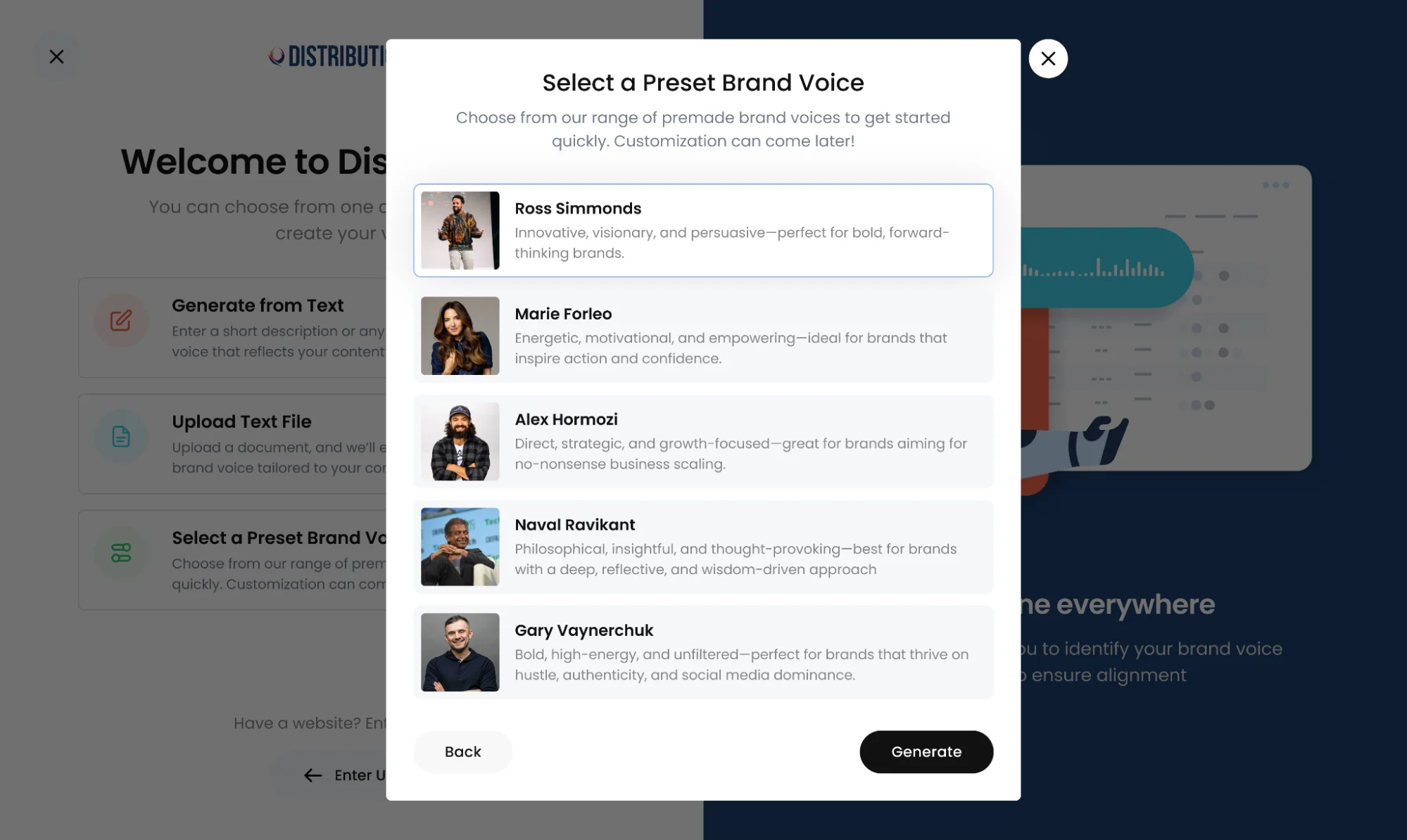
Your editors can directly edit and polish the AI-written social media post drafts before scheduling them for publication.
Basically, the platform has all the features you need to produce and schedule content for different social platforms and track how they perform.
2. ManyChat
ManyChat provides you with the reply automation layer for comments and DMs for lead capture. It automates Instagram, Facebook and TikTok comment replies and can trigger follow-up DMs automatically.
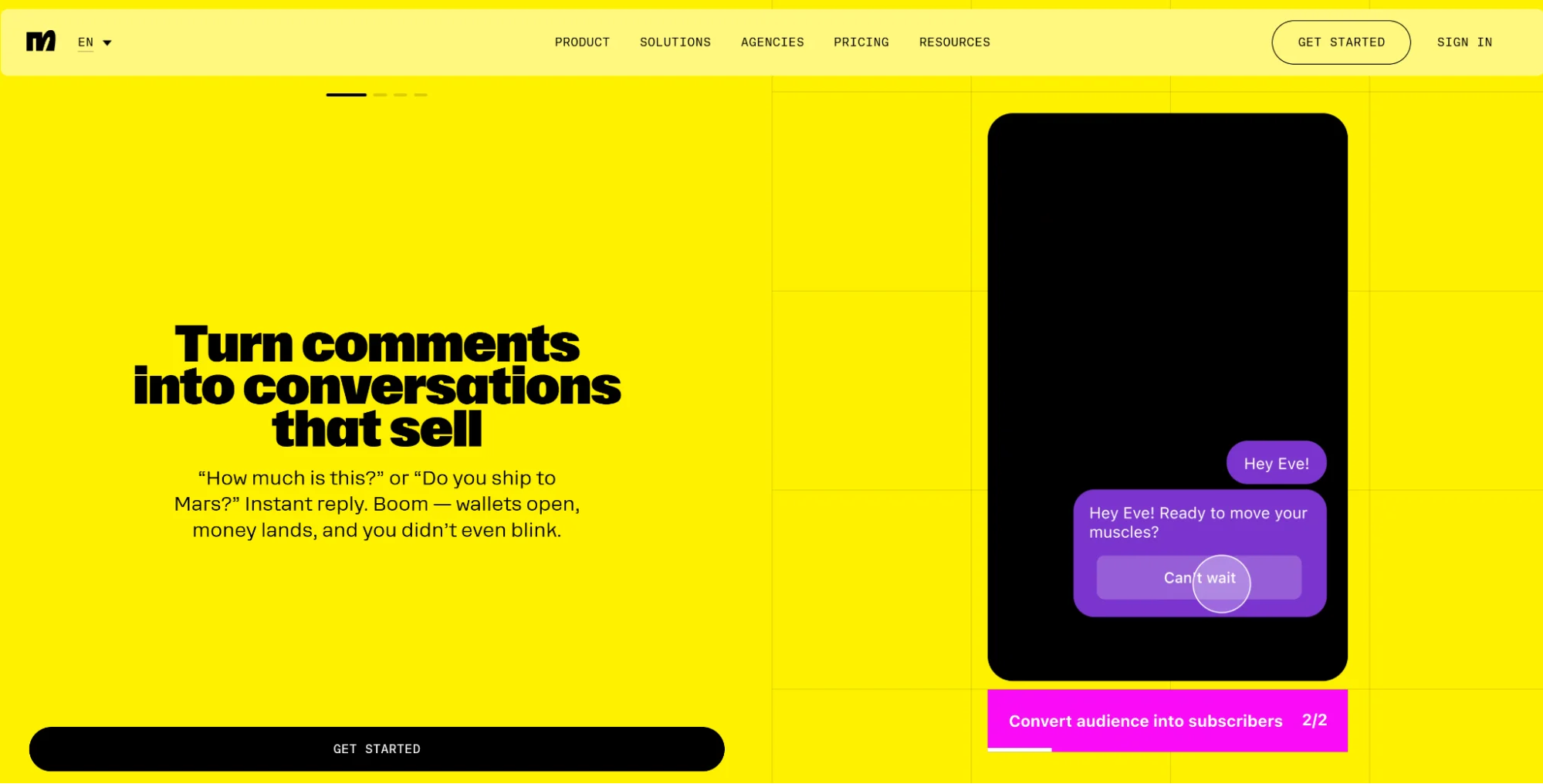
You can collect leads, email addresses or inquiries straight from engagement moments, and set up keyword-triggered conversations in DMs.
It’s especially useful for social media managers for B2C brands where instant follow-up is key for converting a lead.
3. Brandwatch
Brandwatch is your listening and monitoring automation solution. The platform tracks conversations around your brand across social media, forums, news sites, blogs and other online sources to alert you when negative sentiment spikes.
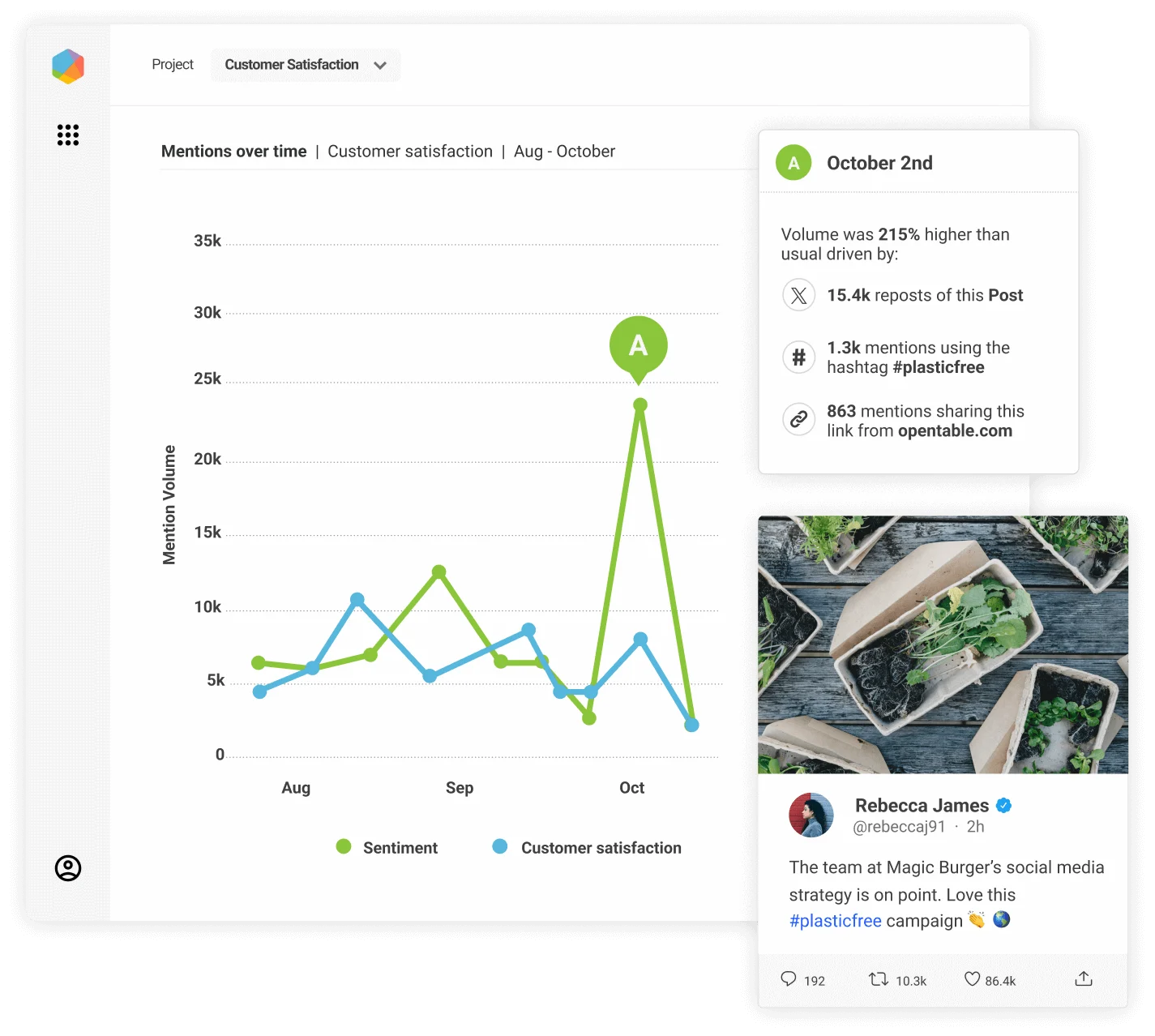
When you proactively monitor brand mentions, you can find an issue before it becomes a trending topic within your niche. It also allows you to know what your audience is saying about your competitors, which can surface new content opportunities.
4. Social Status
Social Status pulls social analytics from your major social channels into one dashboard, automates recurring reports, generates custom reports and exports in stakeholders’ preferred formats.
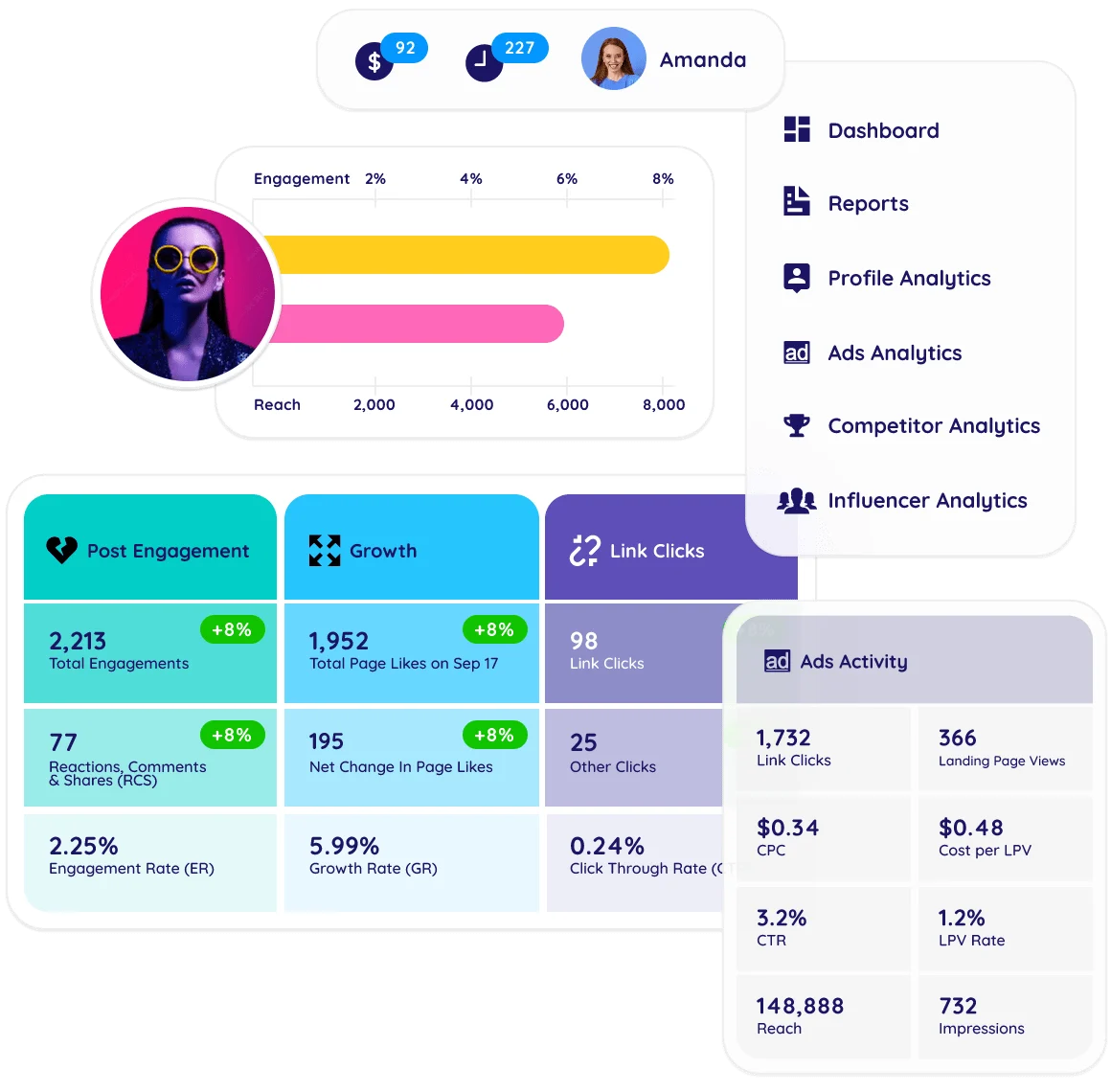
With the tool, you can track performance metrics, such as reach, engagement, clicks and conversions, for every channel across the funnel to give you the complete picture.
Build a Social Media Automation Strategy in 4 Steps
These four steps will help you get started quickly and see measurable results without breaking your existing workflow.
1. Audit Your Current Workflow
The point of the audit is to see where your time is actually going and where the same manual work keeps repeating itself.
You need to start analyzing daily and weekly tasks and note how long each one takes, which ones involve copy-pasting or reformatting, which ones create delays or errors and which ones rely on one person remembering to do them manually.
To run the audit, map your social media workflow from the moment content is sourced all the way through to post-publication reporting. Document the tools you use, your approval steps, your friction points and every handoff point.
Then pick the two or three tasks that require little strategic thinking but consume a significant chunk of time.
2. Start With Easy and Measurable Wins
You can consider relatively easier-to-automate tasks like batching and scheduling posts a week in advance, repurposing one long-form asset into several social drafts, auto-generating weekly reports and setting up canned responses for comments and general DM inquiries.
Additionally, you can set them up quickly, which can build confidence and encourage you to target more complex tasks. For instance, you can connect social media platforms with CRMs and directly add leads to your drip campaigns.
3. Test and Adopt the Right Tool
When picking social media tools, you need to focus on your needs. A platform with a few features can be better for your team than a well-known tool with all the bells and whistles.
You can do it by asking the following questions:
- Does this tool solve your actual problem or pain point?
- How well does it support the channels your target audience lives on?
- Can it preserve brand voice and approval control?
- Does it integrate with the rest of your stack?
- Is the reporting clear enough for the people who’ll actually read it?
- Is the learning curve realistic for the size of your team?
An effective way to answer those questions is by using it for one campaign.
4. Monitor the Process Closely
On the performance side, track post engagement by channel, clicks and conversions, response speed, content output volume and consistency of publishing cadence. These metrics reveal how well you understand your audience’s pain points and needs.
Similarly, you also need to track the process’s efficiency. Monitor KPIs like hours saved per week, time from asset creation to publication, report generation time and approval turnaround time.
Common Social Media Automation Mistakes to Avoid
Automation failures happen for the same few reasons: teams automate the wrong thing, automate too much, forget to track the metrics or remove the human expert from the loop.
Let’s understand these mistakes and look at what you can do to avoid them.
1. Trying to Automate Too Much at Once
It usually happens when teams want immediate transformation and overload the system with a dozen new workflows at the same time.
When you try to automate too much, it makes the setup messy, which affects adoption, and no one can tell which automation is actually helping because measuring becomes nearly impossible.
Rather, restrict your attention to one or two workflows that produce clear time savings and bring in the rest gradually.
2. Overdependence on AI
It can be tempting to use AI features for everything. However, there are certain things that should remain human.
AI models should not do strategic tasks, such as determining the content angle or brand positioning in a campaign. This oversight will produce generic copy, inaccurate claims, tone drift, lost platform nuance and posts that are technically okay but never stick.
A good rule of thumb is to review AI's output before sending it downstream.
3. Ignoring Efficiency Metrics
A lot of teams track engagement religiously, but never check whether the workflow is actually saving time.
There are automation setups that make the overall workflow more complex because you have to manually polish the final output. You may have experienced it when producing complex content pieces with AI tools.
And such workflow “upgrades” can slow you down.
You need to measure operational metrics to quantify the gains in terms of hours saved while contrasting them with the performance shift. The basic goal here is to retain or improve content performance while saving time.
4. Cross-Posting the Same Content Across Channels
Every platform rewards different formats, pacing, hooks and audience expectations. You can use the same core idea, but adjust the packaging for each platform’s tone and style.
An effective way you can prevent cross-posting is by creating platform-specific content guidelines for every social media channel. Then, you can adapt each post uniformly.
Automate Your Social Media Workflow With Distribution.ai
The real struggle for most teams is producing enough good, platform-native content week after week without burning out.
Distribution.ai solves that exact problem.
You can produce several platform-native posts for multiple social media channels in under a minute.
The only thing you need to do is upload a file, paste a link to your blog post or YouTube video, and the automation tool will do the rest.
To streamline things further, you can connect it to your podcast’s RSS feed, and the AI content repurposing agent will write social posts for you on autopilot.
With Distribution.ai you can:
- Get more output from the content investments you’ve already made
- Spend less time rewriting the same message for every platform
- Maintain stronger brand consistency thanks to voice controls and approval workflows
- Publish more content across owned channels without expanding your team
Frequently Asked Questions
1. What Is Social Media Automation?
Social media automation uses software, AI and rules to handle repeatable social tasks. This includes activities like scheduling posts, repurposing content, routing replies, tracking brand mentions and pulling reports. It allows your team to spend more time on strategy.
2. What Are the 7 C’s of Social Media?
The 7 C’s are community, content, conversation, curation, collaboration, conversion and consistency. They describe what a strong social media presence actually needs: real audiences, useful content, two-way dialogue, trusted sharing, partnerships, business results and reliable show-up rates across your channels.
3. What Is the 5 5 5 Rule on Social Media?
The 5 5 5 rule is a simple engagement habit: every time you post, spend a few minutes engaging with 5 people you already follow, 5 people who follow you and 5 new accounts in your niche. It’s a small routine that keeps your social accounts active and your network growing.
4. What Are the 4 Pillars of Automation?
In social, the four pillars are content creation and publishing, reply and engagement automation, social listening and monitoring and analytics and reporting. You should start with one and then move to another to ensure you are saving time while maintaining content performance.
5. Can Social Media Automation Hurt Engagement?
Yes. Poorly thought-out automation or over-automation leads to cross-posting identical content, using robotic auto-replies or leaving AI drafts unedited. These oversights drop engagement quickly and hurt your brand in the long run.
6. Which Social Media Tasks Should Never Be Fully Automated?
Tasks like handling customer complaints, sales conversations, public criticism, crisis response and anything involving real emotion or brand risk should never be fully automated. Here, the human performing the task can use automation, but the end output should come from them.
7. What Is the Best Social Media Automation Tool for Small Teams?
It depends on your biggest bottleneck. If it’s content supply, Distribution.ai can help you repurpose existing content effortlessly. If it’s engagement, ManyChat’s comment automation and smart inbox can help you stay on top of conversations. You should audit your existing social media workflow to know which social media management platform can help you best. Additionally, before adopting a tool, give it a try with its free plan or trial to assess whether it is valuable.
8. How Do You Measure ROI From Social Media Automation?
You need to track two kinds of metrics: content performance and efficiency. Content performance metrics include engagement, clicks, conversions and pipeline influence. Similarly, for efficiency, you need to look at hours saved per week, time-to-publish, report generation time and approval turnaround.

Promote, repurpose & distribute your content with AI
Write 10x faster, engage your audience, & never struggle with the blank page again.
Start 15-Day Free Trial
Frequently Asked Questions
Author

Promote, repurpose & distribute your content with AI
Start 15-Day Free Trial