How to Repurpose Video Content With AI For Social Media (in Minutes)
Learn how to repurpose video content with AI in under 15 minutes. Turn long-form videos into short clips, LinkedIn posts, X threads and newsletters at scale.

You know that your video content can do more for you.
It can be converted into short clips, LinkedIn posts, X threads and email newsletters to increase your brand’s reach.
But you also know that it’s easier said than done.
Extracting viral-worthy snippets for different social media platforms from long-form videos can take hours. Similarly, writing new posts for LinkedIn or X can take a huge chunk of your day every week.
AI-powered video repurposing solves this challenge by producing short-form social media content from existing videos in multiple formats in just a few clicks.
In this article, let’s understand video repurposing, why you should consider it, how to repurpose video content with AI it in minutes and some best practices.
Key Takeaways
- Every long-form video you’ve already published can be converted into 10+ pieces of content, such as clips, LinkedIn posts, X threads and newsletters.
- Doing this manually eats hours every week, which is why, understandably, most teams skip it. AI can do that in minutes: Paste a link and get channel-native content.
- It is essential to choose the right videos for repurposing. Prioritize evergreen topics, your most-watched uploads and anything with viral-worthy takes or trend commentary.
- Each repurposed piece should cover one idea. Tighter focus means more engagement and more posts per source video.
- You should polish the AI-generated content pieces by sharpening the hook, updating stale info, including CTAs and adding subtitles is what separates decent from good.
- Monitor what works across platforms so you can double down on the formats your audience engages with.
What is AI Video Content Repurposing
AI Video content repurposing is turning one long-form video asset into multiple short-form clips and posts using artificial intelligence for further distribution.
For example, turning an hour-long podcast episode into multiple LinkedIn posts, YouTube Shorts, X threads and email newsletters.
The AI model will analyze your existing video content to extract important takeaways and actionable points. Then, it will clip those moments to create short videos and write social media content in various formats.
Its key advantages include:
- Saving hours every week in content creation by creating channel-native content in minutes
- Increasing publishing cadence without creating new content from scratch
- Extending the ROI of video creation efforts by converting it into social posts, articles, captions and newsletters
- Expanding your reach by reaching audiences in different formats such as short-form video, email, X threads and social media content
4 Steps to Repurpose Video Content in Minutes With AI
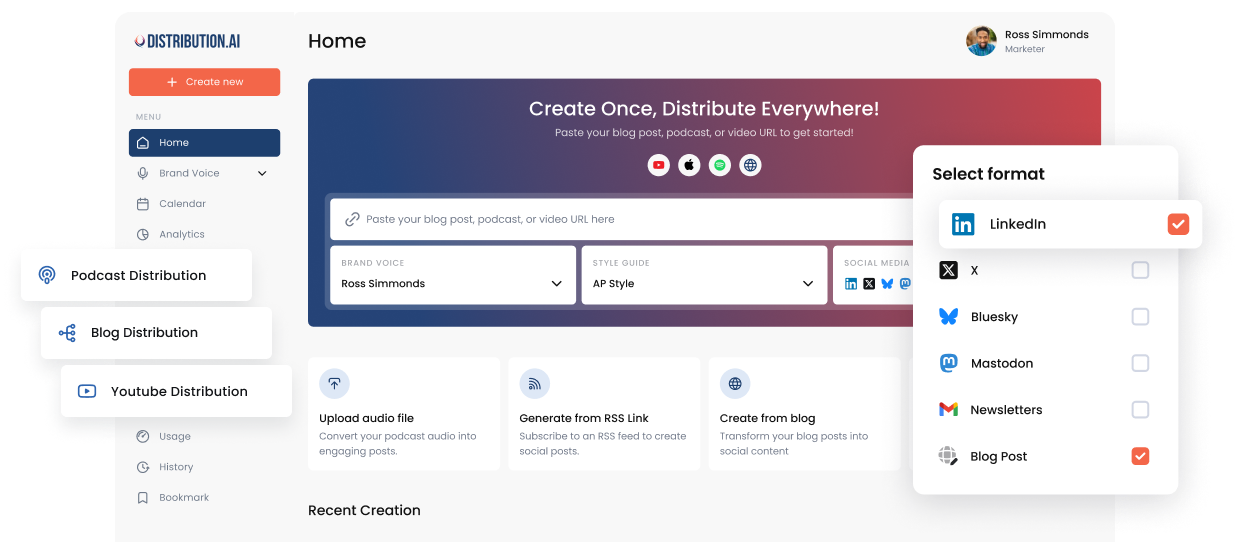
You can create and publish your repurposed video content in under 15 minutes by following the four steps with Distribution.ai, an AI video repurposing solution built for content distribution.
1. Sign Up for Distribution.ai
Distribution.ai is an AI-powered video repurposing platform that converts your long-form videos into short clips and text-based content for social media.
You can upload a YouTube video, product demo, webinar or sales call recording, and the platform will extract viral-worthy clips and write social media posts with the key takeaways.
After you sign up, the 15-day free trial will let you repurpose videos to create several content pieces.
2. Customize Your Tone and Style
The next step is to tell the solution what you sound like by describing your style, picking a preset or uploading an existing content piece.
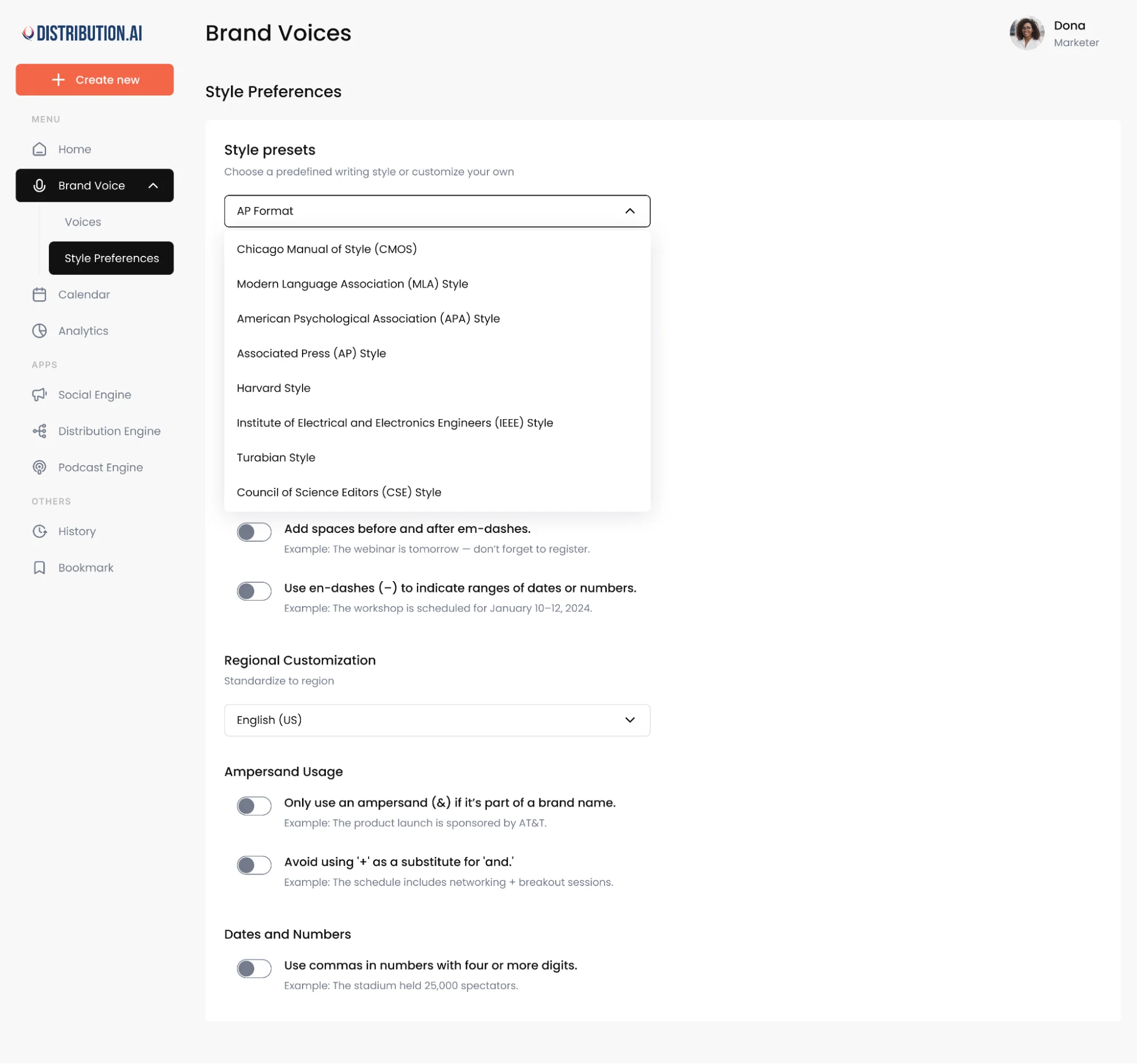
This ensures that the repurposed video content is closer to what you’d normally post. It is also pivotal to maintain consistency across clips, posts and captions for all social media networks.
3. Paste a Link or Upload a File
Then, you share your video content. You can paste the link to your published YouTube video or podcast, or directly upload the multimedia file.
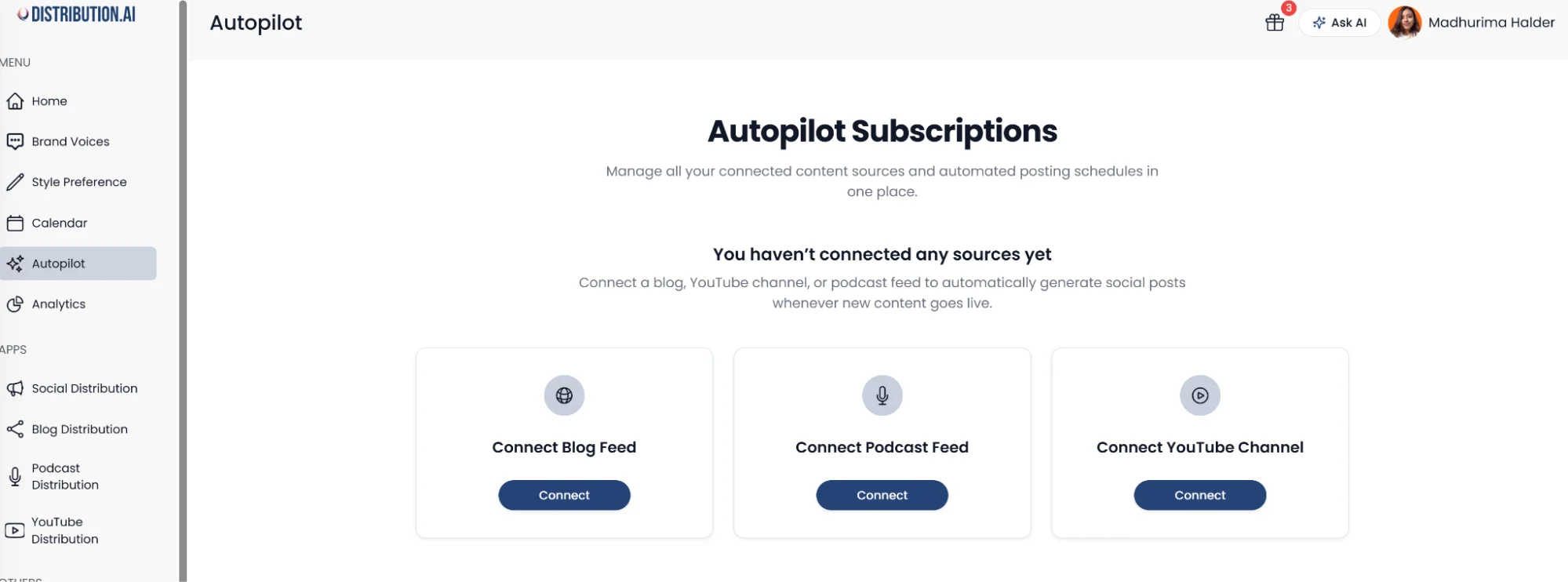
The AI will instantly find the important talking points and insights to create content for different platforms and formats in under a minute.
For instance, you can generate YouTube Shorts (which can be cross-posted on other platforms like Instagram), LinkedIn posts, X threads and email newsletters.
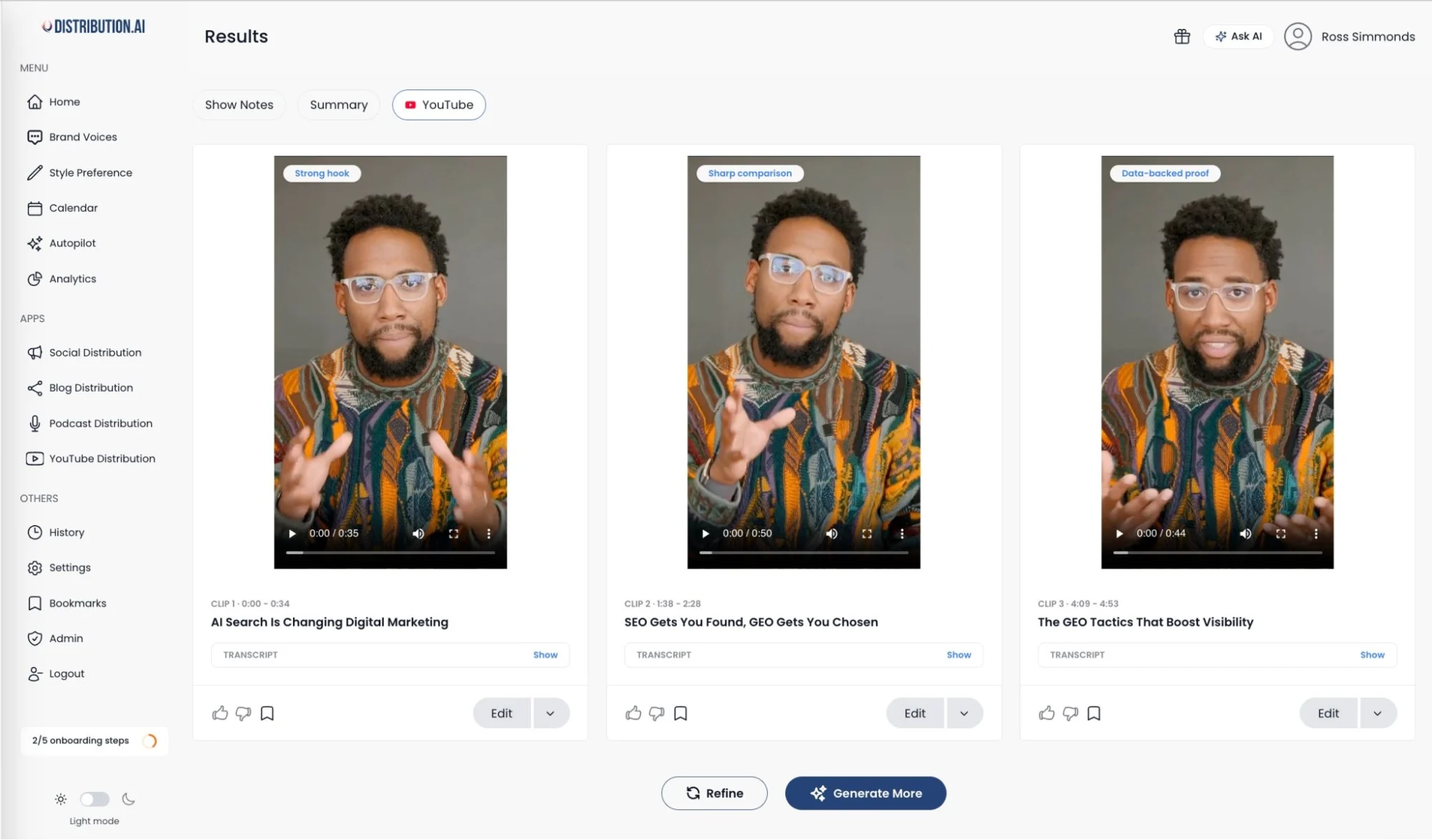

You can set up AI agents inside Distribution.ai that will automatically pull new videos from your YouTube channel or RSS feed as soon as you publish them for repurposing.
4. Review and Schedule
After AI produces the content, you can polish it further to improve its quality. This includes editing the hook, reorganizing the points, optimizing the CTA or adding new information.
Distribution.ai’s content editor allows teams to do this without leaving the platform, streamlining the overall video repurposing process.
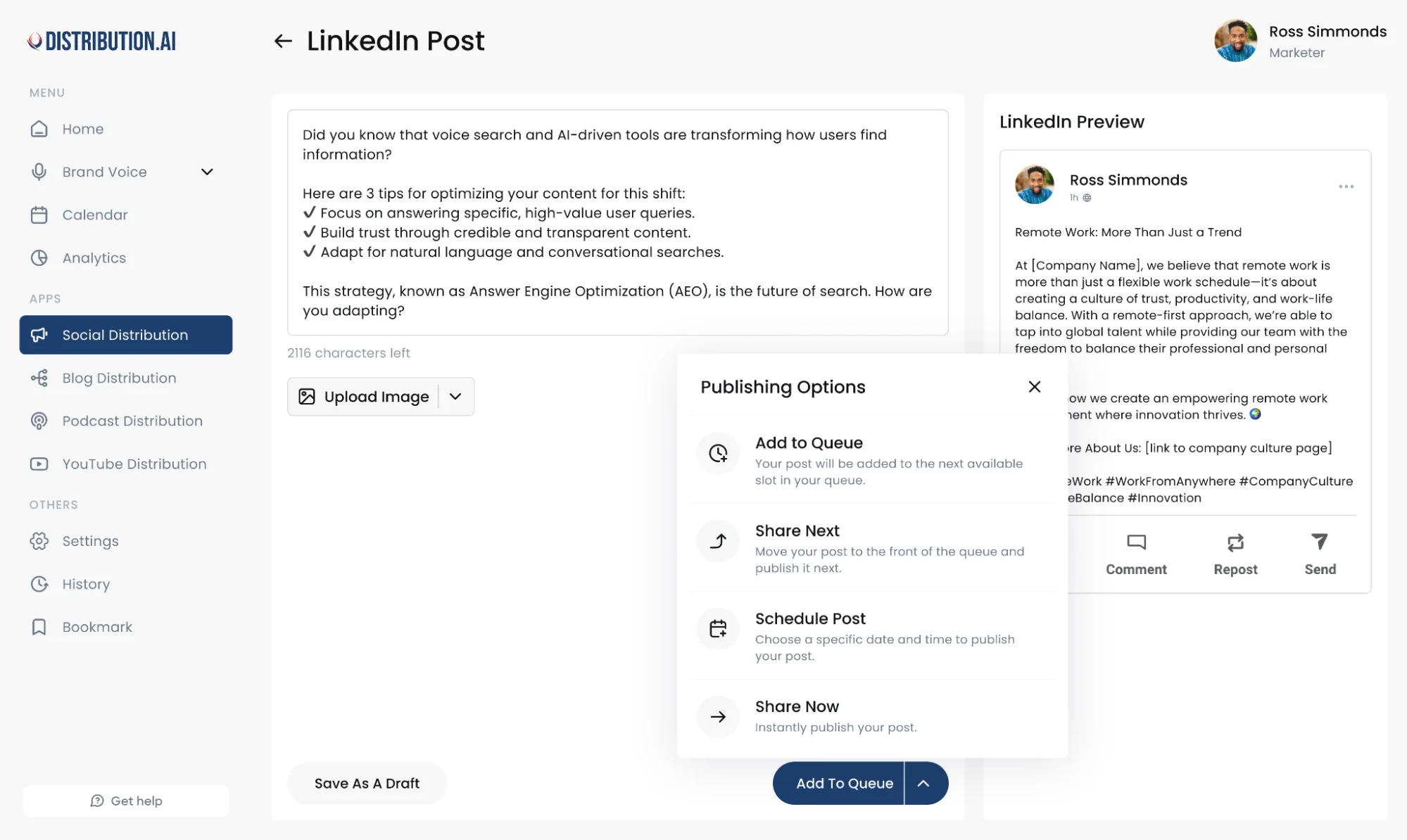
Finally, when the content piece is approved, you can schedule it for publication using the built-in calendar for various platforms, such as LinkedIn, X, Mastodon and Facebook.
How to Pick Videos Worth Repurposing
If you have a library of videos, you can use the criteria below to choose the ones that’ll lead to engaging repurposed content:
1. Prioritize Evergreen Videos Over Topical Content
Evergreen videos cover topics that stay in demand for a long time. These are typically educational or informative videos that discuss concepts and frameworks around your audience’s pain points.
Topical content may outperform evergreen videos in some cases, but they become outdated after a while.
When you repurpose evergreen videos, the short clips and social posts tend to follow suit. They will continue to reach more viewers and attract valuable leads over time.
A good test is to perform a quick keyword research to find out which terms and phrases have high search volume with tools like Ahrefs or Semrush.
2. Long-Form Videos That Are Hits
Choosing the most-watched video can be the quickest way to get instant value out of your video content repurposing workflow. This is more true if the video is still continuing to attract new viewers.
Additionally, longer videos generate more short-form content pieces during repurposing. A 40-minute podcast episode, for instance, will generate multiple vertical clips and social media posts compared to a 5-minute video.
Apart from social media posts, you can convert them into long-form content for your website. For example, if you have an hour-long breakdown of a process, the engaging video content can be written as an in-depth how-to guide.
3. Videos With Viral-Worthy Moments
Videos where you discuss emerging trends or analyze “hot” takes relevant to your niche and industry can give you content pieces that can go viral.
It can be top ten roundups, “hacks” to complete a task, popular myths or data-backed reports. These videos’ talking points can often become powerful hooks that can stop your audience mid-scroll.
If you do podcasts, repurpose the episodes with popular or recognizable guests. You can summarize the key takeaways, clip the moments where they share actionable tips, etc., to maximize reach.
Each insight from these types of assets can be converted into a vertical compelling video or text-based post for various channels. In the case of podcast clips, it can also attract new audiences to your brand.
4. Alignment With Current Marketing Campaigns
Another effective way to pick videos for repurposing is to look at your current marketing goals and content focus. If your current objective, for example, is to generate demand, then repurpose videos that analyze the problem you solve and offer practical solutions.
This approach can also help you track how your video repurposing efforts complement your existing marketing strategies. You can compare key performance indicators (KPIs) like impressions, likes, comments, click-through rates and follower growth from when you didn’t repurpose videos.
Types of Videos and How to Repurpose Them
There are different types of videos you can create (or may already have created) for your audience that can be repurposed effectively.
Below are three broad categories of B2B marketing videos and the best way to go about repurposing them.
Product or service videos
Product or service videos explain how your brand’s core offering works. It describes a process or a feature to highlight the value it brings for your target audience.
For example, if you are a SaaS business, a product video may walk the audience through the latest feature updates or the navigation.
Similarly, if you are a web design agency, your service video can cover how your team converts a Figma file into an interactive web page.
These types of videos can be repurposed as:
- How-to articles: List of steps with visuals (like images or GIFs) for your website
- X threads: Each post in the thread can discuss one pointer
- Email newsletter: Quick rundown of the points for your readers and past customers
- LinkedIn posts: Share what you (or your product) can do and how it is better than alternatives
Explainer videos
Explainer videos are educational videos that elaborate on a concept or provide a framework that helps the viewer solve a problem and/or make better decisions.
For instance, titles like “how to choose keywords for your next marketing campaign” or “what makes a website intuitive” fall into this category.
Typically, these types of videos are evergreen and continue to generate value for your brand for a long time. Therefore, you need to repurpose them into formats that can do the same:
- Blog posts: Short-to-medium (word count<1500) pieces that provide actionable insights
- Long-form social media posts: Descriptive content pieces that can be reposted
- Short clips: Vertical videos covering one talking point at a time that can be cross-posted across social networks
Podcasts and trending content
Podcasts are topical videos that could be a conversation between two or more individuals, or a monologue from a solo presenter. Some podcasts may fall in the explainer video category.
Trending videos cover a hot topic within your niche or industry that your audience is very interested in. These types of videos have a higher chance of going viral due to high demand.
The repurposed content for podcasts and trending content should be punchy and scannable, so it attracts the attention of your audience instantly and provides them with actionable takeaways without focused reading/viewing.
You can achieve that by keeping the core message at the front, whether it is a short-form video or text-based social media post.
The following formats can work well:
- LinkedIn carousels: Visual-heavy slides that get your points across in under a minute
- X threads: Hook the reader in with the first post and retain them in the thread
- Short clips: Trim the “unfiltered” opinions and “hot” takes
- Email updates: Give your subscribers and customers the “inside scoop”
Experiment with different formats and channels when repurposing a video. You can always mix and match based on what works for your audience.
Best Practices When Repurposing Video Content With AI
If you are just beginning to repurpose video or establishing a video repurposing workflow, you can keep the following in mind to get immediate value:
1. Cover One Idea in Each Repurposed Piece
Repurposed content pieces are short-form, meaning they should focus on one small but valuable takeaway. This makes them more engaging because your audience’s attention will be concentrated on one point over three and will cater to audiences with multiple pain points.
On top of that, creating one-idea posts and clips generates more volume of content from a single long-form video. It increases your content’s ROI further without creating anything new from scratch.
2. Add Subtitles and Visuals If Needed
If you are creating content for a professional audience, consider editing the clips further to add subtitles and captions. This allows your viewers to consume the content in office environments where they have to reduce the volume or watch the video on mute.
It also expands the reach by making your content accessible to viewers with special needs.
3. Track Repurposed Content’s Performance
Monitor which social channels, content formats, lengths and styles are getting you the best results. Distribution.ai’s unified dashboard shows key metrics across platforms (likes, comments, click-through rate, etc.) and which content pieces have performed well in one place.
Alt text: Distribution.ai’s performance tracking dashboard
The insights from these performance metrics will help you scale up or down your content efforts.
4. Consider Reposting and Cross-Posting
Reposting is posting a previously published content piece on the same social media channel.
Cross-posting is copying content on one platform to another, such as posting a YouTube Short as an Instagram Reel. When repurposing YouTube videos, ensure that you change the aspect ratio accordingly so you can seamlessly upload the content to other platforms.
These methods keep your content calendar full without creating new content.
However, be careful when reposting and cross-posting. If it’s done too frequently, your audience might find that repetitive and disengage.
Moreover, make sure that the format and tonality fit the other platform. For example, if you are cross-posting an X post (which is typically informal) to LinkedIn, make sure that the content’s style and emotionality don’t veer too far away from what LinkedIn users prefer.
5. Always Enhance the Content Before Publishing
You can reorganize the talking points, add new information, tighten some sentences or update some details. These seemingly minor edits humanize your content, which can improve engagement.
It also makes your social media posts and videos more relevant because the source asset might be dated. A final check will help you shape your content strategy as per the latest information.
Automate Video Repurposing with Distribution.ai
Repurposing video content manually can be difficult. You need a dedicated video editing tool to extract short clips, write platform-native posts, edit them, schedule them for publication and track performance. This can cost you hours every week.
Distribution.ai does it all in minutes.
You can paste the published link to your video or upload a file, and the platform will produce several repurposed pieces in under a minute. It will create short clips and write social media posts that you can polish and take forward.
Then, after approval, you can schedule them for publication in the built-in calendar and monitor KPIs in the unified dashboard.
Promote, repurpose & distribute your content with AI
Write 10x faster, engage your audience, & never struggle with the blank page again.
Start 15-Day Free Trial
Frequently Asked Questions
Author

Promote, repurpose & distribute your content with AI
Start 15-Day Free Trial