YouTube Video to Blog Post: How to Turn Videos Into Articles That Rank
Turn a YouTube video to blog post that ranks: an 8-step workflow, an on-page SEO checklist and how to repurpose YouTube videos at scale.
 By
Quick answer
To turn a YouTube video to blog post that ranks, start from the transcript, pick one search query the article should answer, then rebuild the talk as a structured article with a direct answer up top, clear H2 sections, the video embedded and the key moments timestamped. Edit for reading, add what the video skipped, and publish the article as its own page that links back to the video.
Most B2B teams record more than they publish. A 25-minute YouTube video holds the raw material for a full article, a newsletter and a week of social posts. Most of that material never gets used.
This guide shows how to convert a YouTube video to a blog post that people read and search engines can rank. It covers the workflow, the edit, the on-page SEO and how to repurpose YouTube videos at scale without the article reading like a transcript.
Key Takeaways
- A YouTube transcript is a first draft. A blog post needs structure, a search target and edits for reading.
- Choose one query per article. The video can cover five ideas. The article should own one.
- Put a 2-3 sentence answer at the top so search engines and AI assistants can quote it.
- Embed the video, add timestamps and link both ways. The article and the video should support each other.
- Automate the first draft. Keep a human edit before anything publishes.
Why turn a YouTube video to blog post at all
Video and text reach people in different moments. Someone watching YouTube chose to spend 20 minutes. Someone searching Google or asking ChatGPT wants an answer in 20 seconds. An article serves the second person without asking them to press play.
Text also gives you more surface area in search. A video ranks for a handful of queries on YouTube and in Google’s video results. A well-structured article can rank for the main query plus long-tail variations, and it gives AI assistants clean text to cite.
Video still earns citations on its own. In an Ahrefs study published March 2, 2026, YouTube accounted for 5.6% of all URLs cited in Google AI Overviews. Pairing a video with a written companion gives you two assets that can each be found and cited.
Ross Simmonds calls this the core of Create Once, Distribute Forever: the work of making the idea is already done, so distribution should squeeze every format out of it.
Transcript vs blog post: what changes
Pasting a transcript under a video and calling it a blog post is the most common shortcut. It rarely ranks and almost nobody reads it. Spoken language repeats itself, wanders and depends on visuals the reader cannot see.
| Element | Raw transcript | Blog post that ranks |
|---|---|---|
| Opening | “Hey everyone, welcome back” | A direct 2-3 sentence answer to the search query |
| Structure | One long block in speaking order | H2 and H3 sections in the order a reader needs |
| Focus | Every tangent the speaker took | One primary keyword, supporting points only |
| Visuals | “As you can see here” | Screenshots, tables and described steps |
| Proof | Claims made out loud | Claims linked to sources |
| Ending | “Like and subscribe” | FAQ plus one clear next step |
How to convert a YouTube video to a blog post in 8 steps
This is the YouTube to blog workflow we recommend. It works for webinars, tutorials, interviews and talking-head videos.
Pick the video with the clearest single idea
Tutorials and how-to explainers convert best. Interviews work too, but you’ll need to choose one thread to follow.
Choose one search query
Check what people search for around the topic. Pick the query the video answers best. That becomes your primary keyword, your title and your first sentence.
Pull the transcript
Use YouTube’s own transcript, a transcription tool or a repurposing platform. Fix names, product terms and numbers before you do anything else.
Outline from the reader’s question
List the 4 to 7 sub-questions a reader has. Map the video’s segments to them. Drop the segments that don’t answer anything.
Write the answer box first
Two or three sentences that fully answer the query. If an AI assistant quoted only this, the reader should still get value.
Rewrite for reading
Cut filler. Turn spoken lists into numbered steps. Replace “as you can see” with a screenshot or a described step. Add context the speaker assumed.
Embed the video and add timestamps
Place the embed near the top. Add a short “Watch the key moments” list with timestamps so readers can jump straight to a demo.
Link both ways and distribute
Add the article link to the YouTube description and pinned comment. Then turn the article into social posts and a newsletter section.
Pro tip: One long video can feed two or three articles. A 45-minute webinar often has a “what” piece, a “how” piece and a comparison piece hiding inside it. Give each its own query.
On-page SEO for video-to-blog articles
The edit makes the article readable. On-page SEO makes it findable. Use this checklist before you publish any video to blog post conversion.
Title and intro
Put the primary keyword in the title and the first 100 words. Keep the title honest about what the reader gets. A promise the article can’t keep raises bounce rates fast.
Headings
Use H2s for the main sub-questions and H3s for detail. Write headings people would actually type into a search bar. “Step 3” tells nobody anything. “How to pull a YouTube transcript” does.
Media and structured content
Embed the video. Add at least one table or numbered list. Structured content is easier to skim and easier for AI assistants to extract.
Links
Link to two or three related articles on your site and one or two credible outside sources. Link back to the video in the copy, not only in the embed.
Freshness
Videos age. When a product changes, update the article and note the date. The back catalogue guide covers how to refresh and recirculate older pieces on a schedule.
Repurpose YouTube videos at scale
Doing this by hand works for one video a month. Most teams publish more than that. The bottleneck becomes the first draft.
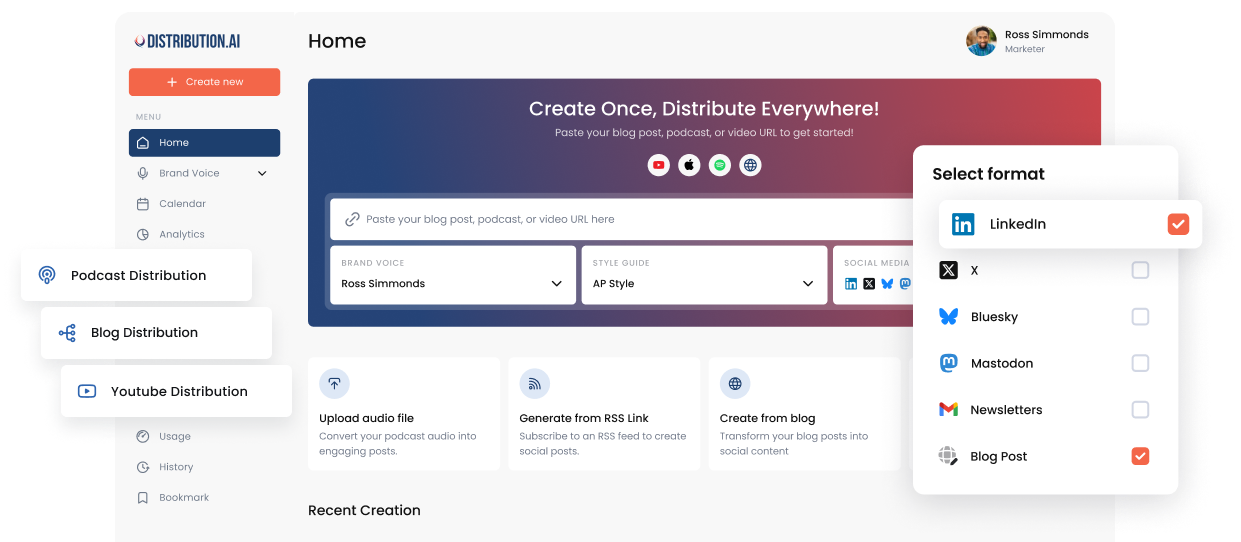
Distribution.ai’s YouTube Distribution Agent turns YouTube videos into blog posts, social posts and newsletters. With Autopilot, you link your YouTube channel once, and channel-ready drafts are created the moment a new video goes live. You set a brand voice so drafts sound like you, and your team reviews them before anything is scheduled. See the plan options on the pricing page.
If you prefer to work inside an AI assistant, the Distribution.ai MCP connector lets you paste a YouTube link into ChatGPT or Claude and get per-channel posts with character limits checked. Our Claude setup guide walks through the connection.
The article is one output. For the full asset set from a single video, read how to turn one YouTube video into 5 assets. The same logic applies to audio, which we covered in our guide to repurposing podcast episodes.
How to know it worked
Track the article and the video together. Watch organic clicks and rankings for the primary keyword, views referred from the article to the video, and whether AI assistants cite the article for the query. Our guide to measuring content distribution covers traffic, pipeline and AI-search citations in one framework.
Go deeper
Frequently asked questions
Can I just publish the YouTube transcript as a blog post?
You can, but it rarely ranks or gets read. Transcripts repeat themselves, lack structure and reference visuals the reader can’t see. Use the transcript as raw material and edit it into an article.
How long should a blog post made from a YouTube video be?
As long as it takes to fully answer one query. For most B2B how-to topics that lands between 1,200 and 2,000 words. Cut anything the reader doesn’t need.
Should I embed the video in the blog post?
Yes. Place it near the top and add timestamps for key moments. The embed serves people who prefer to watch, and the article serves people who prefer to read.
Will a blog post compete with my YouTube video in search?
Usually they show up in different places. The video appears in YouTube and video results. The article targets standard results and AI answers. Linking them helps both.
What’s the fastest way to convert a YouTube video to a blog post?
Automate the transcript and first draft, then spend your time on the edit. Distribution.ai can draft blog posts, social posts and newsletters from a YouTube link, and Autopilot does it every time you publish a new video.
Every video you publish can become an article
Link your channel once. Get blog, social and newsletter drafts each time you upload.
No credit card required.
Frequently Asked Questions
Author

Promote, repurpose & distribute your content with AI
Start 15-Day Free Trial