


How to Build a Social Media Plan [Step-by-Step Process + Templates]
Learn how to create a social media plan that aligns with your goals, improves consistency, and drives measurable results.
A social media plan gives your brand the blueprint it needs to show up consistently and create messaging that actually ties back to your marketing goals.
However, fast-moving content teams and marketers do face some challenges when creating such a plan for multiple social media networks.
For instance, teams often use multiple tools to run the entire social media marketing workflow. The constant context switching can burn teams out because members spend more time cycling between platforms instead of creating and scheduling content.
Another roadblock is slower content production processes due to resource constraints. Social media success depends on quality, bite-sized content that delivers value to your audience.
But if you don’t have the time and resources to do it consistently and effectively, the strategy will fall flat.
Here’s a quick rundown:
- Audit your current social presence to identify what’s working and gaps to fix
- Set clear goals and KPIs tied to business outcomes
- Understand your audience through data, research, and insights
- Focus on 1–3 platforms where your audience is most active
- Define 3–5 content pillars to guide consistent messaging
- Repurpose long-form content into bite-sized social posts
- Build a content calendar to plan and schedule consistently
- Actively engage to build a community, not just an audience
- Track performance and optimize based on key metrics
- Use the right tools to streamline creation, scheduling, and analytics
In this article, let’s look at how you can build a social media plan that your team can execute and continually iterate on.
What is a social media plan?
A social media plan is a strategic framework that guides how businesses use social media platforms to achieve marketing objectives.
It covers everything from setting SMART goals, identifying your target audience, auditing your current social media presence, choosing the right platforms, and locking in a posting schedule to creating content that resonates.
A well-executed social media plan helps you:
- Save time and resources: It streamlines the content creation process and eliminates last-minute scrambles.
- Maintain brand consistency: It keeps your voice and messaging unified across every social network.
- Target effectively: It helps you reach distinct audience segments who actually connect with your brand.
- Stay competitive: It surfaces valuable competitor insights that sharpen your social strategy.
- Measure and optimize: It makes it easy to track key metrics and refine your marketing efforts over time.
- Ensure regular engagement: It helps you interact with your audience consistently across platforms.
How to Create a Social Media Plan?
When it comes to creating a social media plan, there’s often confusion: is it a social media strategy or a content calendar?
The short answer: it’s both.
Your social media strategy defines the “why” and “who.” This includes your business goals, target audience, core topics and the platforms you’ll focus on.
The content calendar defines the “what” and “when,” that is, what you will post and when.
Together, these two pieces form your complete social media plan, giving you a system that’s both strategic and executable. And you can do it in ten steps:
Step 1: Audit your current social media presence
Before you plan anything new, you need a clear picture of where you stand right now.
A social media audit helps you take stock of what’s working and where there are gaps to fill. It’s the foundation of any successful social media strategy because it removes guesswork.
Here’s what to look at during your audit:
- Active social media accounts: List every account you have across every social media platform where you have posted some content in the past.
- Content performance: Dig into what’s actually resonating. Review reach, engagement, shares and saves to see which content formats and types deliver results.
- Key metrics: Beyond content performance, check follower growth and click-through rates, and note which content types you’ve been using.
- Inconsistencies: Flag any gaps in your messaging, visual style, or posting formats. These inconsistencies weaken your social presence and confuse your audience.
If you’re just starting out and don’t have much of your own data yet, look at competitors and adjacent creators in your niche. Their performance can give you a sense of what already works with your target audience and help you set realistic benchmarks.
Step 2: Define Clear Goals and KPIs
Your social media plan needs goals that connect directly to your broader business objectives. You need to go beyond vague aims like “grow our social presence” and set tangible, measurable goals so you can actually track progress and measure success.
For example:
- Increase brand awareness by 30% on X in 90 days
- Drive 5,000 visits/month to your website from Instagram
- Grow LinkedIn newsletter subscribers by 1,000 in 60 days
Alongside your goals, define key performance indicators (KPIs) that map to each objective.
If your goal is awareness, track impressions and follower growth rates.
Similarly, for lead generation, monitor conversions like downloads, subscriptions, click-through rates, or sign-ups.
Step 3: Understand Your Audience
Most social platforms offer built-in demographic insights. LinkedIn, for example, shows your audience’s location, industry, job role, company size and more.
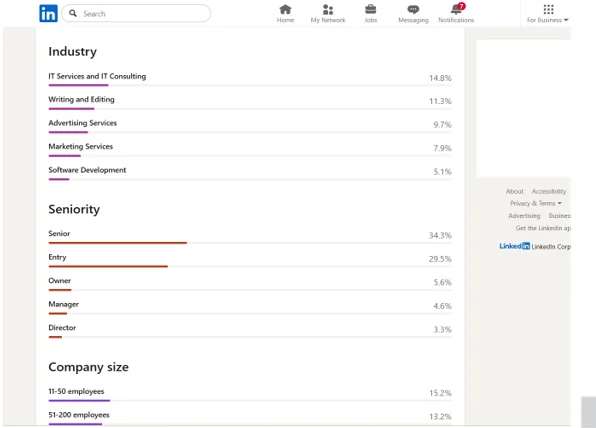
But basic demographics only get you so far. To really nail your audience research, go deeper:
- Conduct surveys and interviews: Ask about core interests, pain points, challenges and content preferences. First-party data will help you create unique content that distinguishes you from others.
- Research your competitors: Check their content types, what gets the most engagement and who their audiences are. This helps you spot opportunities and gaps.
- Mine your support tickets and sales calls: Your customer-facing teams already know what questions and frustrations come up repeatedly.
With this information, build out personas and ideal customer profiles detailing location, interests, job roles, industry, preferred social channels and the kind of content they engage with.
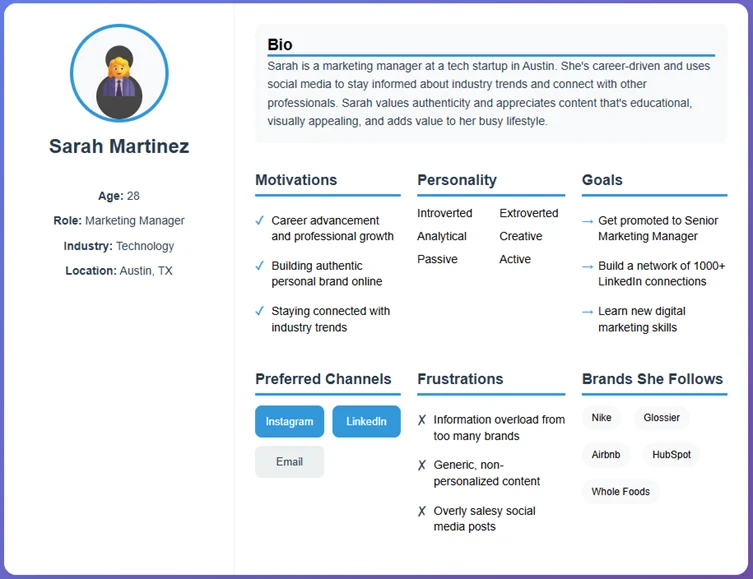
The more specific you are, the more your content will resonate, making it easier to demonstrate expertise in a way that actually matters to your audience.
Step 4: Choose the Right Social Media Platforms
If you’re just getting started, resist the urge to be everywhere at once. Pick a maximum of three social media platforms where your audience is the most active.
Spreading yourself too thin across too many social channels is a recipe for inconsistent posting, diluted effort and burnout, especially for smaller teams with limited bandwidth.
Also consider your business goals and the content formats that best fit your product or brand while keeping the core message constant.
For example, if you’re a B2B agency, you might share educational content, user-generated content, personal opinions and brand stories on LinkedIn to attract leads, then repurpose that content into infographics for Instagram.
The key is to go deep on a few platforms rather than going shallow on many. Once you’ve built momentum and have a repeatable content creation process, you can expand to additional social networks.
Step 5: Map Out Content Themes and Pillars
Identify 3–5 content pillars, core topics relevant to your audience’s interests and your brand’s expertise. These pillars keep your social media content plan focused, helping you create content with consistency and purpose.
Here’s an example of how content pillars might look:
Pillar Description
Educational Share something useful, actionable, or industry-specific
Behind-the-scenes Share team experiences, processes to humanize your brand
Promotional Announce new products/services, case studies, and results
Engagement Polls, memes, Q&As, relatable moments
User-generated content (UGC) Reposts from fans and customer testimonials
A simple breakdown of content pillars to balance value, trust, promotion, and engagement.
Step 6: Produce Bite-Sized Content for Different Platforms
Content creation is the heart of any social media plan because it delivers value to your audience and gives them a reason to follow you.
Of course, it can be resource-intensive if you start from scratch every time. Fortunately, you can repurpose existing long-form content into many short-form, snackable assets.
A rule of thumb here is to pick long-form blog posts, like how-to articles and explainer guides that already perform well and convert them into multiple social media posts. The same goes for podcast episodes and YouTube videos.
Distribution.ai accelerates this by automating the entire creative workflow.
After signing up for free, you can paste the published link to an article, podcast, or YouTube video and turn it into several short-form content pieces for different social media channels in under a minute.
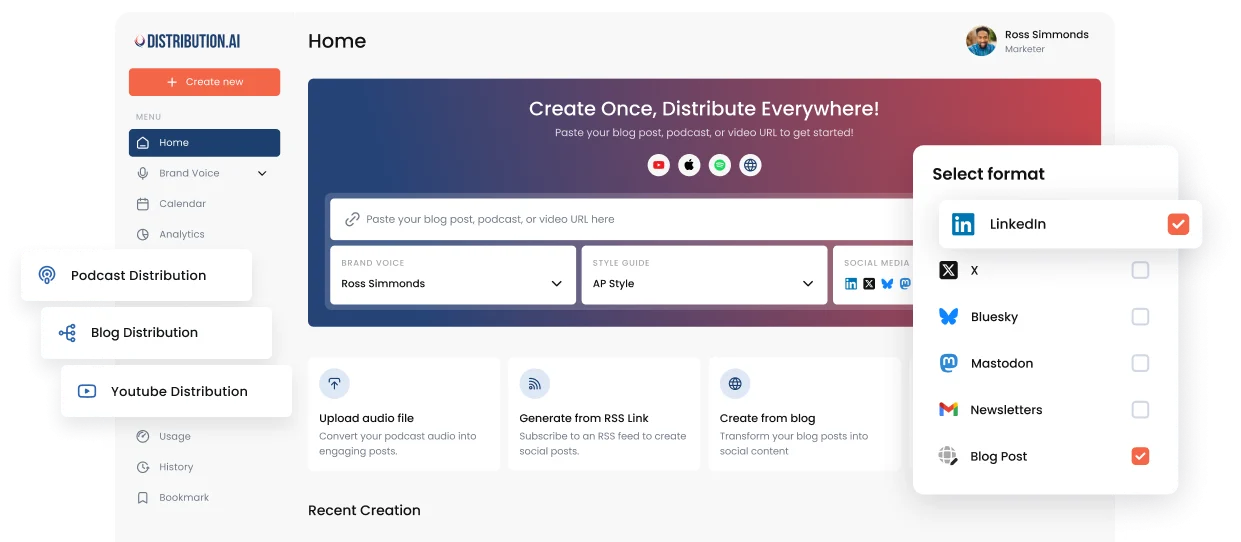
Moreover, you can give it custom voice and tone guidelines so the AI-generated content is closer to what your audience prefers.
Step 7: Build a Content Calendar
Once your content assets are ready, organize them into a weekly or monthly social media content calendar.
A well-structured content calendar helps you maintain a consistent posting schedule, balance the types of content you share, align posts with upcoming social media campaigns and avoid repetitive messaging.
Your content calendar should include the content pillar, format type, platform and topic for each post. Here’s an example of a weekly calendar:
| Date | Pillar | Type | Platform | Topic |
| August 11 | Educational | Video tutorials, Carousel | YouTube, LinkedIn | 3 growth hacks for content creators |
| August 12 | Promotional | Carousel, Infographic | LinkedIn, Instagram | How we grew a newsletter by 10K subscribers |
| August 13 | Engagement | Text post | LinkedIn, Twitter/X | Preventing burnout as a solo creator |
| August 14 | Behind-The-Scenes | Video content, reels | Instagram, TikTok | A day dedicated to video editing |
| August 15 | Engagement | Poll | Instagram Story, LinkedIn | Do you plan your content monthly or weekly? |
A 5-day content plan mixing education, promotion, and engagement across key platforms to drive growth and consistency.
You can also add columns for reference videos, blog links, competitor posts, hashtags and CTAs to make each entry more actionable.

Distribution.ai includes a built-in scheduling tool, which means you can line posts up and publish them without leaving the platform.
Step 8: Plan Engagement and Community Building
Posting relevant content attracts an audience by providing them with value, but your engagement efforts turn them into followers who might buy from you.
Consistent engagement will help you build a community around your brand, which turns buyers into fans and advocates.
Here are a few simple habits to build into your routine:
- Block 10 minutes per platform per day to comment on posts, like relevant content, reply to your audience and share industry insights.
- Use social listening tools to track brand mentions and audience sentiment.
- Share polls or open-ended questions to drive more audience interactions and surface content ideas.
Step 9: Set Up the Reporting and Optimization System
Track key social media analytics: engagement rate, DMs, saves, shares, conversion rate and any other metrics tied to your business goals. These insights will help you continuously refine and improve your social media performance.
Most social networks offer built-in analytics, but cycling through them to create a comprehensive report can be tiring. A more effective approach is to use a tool that brings it all together.
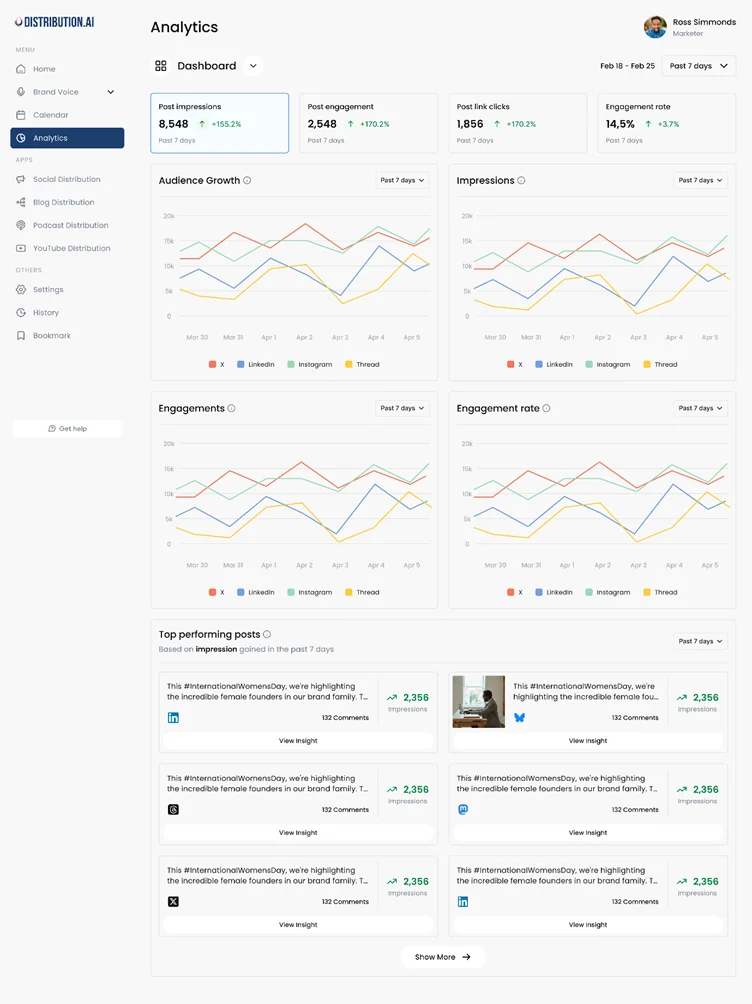
You can use Distribution.ai’s analytics feature to monitor impressions, engagement rate, clicks and top-performing posts across all your social media platforms in one place.
This gives you a clear view of what’s working and what needs adjusting, without the tool sprawl of multiple dashboards.
Step 10: Use the Right Tools and Start Publishing
The right tools help you do more with less.
The goal is to run your entire social media marketing strategy using 2–3 platforms that cover content creation, scheduling and analytics, keeping your workflow simple and cost-effective.
Here are a few social media management tools worth considering:
- Distribution.ai: AI-powered content repurposing, scheduling, publishing and performance tracking.
- Canva: For creating brand-aligned images, templates and visual content.
- Sprout Social or Hootsuite: For social listening, in-depth analytics, monitoring social media trends and automating approval workflows.
- CapCut or Descript: For generating and editing video content with features like an AI video editor and voice cloning.
To increase their reach further, some teams experiment with paid amplification or third-party services like an SMM panel to boost initial visibility, though results can vary. These should complement organic content planning and performance analysis.
5 Free Social Media Plan Templates
You don’t have to build your social media plan from scratch. These templates give you a head start so you can focus on strategy and execution rather than formatting.
1. Canva’s Social Media Strategy Template
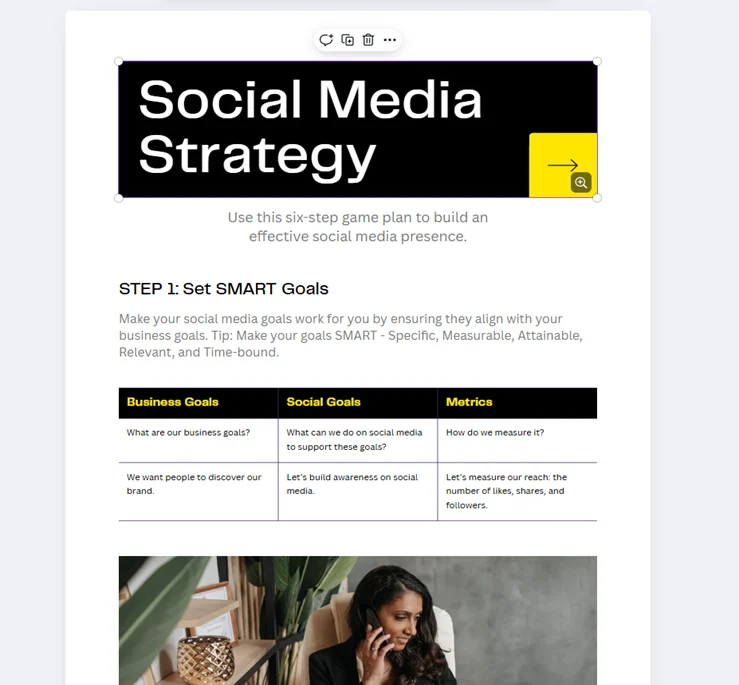
Canva’s template offers a 6-step framework for building your online presence. It walks you through setting SMART goals, identifying your target market, analyzing the competition, running a social media audit and conducting a SWOT analysis. It’s a solid starting point to map out your strategy and adjust as you go.
Ideal for: Content creators and small teams working with 1 to 3 social media accounts.
2. ClickUp’s Social Media Plan Template
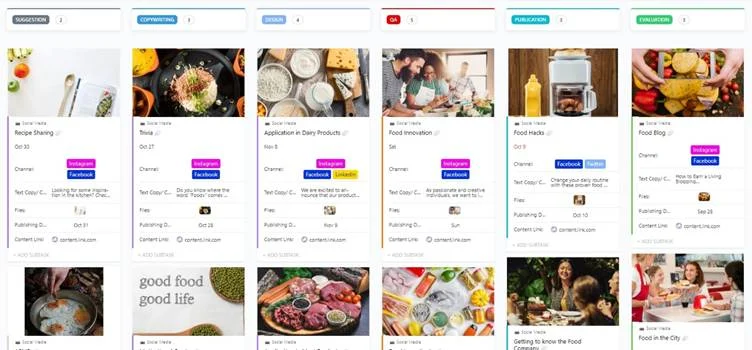
ClickUp’s beginner-friendly social media plan template gives you a centralized hub for all your social accounts. It helps you organize content ideas, streamline the content creation process and collaborate with team members. Custom statuses let you track post and task progress, while custom views help you visualize your plan however you prefer.
Ideal for: Small teams and agencies handling multiple social media accounts across different platforms.
3. SmartSheet’s Social Media Strategy Plan Template
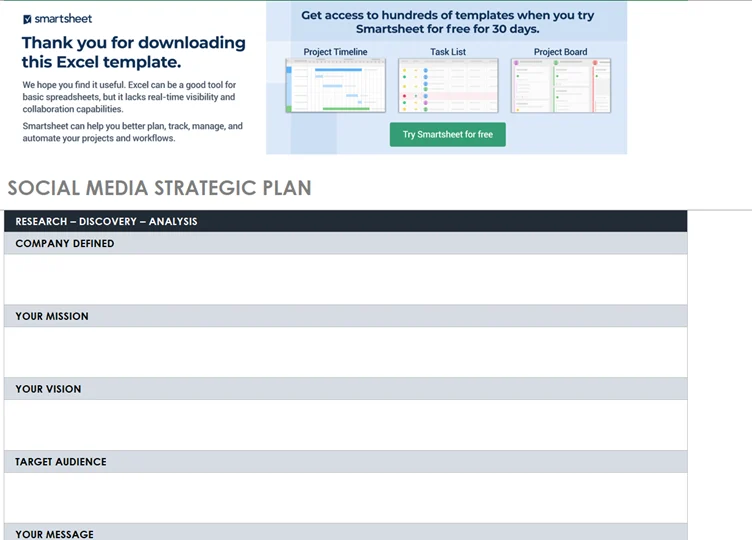
SmartSheet’s Excel-based template helps you organize each stage of your social media marketing plan—from initial research and competitive analysis to goal-setting. Download the spreadsheet and customize it to fit your social media requirements.
Ideal for: Marketers and strategists who prefer offline, spreadsheet-based workflows.
4. Backlinko’s Social Media Strategy Template
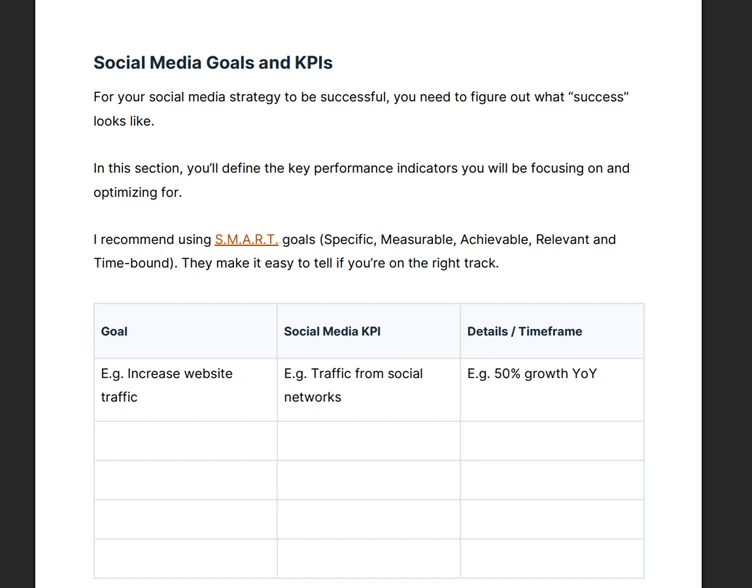
Backlinko’s template focuses on helping you set clear social media goals and KPIs. It includes tables for tracking website traffic sources, follower counts, engagement levels and competitor information. Available in Google Docs, PDF and Word formats, it also lets you plan engagement tactics and list the social media management tools in your stack.
Ideal for: Marketers and creators looking for a straightforward social media strategy template to get organized.
5. Figma’s Social Media Planner Template
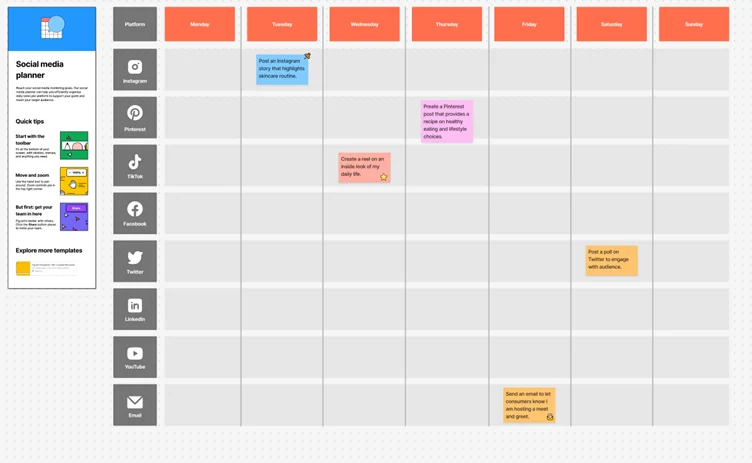
Figma’s planner template is designed for day-to-day content planning across platforms. It lets you create content pillars, track social posts, manage posting frequency and streamline the entire content distribution process.
Ideal for: Creators and marketers who work primarily with visual content and want a customizable social media calendar.
How to Use AI to Create a Social Media Plan
AI is changing how marketers approach social media planning by taking over repetitive action items, and you can do the same for other business tasks across your workflow.
1. Brainstorm Content Ideas
AI can be your go-to assistant for brainstorming post ideas, generating hooks, picking out core topics or mapping out the entire content strategy.
Prompts like “create 10 carousel ideas for an eCommerce brand” can generate multiple ideas that serve as a strong starting point for your social efforts.
2. Generate Captions and Visuals
Once you have your list of content topics, use AI to draft captions and even generate visuals. Just make sure you edit the output to add your personal touch and maintain authenticity, because audiences can spot generic AI content quickly.
A memorable visual identity is also essential for building recognition and trust, so invest in strong branding that stands out on every platform.You can experiment with an intuitive logo generator to prototype your brand visuals before committing to a final refined version.
3. Build Social Calendars Automatically
Once your posts are ready, AI can help you build and schedule your social media content calendar.
These models analyze historical data to suggest the right posting time to maximize reach and audience engagement. They also replace messy spreadsheets and eliminate the back-and-forth that comes with manual schedule changes.
4. Analyze Content Performance and Iterate
When reviewing content on a weekly or monthly basis, AI-powered analytics tools help you track what matters.
With Distribution.ai’s built-in analytics feature, you can monitor impressions, engagement rate, clicks and top-performing posts. This tells you which formats work best and what kind of content your audience engages with the most.
Execute Your Social Media Plan Seamlessly with Distribution.ai
The social media plan is the blueprint. The real work is executing it consistently, week after week, and this is where most teams struggle.
Roadblocks like content creation bottlenecks and tool sprawl can get in the way of marketers producing content and putting it out consistently.
Distribution.ai was built to solve exactly that.
It brings AI-powered content creation, repurposing, scheduling and performance tracking into a single platform. Instead of bouncing between tools, your team can create content, match it to your brand voice, schedule it across social channels and track what’s working from one place.
Whether you’re a solo creator or part of a growing team, Distribution.ai helps you turn your social media marketing plan into a well-oiled system that delivers measurable business results.
Ready to put your social media plan into action?
Frequently Asked Questions
1. How to begin creating a social media plan?
Start by auditing your current social media presence. This will reveal what’s working and where the content gaps are. From there, set clear goals, identify your target audience, spot key content topics and choose the platforms that make the most sense for your brand and business objectives.
2. How to create a social media strategy/calendar from scratch?
Begin with your goals and audience research, then define your content pillars and the social platforms you’ll use. Map out a weekly or monthly content calendar that includes the post type, pillar, platform and topic. Use a scheduling tool to stay consistent and review performance regularly.
3. What is the current state of social media platforms?
Social media platforms continue to evolve rapidly. Short-form video remains dominant, AI-powered features are expanding across platforms and algorithm changes are pushing brands toward more authentic, community-driven content. Staying up to date with platform trends and industry news is critical for any social media marketing strategy.
4. What is a social media strategy?
A social media strategy is your high-level plan for how you’ll use social platforms to achieve specific business goals. It defines your target audience, content approach, platform choices and how you’ll measure success, essentially the “why” behind everything you post.
5. What’s everyone’s game plan with tech/social media?
Most marketers and social media managers are leaning heavily into AI-powered tools to speed up content creation, automate scheduling and get better analytics insights. The focus is shifting from posting volume to high-quality content that drives audience behavior and delivers real business outcomes.
6. Can social media help me network?
Absolutely. Platforms like LinkedIn, Twitter/X, Facebook and even Instagram are powerful for building professional connections. Actively engage with industry conversations and share valuable insights to expand your network organically.
7. What is a “channel-first” social media strategy?
A channel-first approach means designing your content specifically for the platform it’ll appear on, rather than creating one piece and cross-posting everywhere. Each social network has its own preferred content formats and audience behavior, so tailoring your content to each channel typically drives better results.
8. How do I plan a social media strategy for an app launch?
Start by building anticipation with teaser content and behind-the-scenes posts. Set up social media campaigns with clear timelines, define KPIs for each phase (pre-launch, launch day, post-launch), create content that addresses your audience’s concerns and plan targeted ads to boost visibility. Make sure your content calendar accounts for launch-day intensity and ongoing engagement.
9. What is an actual social media strategy? And how to create one for clients?
An actual social media strategy goes beyond a content calendar. It includes audience research, competitive analysis, platform selection, content pillars, a posting schedule, engagement tactics and a reporting framework. When building one for clients, start by understanding their broad business goals and work backward to define how social media efforts can support those objectives with measurable results.

Promote, repurpose & distribute your content with AI
Write 10x faster, engage your audience, & never struggle with the blank page again.
Start 15-Day Free Trial
Frequently Asked Questions
Author

Promote, repurpose & distribute your content with AI
Start 15-Day Free Trial