


Best 8 Podcast Distribution Platforms for B2B Brands in 2026
Compare the best podcast distribution platforms for B2B brands in 2026, including tools for repurposing, analytics, social scheduling, SEO and audience growth.
Do you know that podcasts help you connect with your audience more deeply, even more than videos?
Over 90 percent of people who start a podcast listen to most (if not all) of an episode compared to just 12 percent for video.
That leads to a higher brand recall, increasing your chances of converting your audience.
At the same time, you need to ensure that the insights from your B2B podcast’s episodes reach your potential buyers on their preferred channel and format.
And you can do that with podcast distribution platforms.
In this guide, let’s look at eight podcast distribution platforms that will help you grow your B2B podcast’s reach and authority to fill your pipeline.
Key Takeaways:
- Best for text-based distribution: Distribution.ai can be a great choice if you want to turn each podcast episode into blog posts, LinkedIn content, X threads, newsletters and captions with minimal manual effort.
- Best for multimedia repurposing: Recast Studio can be a great choice for teams that need short-form videos, audiograms and localized clips to reach a global audience.
- Best for transcript-based editing: Descript can be a great choice for podcasters and marketers who want a hands-on editing workflow without a steep learning curve, backed by AI cleanup features.
- Best for building a podcast website: Podpage can be a great choice for brands that need a dedicated, SEO-friendly page for their episodes without dealing with web development or a WordPress site.
- Best for monetizing your podcast audience: beehiiv can be a great choice for B2B brands that want to grow revenue through newsletters, paid memberships and a built-in ad network rather than just expanding reach.
- Best for centralized podcast analytics: Podkite can be a great choice for marketers who care most about chart rankings, attribution and tracking growth across major podcast apps from one dashboard.
- Best for video podcast clips: CapCut can be a great choice for video podcasters who want to extract viral-worthy moments, add captions and publish to YouTube, TikTok and Instagram quickly.
- Best for social media scheduling: Later can be a great choice for teams focused on planning, scheduling and collaborating on promotional posts across many social channels at once.
What Are Podcast Distribution Platforms
Podcast distribution platforms are tools that help brands expand the reach of their podcast episodes beyond basic podcast apps and listening apps.
These solutions get your episodes in front of the right audiences across channels like newsletters, websites, social media and forum communities.
Basically, they promote, syndicate, repurpose and amplify podcast episodes after they are published. Some of their core capabilities include clip creation, content repurposing in different formats, multi-channel scheduling and podcast analytics.
What to Look for in a Podcast Distribution Platform
While this article will help you narrow down options, you can evaluate potential fits even more practically by focusing on these four areas:
- Audience reach and channel coverage: You should opt for a tool that helps you distribute podcasts beyond top podcast directories, such as LinkedIn, X, Instagram, newsletters and your podcast website.
- Repurposing capabilities: The podcast distribution tool should help you convert existing episodes into clips, transcripts, blog posts and social media snippets.
- Analytics and attribution: You should be able to easily measure the impact of your podcast creation and distribution efforts by tracking metrics such as listener growth, engagement, brand sentiment, clicks and organic visibility. Advanced podcast analytics make this easier across major distribution channels.
- Workflow and collaboration: The right solution should seamlessly fit into your existing process and help various stakeholders, like marketers and writers, work together in a more productive manner.
8 Best Podcast Distribution Platforms for B2B Brands
If you are in a rush, here’s a quick breakdown of the eight tools covered:
| Top 8 Podcast Distribution Platforms Summarized |
|||
|---|---|---|---|
| Tool | Best For | Standout Feature | Pricing (as of May 2026) |
| Distribution.ai | Automating the entire podcast repurposing and distribution workflow | AI-powered repurposing of episodes into multiple text-based assets tailored to each channel’s tone and style | 15-day free trial; Individuals from $29/month (billed annually); Organizations from $59/month (billed monthly) |
| Recast Studio | Podcasters who need a multimedia-focused distribution tool | Multimedia repurposing that turns long-form video and audio into short clips, audiograms and social posts | Free forever plan (60 credits); Starter $17/month; Professional $37/month (both billed monthly) |
| Descript | Podcasters and marketers who want an easy-to-use tool to repurpose their episodes | Transcript-based editing that lets you edit podcasts like a Word document | Free trial; Hobbyist $24/user/month; Creator $35/user/month (both billed monthly) |
| Podpage | Marketers who need a dedicated page for their podcast content | Converts your podcast RSS feed into an SEO-friendly webpage automatically | 14-day free trial; Basic $19/month; Pro $29/month (both billed monthly) |
| beehiiv | B2B brands looking to monetize their podcast audience through creator subscriptions | Native hosting paired with paid newsletters, memberships and an ad network for monetization | Free plan available; Scale plan from $43/month (billed monthly) for up to 1,000 subscribers |
| Podkite | Marketers who need centralized analytics to measure the growth of their shows | Tracks chart rankings, reviews, downloads and attribution from one dashboard | 7-day free trial; Starter from $19/month; Pro $99/month (both billed monthly) |
| CapCut | Video podcasters who want to get more mileage out of every episode | Automated video editing with viral-clip extraction, captions and social media templates | Free plan available; paid pricing varies by plan, type and region |
| Later | Podcasters looking to manage multimedia social media posting more effectively | Smart scheduling with a visual calendar across 8+ social channels | 14-day free trial; Starter $25/month; Growth $50/month (both billed monthly) |
A snapshot of how the leading podcast distribution platforms stack up for various use cases.
1. Distribution.ai
Distribution.ai helps brands distribute podcasts by converting episodes into text-based content, such as blog posts, social media threads, captions and newsletters. Then, these assets can be refined and scheduled for various channels, like X, Facebook, Instagram and LinkedIn.
You just need to paste the published link of the episode you want to distribute, choose a brand voice, pick a writing style, select the distribution channels and hit “Generate.”
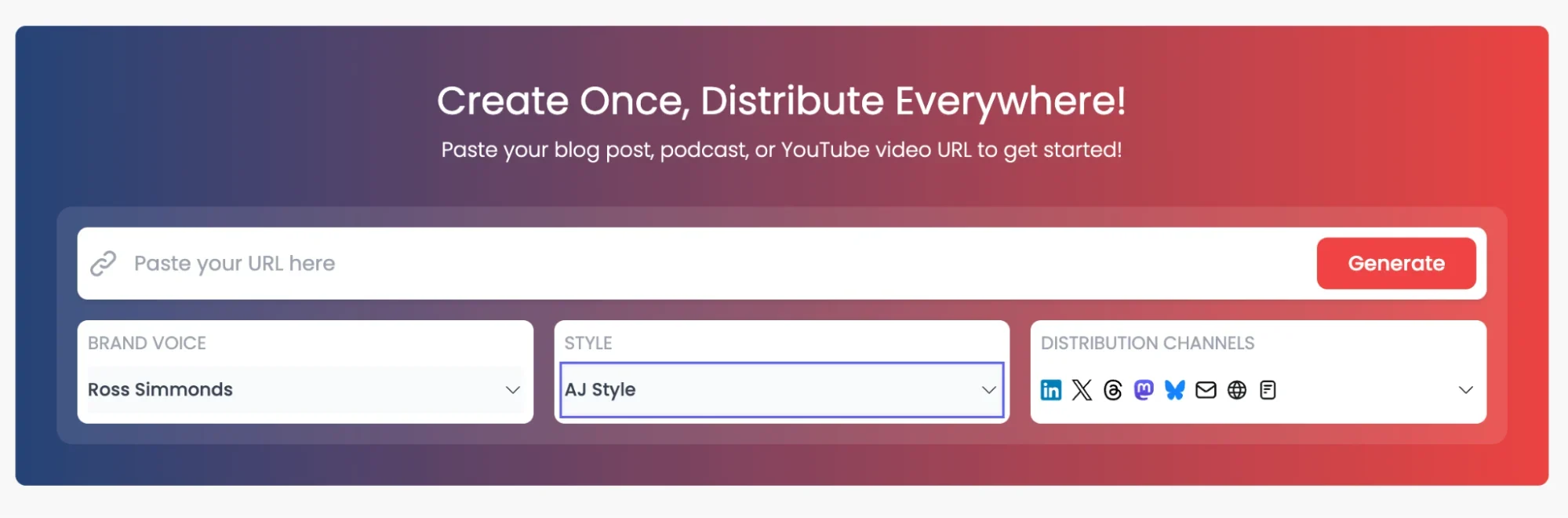
In under a minute, you will get several bite-sized content pieces that can be published instantly for your audience.
Distribution.ai is best for: Automating the entire podcast repurposing and distribution workflow.
Distribution.ai’s key features:
- AI-powered podcast repurposing: Takes a URL or an existing episode and turns it into multiple assets tailored to different channels in your preferred tone and style.
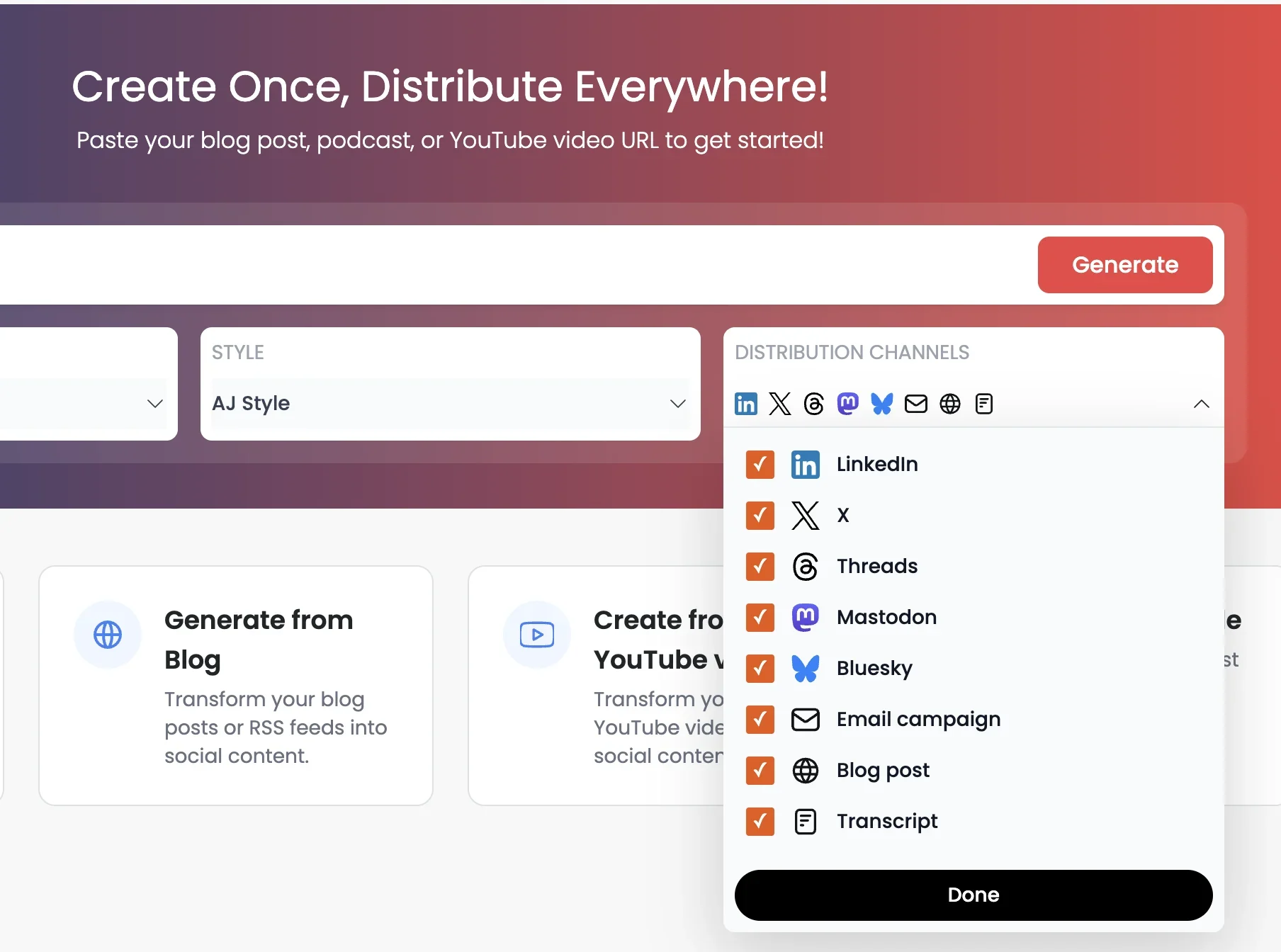
- Voice and tone customization: Get first drafts that are closer to what your audience will like by picking the voice and personalizing the tone.
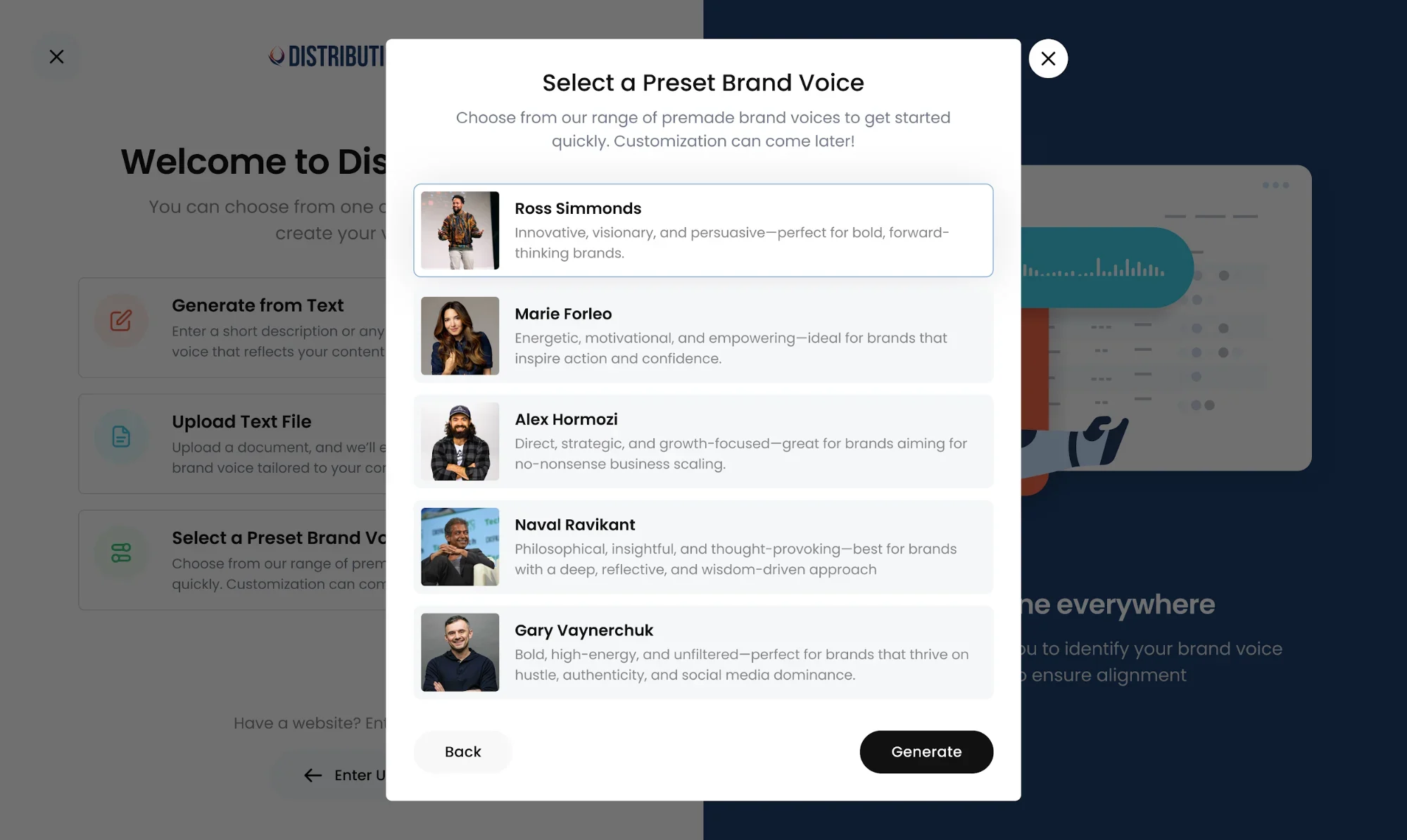
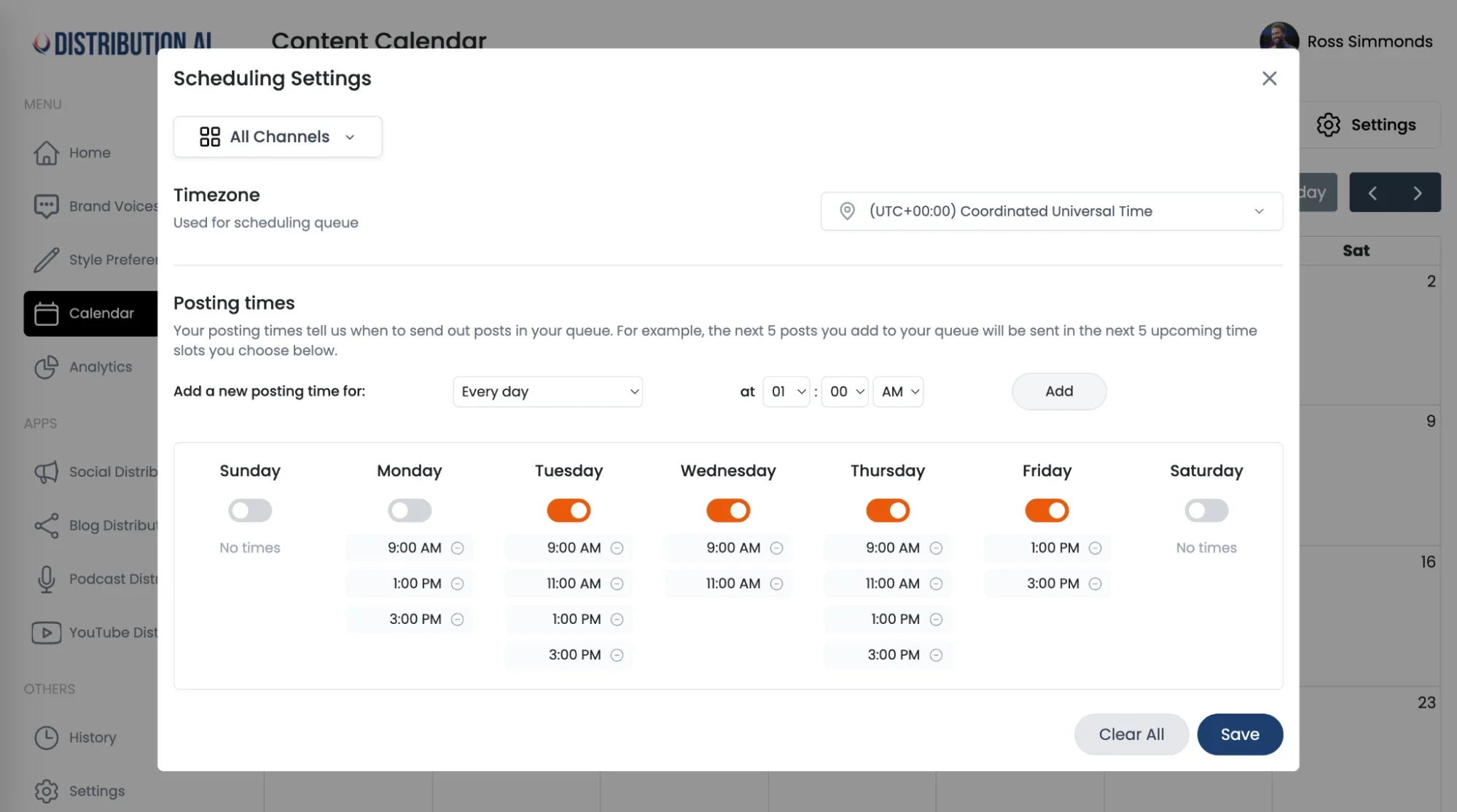
- Automated scheduling: Helps you publish the newly created assets at optimal times to maximize reach and visibility.
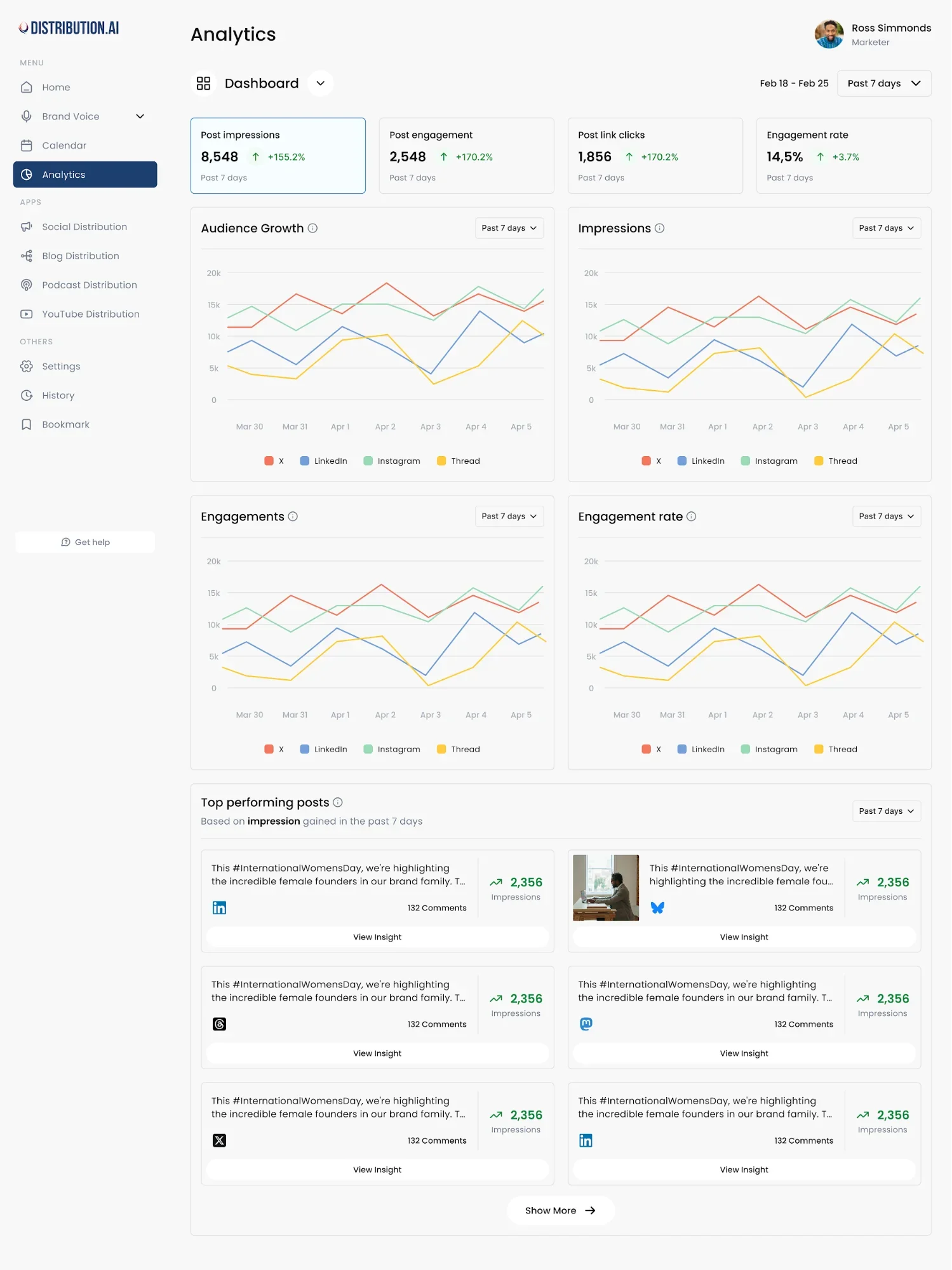
- Performance analytics: Makes it easy to track the performance of the repurposed content pieces by consolidating KPIs in one place.
Distribution.ai’s pros:
- Reduces the time required to create content to promote podcasts across social channels.
- Extends the ROI of each podcast episode by enabling you to reach audiences that prefer text-based content.
- Adheres to your tone and style guidelines to produce first drafts that are closer to what you’d write.
Distribution.ai’s cons:
- You can only repurpose podcast episodes into text-based content, not multimedia.
- There are limited reviews on third-party websites, making it difficult to assess its impact.
Distribution.ai’s pricing:
Distribution.ai offers a 15-day free trial. It offers two types of pricing: for individuals and for organizations.
For individuals, pricing starts at $29/month, billed annually, which allows 250 minutes of repurposing. For organizations, the first subscription tier costs $59/month, billed monthly, which allows five members ($55/month for each additional member). Every user is allocated 750 minutes per month.
2. Recast Studio
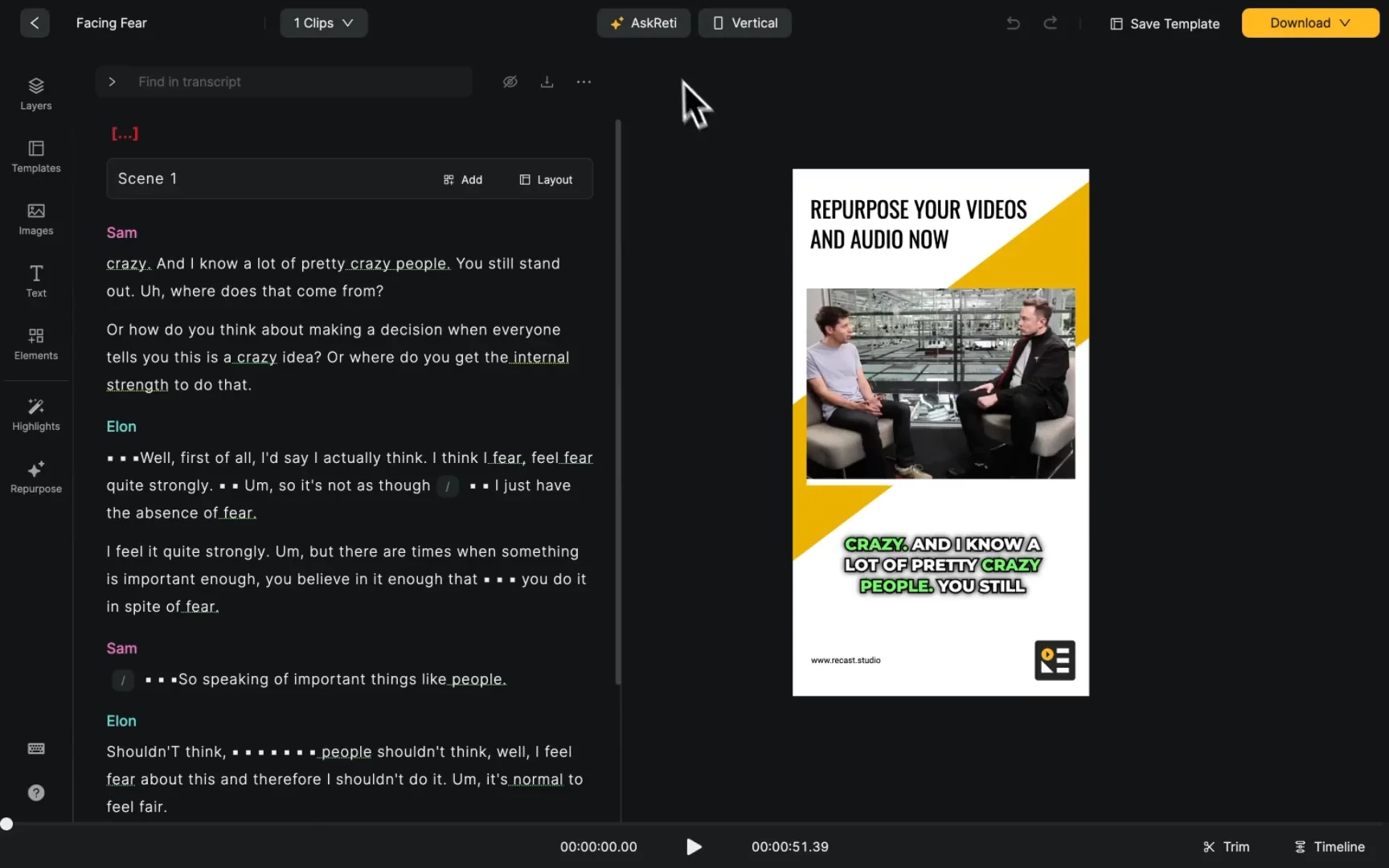
Recast Studio turns podcasts and other long-form multimedia content, like webinars and call recordings, into short-form videos, audiograms, show notes, blogs and social posts. The tool also allows users to directly schedule the repurposed content across social media.
Recast Studio is best for: Podcasters who need a multimedia-focused distribution tool.
Recast Studio’s key features:
- Multimedia repurposing: Turns existing video and audio files into atomic assets with AI.
- Text-based repurposing: Produces show notes, articles, summaries and social media captions.
- Content editing: Users can make quick tweaks to clips and captions before publishing.
- Content localization: Can transcribe a podcast episode into 20+ languages, enabling you to reach a global audience.
Recast Studio’s pros:
- Easy-to-use interface that reduces podcast admin and promotional overhead significantly.
- High-quality podcast transcription that requires minimal edits.
Recast Studio’s cons:
- Users have reported that they have been charged money but were unable to use the tool.
- Some users have pointed out issues with multimedia uploading and downloading.
Recast Studio’s pricing:
Recast Studio offers a free forever plan with 60 credits that allows you to export a 5-minute video. Solo podcasters can go for the Starter tier, which is priced at $17/month, billed monthly, providing users with 150 credits/month.
For larger teams, Recast Studio’s Professional plan, which is priced at $37/month, billed monthly, can be ideal. It gives 360 credits per month.
3. Descript
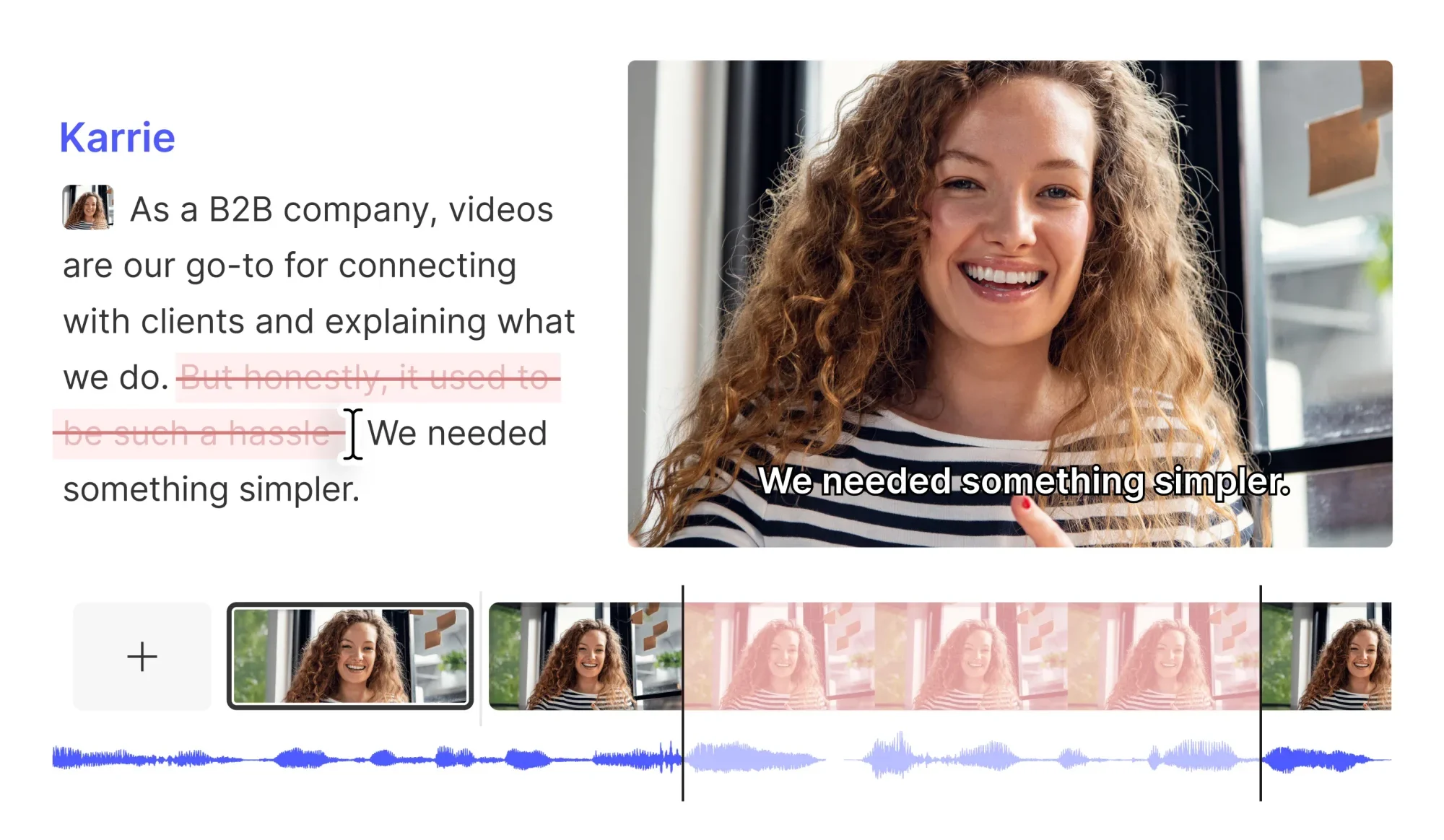
Descript allows you to edit your podcasts like you edit Word documents. You can edit the podcast episode in the transcript rather than the playback timeline, and use its tools to create clips and text-based content for distribution.
Descript is best for: Podcasters and marketers who want an easy-to-use tool to repurpose their episodes.
Descript’s key features:
- Video editing capabilities: Allows you to add transitions, visuals and so on to your podcast episodes, which is useful for video podcasts and YouTube podcasts.
- Direct export: Upload your episode or snippets directly to podcast hosting providers like YouTube, Blubrry, Buzzsprout, Podbean and other networks.
- Transcript-based editing: Makes it effective for beginners who have little experience with editing tools.
- AI-powered editing: The tool can automatically spot and remove filler words and reduce background noise to polish your podcast episodes.
Descript’s pros:
- AI and transcription-based editing speed up the post-production workflow for B2B marketers and podcasters.
- Users have praised Descript for its intuitive interface and AI voice cloning feature.
Descript’s cons:
- Users complain about poor customer support and confusing pricing tiers.
- Some reviewers have mentioned that the new interface is more confusing and that frequent product upgrades can be disruptive.
Descript’s pricing:
It offers a free trial where you can edit 1 hour’s worth of content and export it in 720p with Descript’s watermark. Beginners can go with the Hobbyist plan, which charges $24/user/month (billed monthly) for 10 media hours/month and allows 1080p exports without watermarks.
For professionals with extensive needs, the Creator plan can be better. It charges $35/user/month, billed monthly, for 30 media hours/month and 4k exports.
4. Podpage
Podpage helps you distribute your podcast by converting your RSS feed into an SEO-friendly free podcast website. It creates episode pages with an embeddable podcast player to improve your multimedia content’s discoverability in organic search.
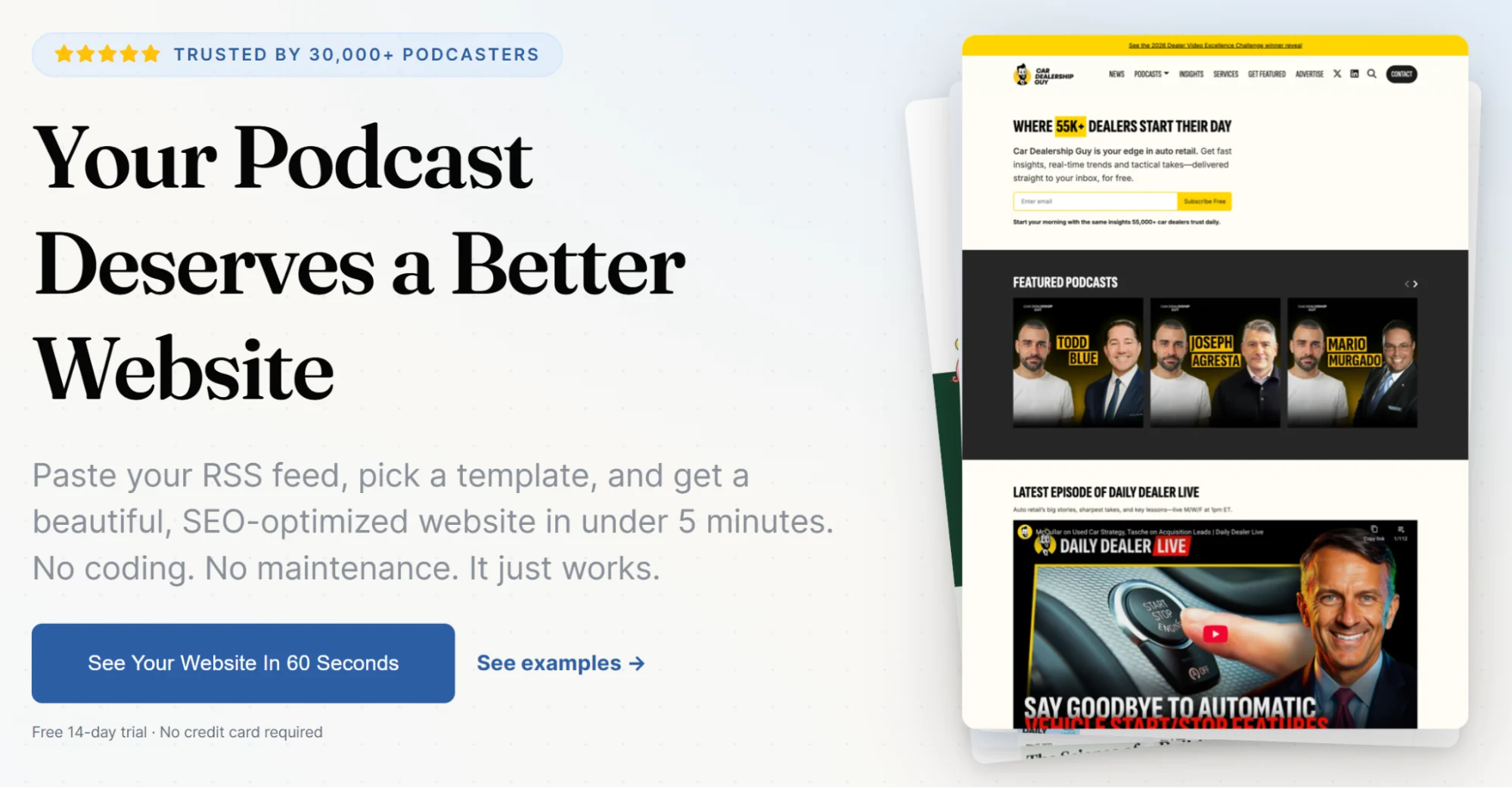
Podpage is best for: Marketers who need a dedicated page for their podcast content.
Podpage’s key features:
- Reduces admin effort: Automatically creates and updates your podcast page without you having to build it manually, which is helpful for those without a WordPress site.
- Enriches episode content for SEO: Supports adding transcripts, follow pages, app links and show notes on the podcast hosting site to increase your visibility in organic search across major listening apps.
- Supports multi-show producers: Publish episodes to multiple network sites and create custom domains, making it easier to host multiple podcasts.
Podpage’s pros:
- Many users have complimented how quickly and easily Podpage helps them make polished webpages without coding.
- Long-time users have praised customer support.
Podpage’s cons:
- You still have to manually add and optimize content for each episode page, including transcription and show notes.
Podpage’s pricing:
The podcast distribution tool offers a 14-day free trial. The Basic plan is priced at $19/month, billed monthly, which may be enough for most B2B brands starting out.
Established businesses may opt for the Pro plan, priced at $29/month, billed monthly, which offers lead generation capabilities like building email lists and integrations with existing tools like CRMs. This tier also enables users to host unlimited podcasts.
5. Beehiiv
Beehiiv is a newsletter and creator distribution solution that can help you grow and monetize your podcast audience. The solution offers capabilities like email newsletters, referrals, paid subscriptions and a native ad network to promote your podcast episodes beyond social media.
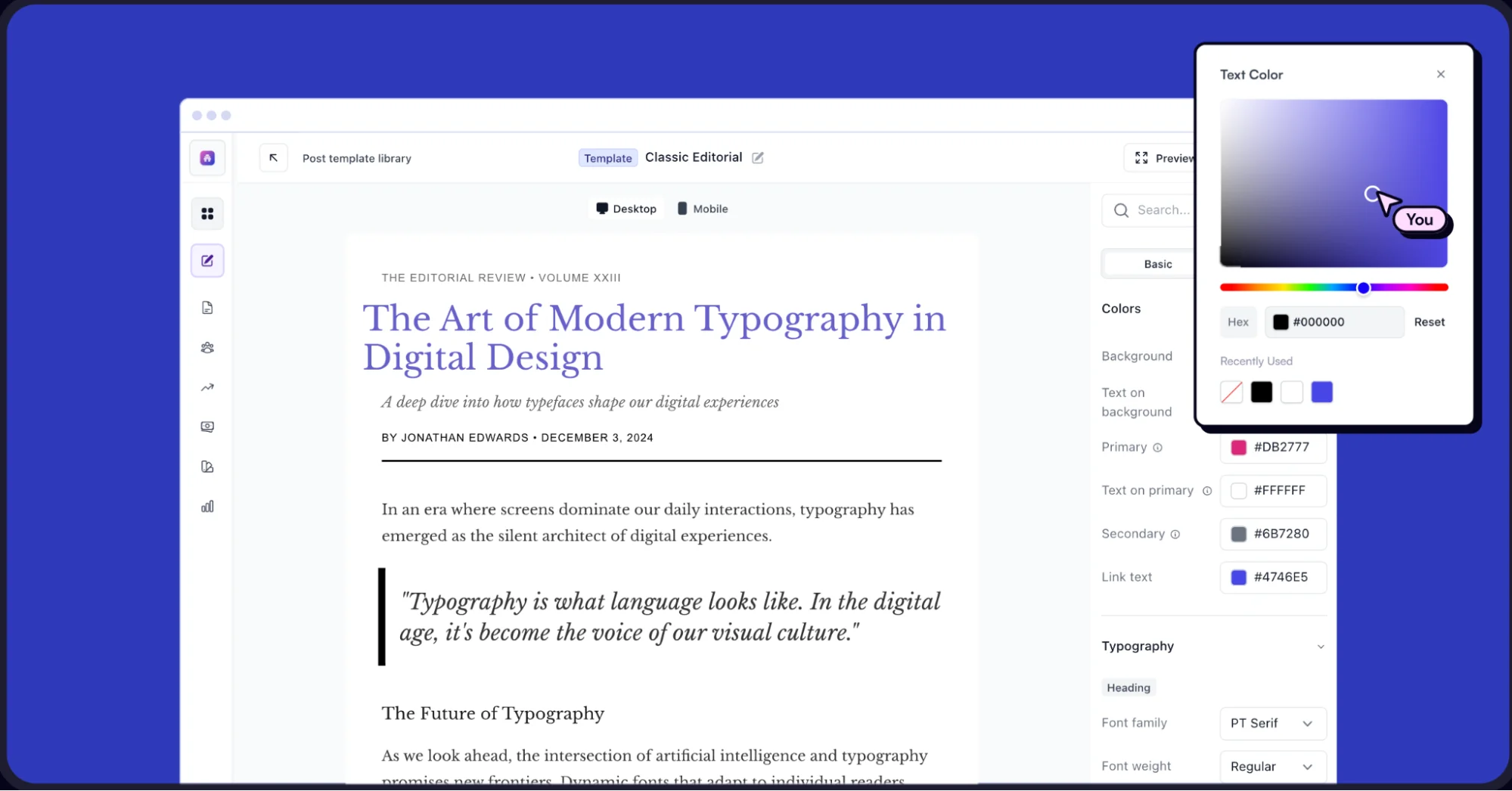
beehiiv is best for: B2B brands looking to monetize their podcast audience through creator subscriptions.
beehiiv’s key features:
- Multi-channel publishing: Upload episodes on Spotify, Apple Podcasts and other listening apps.
- Native hosting and monetization: Allows your audience to listen to your content and converts them through paid newsletters and memberships, similar to Apple Podcasts subscriptions.
- beehiiv promotion: Extend your podcast’s visibility further through referral programs and beehiiv’s recommendation engine and ad network.
beehiiv’s pros:
- The tool is quite intuitive. One of the reviewers, who is 77 years old, got started easily.
- Other users have complimented their highly responsive customer support.
beehiiv’s cons:
- Despite the product’s powerful features, many users feel that the pricing is too expensive.
- Some users have also reported the product to be glitchy, which adds unwanted mailers.
beehiiv’s pricing:
beehiiv offers a free plan, which can be good enough for beginners, with capabilities like unlimited email sends for newsletters, websites and podcasts.
Brands looking to grow their public and private podcasts’ reach and visibility can go with the Scale plan, which starts at $43/month, billed monthly, and allows up to 1,000 subscribers.
6. Podkite
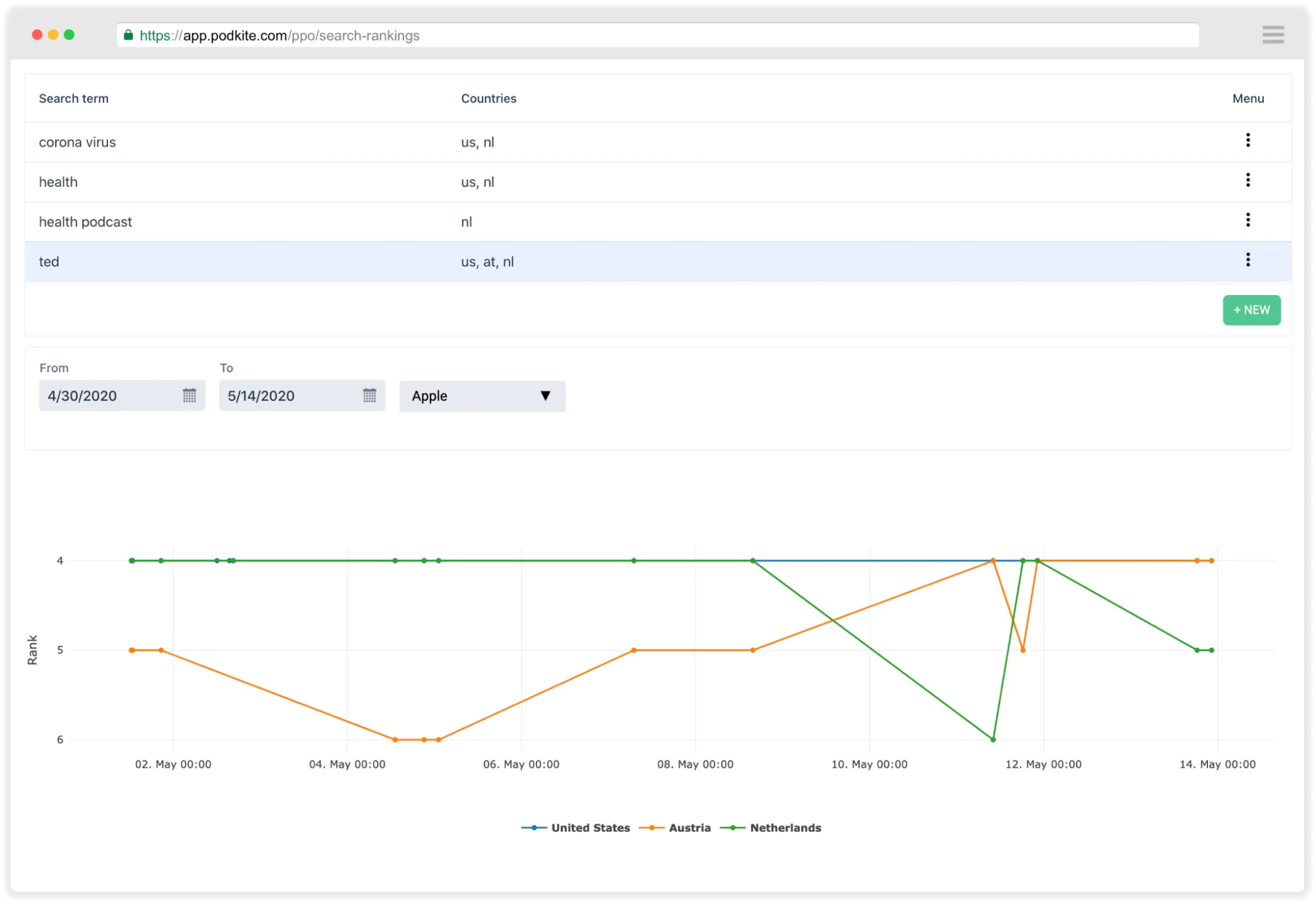
Podkite supports podcast discovery with smart podcast links, review embeds, QR codes, competitor tracking and weekly reports.
Podkite helps marketers and creators track chart rankings, reviews, download advanced analytics and attribution from one dashboard, making it useful for those who manage multiple shows across podcast networks.
The supported networks include Apple Podcasts, Spotify for Creators, Stitcher and Podcast RSS feed.
Podkite is best for: Marketers who need centralized analytics to measure the growth of their shows.
Podkite’s key features:
- Tracks keyword rankings: You can see the ranking for particular episodes inside major podcast apps and across countries.
- Personalizes the listening experience: Creates short links for your audience that route them to their preferred podcast app.
- Simplifies attribution: It correlates episode downloads with website activity and uses its source API to determine if listeners visit your website.
Podkite’s pros:
- There aren’t many publicly available reviews, but one on Trustpilot talks about how good its free plan was. However, Podkite currently doesn’t offer a free tier anymore.
- Positive feedback in German praises how feature-rich Podite has become over time, along with Podkite’s customer support, improving podcast management.
Podkite’s cons:
- Trustpilot features only one negative review, where a user points out that Google and Spotify don’t share any podcast ranking data and Apple Podcasts does it for free, suggesting that its purported advantages might be overhyped.
Podkite’s pricing:
Currently, the it only offers a 7-day free trial. The paid plans start from $19/month, billed monthly, which is recommended for indie podcasters by the brand. B2B brands and professional producers might find the Pro plan more suitable, which is priced at $99/month, billed monthly.
7. CapCut
CapCut is a video and audio editing software that can help podcast creators record, edit, caption, enhance and publish clips for podcast hosting solutions like YouTube, TikTok, Instagram and other social channels.

CapCut is best for: Video podcasters who want to get more mileage out of every episode by publishing to their YouTube channel and other media.
CapCut’s key features:
- Streamlines video distribution: Makes it easy to cut out viral-worthy moments from your episodes and enhance them with captions and special effects, supporting audio-to-video conversion for podcast clips.
- Supports localization: You can add multilingual captions to your podcast clips for a global audience.
- Includes templates: CapCut comes with social media templates you can pick up to instantly repurpose your content.
CapCut’s pros:
- Many reviewers praised its automated editing capabilities, which remove background noise and enhance the voice.
- Users like the intuitive workflows of the tool, which has baked-in social media export options.
CapCut’s cons:
- Users have mentioned that the editing features of CapCut Commerce Pro feel limited compared to its desktop counterpart.
- There are a plethora of 1-star reviews on Trustpilot where reviewers have raised serious concerns around unethical billing and poor customer support.
CapCut’s pricing:
CapCut offers a free plan. The pricing depends on various aspects like the plan (Standard or Pro), platform (Desktop, Mac or mobile), region, promotions and subscription route.
8. Later
Later is a social management tool that can be used by podcasters to schedule and publish promotional content for their episodes. It also offers robust analytics features to track the performance of repurposed content across social channels.

Later is best for: Podcasters looking to manage multimedia social media posting more effectively.
Later’s key features:
- Supports social scheduling and publishing: You can publish content across social media like Instagram, Facebook, TikTok, Threads, YouTube Shorts, Pinterest, LinkedIn and Snapchat.
- Smart scheduling: Recommends the best time to post your episode’s snippets for maximum reach, which is helpful for episode scheduling across channels.
- Team collaboration: Share posts with your team members to get them approved without leaving the interface.
- Social inbox: Manage comments and DMs to interact with your listeners across social media channels from one place.
Later’s pros:
- Users like the visual calendar and the drag-and-drop interface.
- Reviewers have praised the team collaboration features, especially when managing large campaigns.
Later’s cons:
- Users have complained about account-linking issues that sometimes cause them to auto-disconnect from social media.
- Trustpilot reviews suggest that the tool has outdated features and point out that the company unethically charges them.
Later’s pricing:
Later offers a 14-day free trial. Its pricing plans are based on social sets that allow one account per channel. The Starter tier allows one social set and costs $25/month, billed monthly, where you can schedule 30 posts/profile/month.
Professional podcasters who release multiple episodes in a week can go with the Growth plan, priced at $50/month, billed monthly, which offers two social sets and allows you to post 180 posts per profile per month.
Boost Your Podcast’s Visibility with Distribution.ai
Distribution.ai converts one podcast episode into multiple text-based content pieces, such as:
- Website articles
- X threads
- LinkedIn carousel content
- Instagram captions
- Facebook posts
- Newsletter content
You simply need to paste the link of your uploaded podcast episode and the tool will do the rest.
Additionally, you can customize the tone and voice, schedule the posts to get published at optimal times and track how they perform to make your podcast distribution efforts more effective.
Ready to attract more listeners to your podcasts?
Frequently Asked Questions
1. What Is the Best Podcast Distribution Platform for B2B Brands?
The best podcast distribution platform for B2B brands depends on the primary use case. Distribution.ai is best for text-based repurposing and automated distribution, while Recast Studio, Descript and CapCut are better for video clips, audiograms and multimedia promotion across major podcast directories.
2. How Do Podcast Distribution Platforms Help B2B Brands Grow Their Podcasts?
These software help B2B brands grow by repurposing episodes into social posts, newsletters, blog content, clips, transcripts and promotional assets. They increase visibility beyond podcast apps and help teams reach buyers across LinkedIn, websites, email and social channels.
3. What Should B2B Brands Look For in a Podcast Distribution Platform?
B2B brands should look for audience reach, repurposing capabilities, analytics, attribution and workflow support. The right solution should distribute episodes across multiple channels, create reusable content assets, measure engagement and fit smoothly into the team’s existing marketing process.
4. Are Podcast Distribution Platforms Different from Podcast Hosting Platforms?
Yes. The best podcast hosting platforms store and publish episodes through RSS feeds and listening apps. Podcast distribution platforms help promote episodes after publishing by creating clips, transcripts, social posts, newsletters, smart links, SEO pages and analytics reports for broader reach. Many teams use a podcast hosting solution alongside a distribution tool to cover both ends of the workflow.
5. Which Podcast Distribution Platform Is Best for Repurposing Episodes?
Distribution.ai is best for turning podcast episodes into text-based content like blog posts, LinkedIn posts, X threads, captions, Facebook posts and newsletters. Recast Studio and CapCut are better options for brands that need video clips, audiograms and multimedia assets.
6. How Much Do Podcast Distribution Platforms Cost?
They vary widely in cost. Some tools offer a free plan or trials (and a few in adjacent categories offer free podcast distribution as a starter tier), while paid plans in the article start around $17 to $29 per month. Advanced plans for teams or higher publishing volume can cost $50 to $99 per month or more.

Promote, repurpose & distribute your content with AI
Write 10x faster, engage your audience, & never struggle with the blank page again.
Start 15-Day Free Trial
Frequently Asked Questions
Author

Promote, repurpose & distribute your content with AI
Start 15-Day Free Trial