Pinterest SEO: Get Cited in AI Search and Shopping Results in 2026
Learn how Pinterest SEO works today to rank inside Pinterest, get cited by ChatGPT, Perplexity & Google AI Overviews and drive high-intent traffic.
Your Pinterest content can rank on Google, show up in AI search results (AIO, ChatGPT, Perplexity, etc.) and be the first result within the platform for relevant queries.
The improved visibility will attract high-intent traffic to your website or e-commerce store that will engage with your brand and bring you business.
This article contains those exact Pinterest Search Engine Optimization (SEO) strategies that will help you bring your Pins to the first page of search results within Pinterest and in AI chatbots.
Key Takeaways
- The Pinterest SEO strategy requires its own keyword research because the search phrases for this platform are aspirational and mood-driven, compared to solution-oriented in traditional search.
- To maximize in-platform and AI visibility, optimize your content for multimodal search by using relevant keywords in descriptive copy and high-quality media in the correct aspect ratio and pixel dimensions.
- Use the Pinterest search bar to find relevant Pinterest keywords and create content that matches search intent. Try to avoid AI-generated images and videos.
- Implement Rich Pins and the Pinterest Tag & API. This will automatically update your Pins in real time and attribute user activities like making a purchase.
- Core Pinterest SEO tips like building a strong Business Account, ensuring your website is AI-citable, writing Board titles and descriptions around graphed keywords and maintaining a consistent posting schedule are essential for long-term success.
Why Pinterest SEO is Different Than Traditional SEO
Pinterest SEO is much more than “a bunch of keywords” in your niche. The visual platform understands and groups keywords in a slightly different way than traditional search engines like Google.
1. Pinterest Runs on the Taste Graph
The Pinterest Taste Graph is a semantic model of what people care about (or are interested in) and how they are related to one another. It analyzes how Pinterest users save, search and organize Pins to create an evolving web of context that connects what users like with why.
As a result, the search behavior changes. On Pinterest, the search behavior operates through demand clusters, which are groupings of subjective visual and lifestyle phrases that map to aesthetic intent rather than immediate functional needs (as happens in traditional SEO).
Here are a few examples of traditional SEO terms and potential Pinterest demand cluster phrasings to help you understand how it works:
| Leather jacket |
|
| Wedding decorations |
|
| Buy kitchen backsplash title |
|
Table contrasting how traditional SEO keywords and terms translate into Pinterest’s demand cluster phrasings
Usually, traditional SEO keywords are solution-oriented and Pinterest’s phrasings are aspirational and hence contain mood, style and context rather than just the product.
2. Pinterest Assistant Turns Pins into AI-Recommended Products
The Pinterest Assistant is a visual-first AI shopping and discovery tool that works as a personal stylist. It delivers tailored recommendations by finding Pins from the platform’s catalog using Visual Language Models (VLMs).
The model is specifically trained for Pinterest, and it outperforms off-the-shelf models by over 30%.
In practice, it means that using the right keywords in your Pin’s title and description isn’t enough because you need to earn the AI’s recommendation. Consequently, the title and description (for Pins and boards) in your brand’s Pinterest account must convey the mood and style of the creative.
3. AI-Labeled Content and User Filtering
You can upload AI-generated images and videos onto the platform; however, they will be attributed as such on Pinterest. Additionally, users can filter out AI-generated content entirely from their account settings:
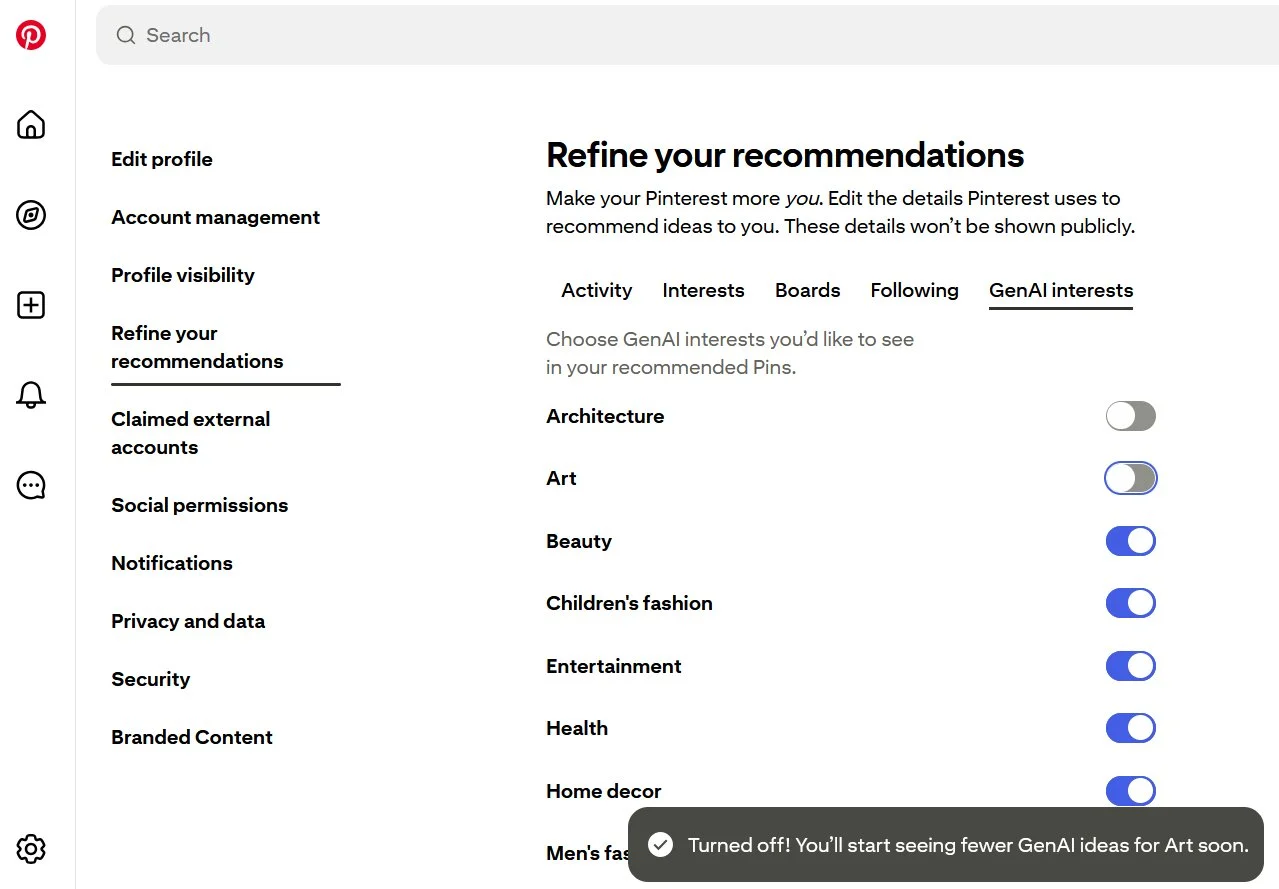
This is yet another way how Pinterest SEO differs because traditional search engines don’t allow you to do it.
A good rule of thumb is to avoid uploading AI-generated multimedia to Pinterest directly, especially for architecture, home decor, fashion and beauty.
4. Discovery is More Important Than Follower Count
Content discovery signals, such as relevance to search queries, quality of the Pin and engagement, matter more for visibility and ranking than follower count.
As a result, Pinterest is more winnable for smaller brands compared to search engines like Google, where you need to have a higher domain authority.
SEO Strategies to Win Inside Pinterest
The strategies below will help you improve your visibility in Pinterest search results, which is also fundamental for showing up on traditional and AI search results.
1. Optimize for Multimodal Retrieval
Your Pinterest content should be optimized for text-based and multimedia retrieval through the platform’s VLM. Follow these best practices to do it:
- Write descriptive, keyword-rich titles and descriptions for Pins and boards that align with the visuals
- Use high-contrast text overlays but avoid too much text, as it affects image recognition
- Always upload high-quality images and videos with one clear subject in each to enable object-detection algorithms to extract key entities
- Incorporate natural alt text with specific visual details like scene layout and colors rather than keywords
2. Fill Out Every Product Attribute
Pinterest product attributes are structured metadata fields, such as title, description, price and availability, included in a store’s catalog. These attributes help describe items in your shopping Pins, increasing their visibility.
The essential product attributes you should focus on are: title, description, image link, product type, google product category, price and availability.
The Pinterest Assistant analyzes these attributes to decide whether to serve a Pin to a user for a particular query. Adding them thoughtfully gives you a definite advantage, especially if you have an e-commerce store.
3. Match the Search Intent for Each Page
The search intent of a Pinterest user determines what kind of pages they expect to see. When you match the intent, be it informational or commercial, it generates a positive engagement signal.
For example, if a user is looking for inspirational designs with “retro gallery walls,” your Pin should send them to an educational blog post.
Similarly, if the search query is “minimalist oak dining table,” your Pin should send them to an e-commerce product page with relevant details they need to complete the purchase.
You can identify the search intent for each query through Pinterest’s live search feed and by analyzing the results. Furthermore, you can use Pinterest Trends to macro, platform-wide search behavior to spot broader, unbranded intent patterns.
4. Update Your Product Feed and Catalog
An updated product feed and catalog share real-time, accurate pricing and availability data with the Pinterest Assistant, allowing the VLM to recommend relevant, in-stock items from your store.
If you keep your e-commerce product pages updated, you can automate it through Rich Pins and Pinterest Tag & API.
Rich Pins fetch structured metadata directly from your online store and show it to your target audience. Pinterest Tag & API track real-time inventory interactions (like purchases) to dynamically update availability.
Pinterest SEO Practices for AI Search Tools
AI search engines like Perplexity, ChatGPT, Lens and Google AI Overviews pull titles, descriptions and structured metadata from public Pins and boards.
The tips below will help you optimize your Pinterest content in that regard for AI SEO.
1. Use Rich Pins
Rich Pins automatically pull information from your website in real time. This helps you keep different kinds of Pinterest content, such as recipe Pins and product Pins, updated in real-time.
Moreover, Rich Pins read schema.org/Open Graph markup from your website (same as AI bots) to read and summarize your content.
2. Write Quotable Titles and Descriptions
AI search tools look for context and meaning, so fully-formed sentences in your titles and descriptions that describe the Pin will perform better than keyword strings and hashtags.
For titles, combine subject and key context to declare what the Pin shows. For example, choose “mid-century modern living room layout for small space” over “cozy living room ideas.”
For descriptions, mention the key characteristics explicitly rather than using subjective adjectives. When describing a rug, for instance, use “hand-knotted 8×10 wool area rug featuring a cream geometric pattern for low-light hardwood floors” over “woolen rug with a beautiful cream pattern.”
To maximize visibility, include the primary keyword as early as possible while keeping it organic. The goal is to keep the title and description readable for humans.
3. Create a Strong Pinterest Profile
A strong Pinterest profile signals authority to AI search tools, increasing the chances of a citation. If your account features a clear brand name, niche-specific bio, claimed site, consistent bylines and description, AI tools can easily attribute the cited content to you.
This is key for brand recall because your brand’s name will be mentioned whenever your content is surfaced.
4. Make the Landing Page AI-Citable
The landing pages are where a Pinterest user lands after they click on an embedded URL in your Pin. If these landing pages are AI-citable, third-party AI engines can accurately extract and verify your content when generating a response.
Additionally, when Pinterest sends traffic to those structured, factual landing pages, AI engines mark them as authoritative sources, which further enhances your brand’s search visibility.
Pinterest SEO Best Practices for Traditional Search
Traditional SEO best practices for Pinterest serve as the foundational layer that supports in-platform and AI visibility.
1. Set Up a Business Account
A Pinterest Business Account unlocks analytics, Rich Pins and Ad Manager. You can either create a new business account or convert a personal account into a business account.
The next step is to name the account after your brand, explain what you do in the bio and the “About” section (500 characters). The information here should align with your website copy and contain branded keywords organically.
After that, claim your website through an HTML tag or DNS TXT record and install the Pinterest Tag & API for conversion tracking.
2. Find Relevant Pinterest Keywords
As Pinterest SEO is different from traditional SEO, it is important to conduct separate keyword research when planning your next campaign.
The most reliable sources are Pinterest search autocomplete and related terms that show up after you search for something on the platform. Group them in clusters and use them when creating content and writing captions.
Another source is Pinterest Trends, which is an analytics tool where you can search keywords, compare seasonal volume curves, filter demographics and discover top/growing topics.
You can also use static reports like Pinterest Predicts, released by Pinterest at the end of every year, that forecast emerging trends and themes for the upcoming year. According to Pinterest, this annual report has an 88% accuracy over the past six years.
3. Get the Pin Dimensions Right
The correct Pin dimensions increase the chances of the Pinterest algorithm favoring your content for a particular query. Here are the key dimensions you should get right:
| Standard Image Pins | 2:3 | 1000 × 1500 px |
| Standard Video Pins | 2:3 or 9:16 | 1000 × 1500 px or 1080 × 1920 px |
| Square Pins | 1:1 | 1000 × 1000 px |
| Idea/Carousel Pins | 9:16 (or 2:3) | 1080 × 1920 px (or 1000 × 1500 px) |
4. Build Boards Around Graphed Keywords
Graphed keywords are search terms from Pinterest’s Taste Graph, which maps semantic relationships between a user’s search intent and visual content.
Naming your Pinterest boards based on these keywords will align your business account with the platform’s algorithmic structure. When the search query directly or closely matches your board’s name, the chances of your Pins shooting to the top of the results increase.
You should also write keyword-rich board descriptions that explain the Pins’ context to the visual search engine. Note that a mismatch here can have the opposite effect.
Moreover, they also help with content discovery, driving consistent organic traffic to your website.
When creating and managing Pinterest boards, ensure that their visibility is set to public, and that the description supports the title in a contextual manner. As usual, try to incorporate the primary keyword early.
5. Maintain a Regular Posting Cadence
Try to publish 1–5 Pins per day rather than dumping 50 at once. It will allow you to verify the information or claims on each of them and give you enough time to monitor their performance, allowing you to tweak your strategy in the middle of a campaign.
Pinterest’s developer terms of use explicitly prohibit you from building automations that take actions on your behalf, including posting content. The objective is to ensure that each user action on the platform is authentic and human-driven.
You can still schedule posts by individually approving Pins.
6. Measure the Key Performance Indicators (KPIs)
You can use Pinterest Analytics to track the following metrics:
- Outbound clicks: Website traffic from Pins’ embedded links.
- Outbound CTR: Percentage of impressions that led to site visits.
- Impressions: How many users viewed your Pin in feeds and search results.
- Saves (Repins): Measures long-tail value and sends a relevance signal.
- Pin clicks (Closeups): How many users clicked to expand your Pin.
- Top Pins by search/keywords: Reveals topics and phrases that generate the highest proportions of impressions and traffic.
Finally, with Google Analytics, you can attribute conversions (signups, sales, etc.), provided you’ve set up the Pinterest Tag.
Biggest Challenge When Growing on Pinterest: Creating Fresh Content
Pinterest’s algorithm rewards new creatives, even if the URL remains the same. And creating unique, Fresh Pins can be taxing.
A typical process starts with creating a design brief, followed by producing the image or video, reviewing it to make further edits and publishing it on Pinterest. Running this cycle several times every day or week can slow down the rest of your marketing processes.
On top of that, you need to come up with a variety of designs and copy (titles and descriptions) that are topical and on-brand.
Create Engaging Pinterest Content with Distribution.ai
Distribution.ai helps marketers and creators produce fresh content pieces for Pinterest by repurposing their existing long-form assets or generating new posts from ideas or talking points.
If you already have a library of well-researched videos and articles, just paste the published link or upload the file to Distribution.ai, select Pinterest from the dropdown and click “Generate.”
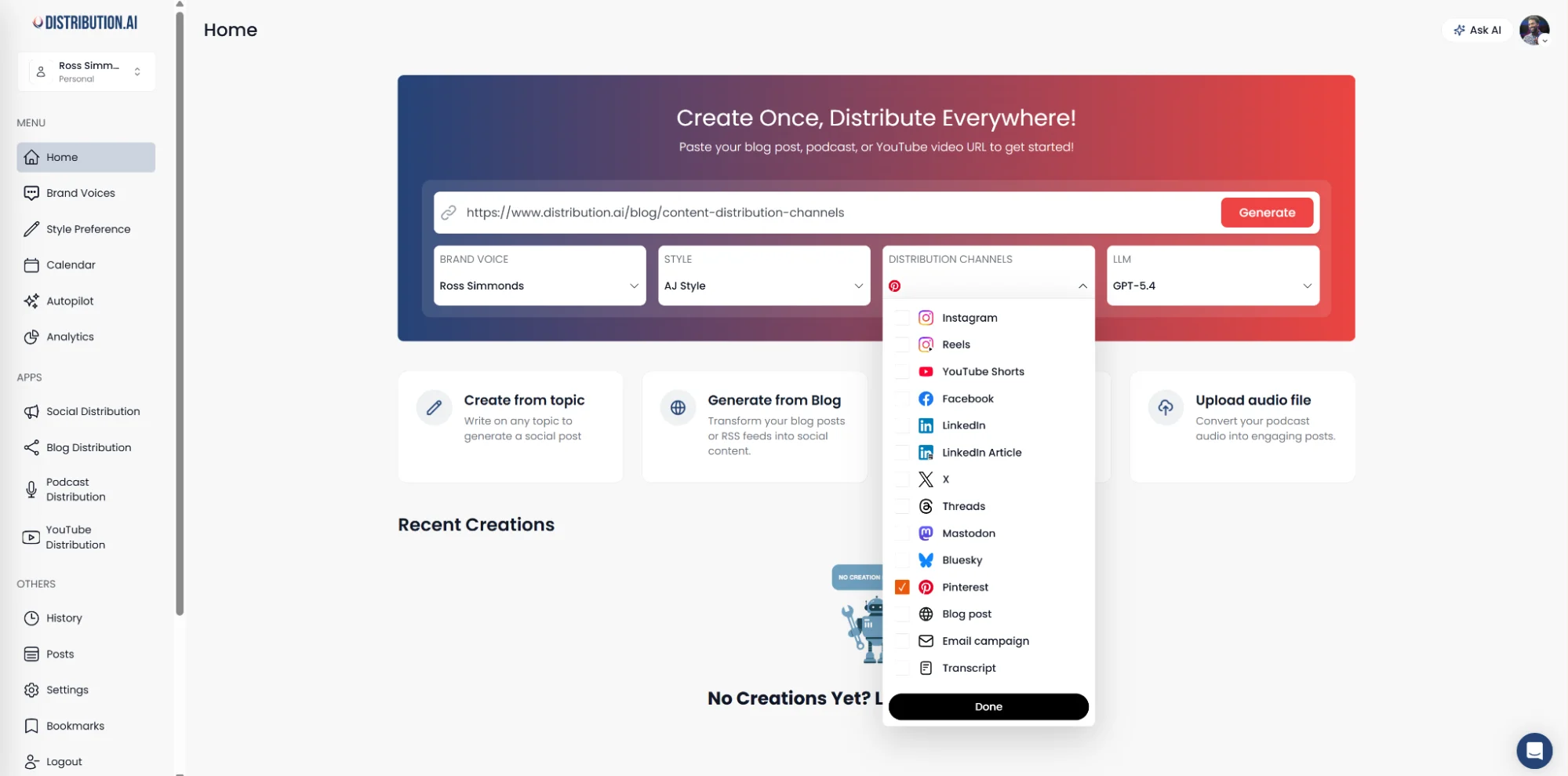
Alternatively, you can share key insights around your Pinterest content in the Social Distribution app to produce engaging copy:
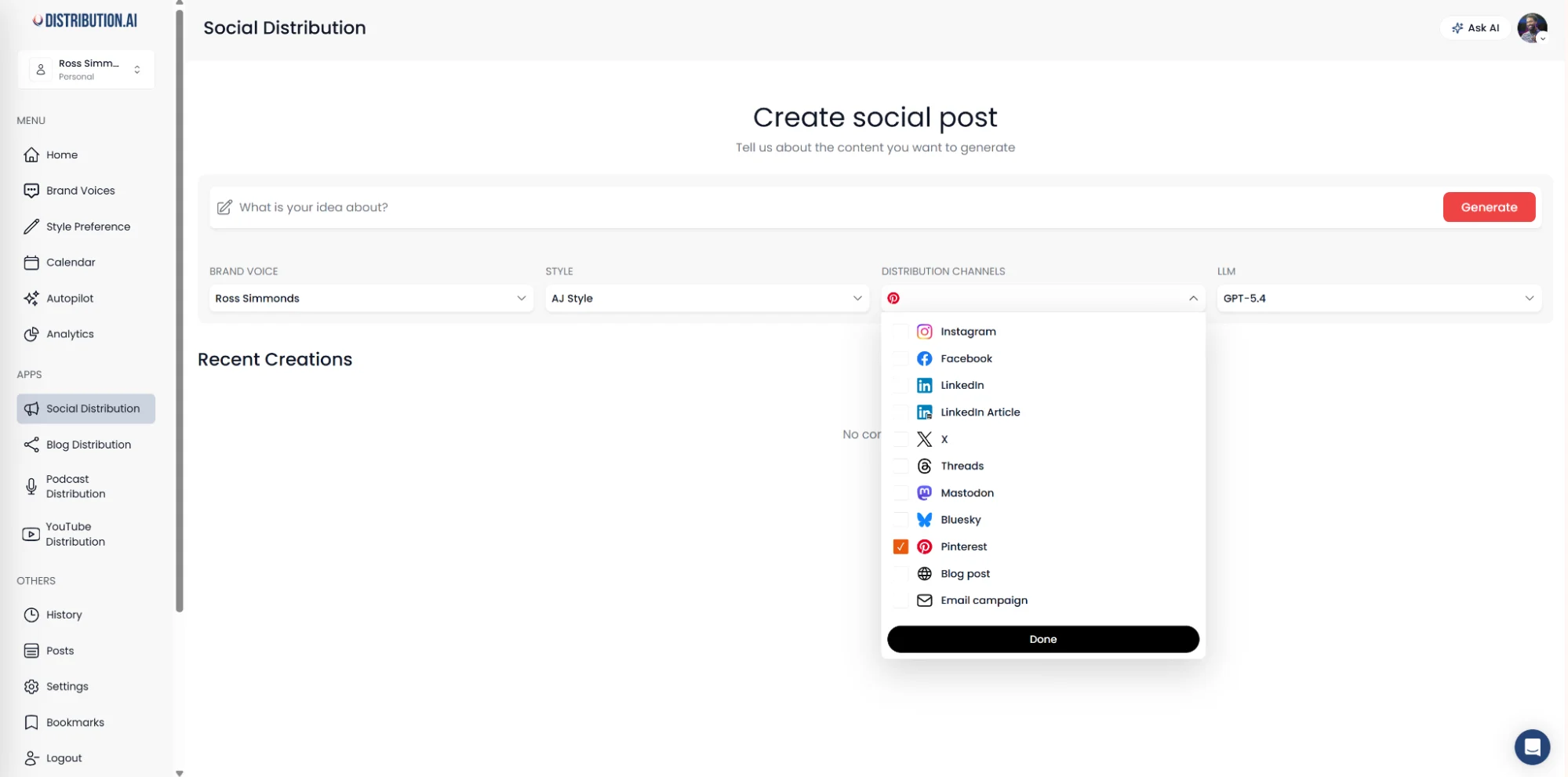
In under a minute, you will see multiple Pin variations that you can polish and schedule for publication without leaving the platform.
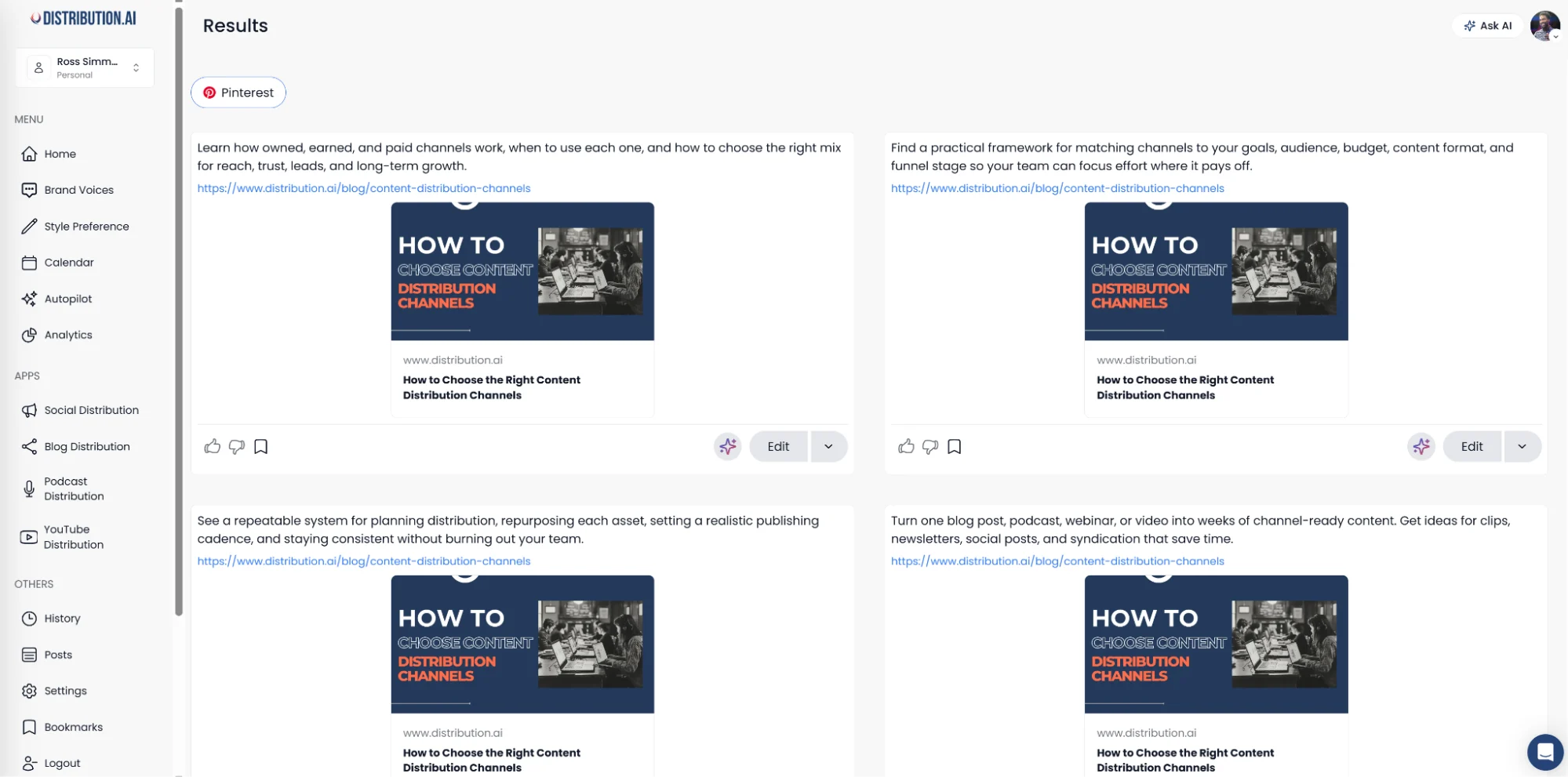
This updated workflow allows you to produce a week’s worth of Pinterest content in hours.
*No credit card required. Cancel anytime.
Frequently Asked Questions About Pinterest SEO
1. How Does Distribution.ai Help with Pinterest SEO?
Distribution.ai helps with Pinterest SEO by repurposing your existing long-form assets (articles, videos, etc.) into on-brand Pins in minutes. It also allows marketers to produce brand new content for the social media platform from ideas and insights. This solves the biggest challenge in Pinterest marketing: producing fresh content every week.
2. How Long Does It Take for Pinterest SEO Efforts to Show Up in Search Results and AI Citations?
The timeline depends on how frequently you post content and how accurately you’ve set up your business account. Your content’s visibility depends more on how well it is received and how relevant it is rather than the number of followers of your Pinterest account.
3. Do I Need a Pinterest Business Account, or is a Personal Account Enough?
A Pinterest Business Account is a better choice. With it, you will get access to Pinterest Analytics, Rich Pins and a few other features that will help you create content and attract customers.
4. What Are the Top 3 Pinterest SEO Best Practices That Have the Highest Impact?
The top 3 SEO best practices for Pinterest depend on where you are. For most brands, enhancing your profile by writing a bio and description that fit your brand, publishing Pins with descriptive and quotable titles and descriptions and organizing your content in boards that are named around graphed keywords will get the best results.
Promote, repurpose & distribute your content with AI
Write 10x faster, engage your audience, & never struggle with the blank page again.
Start 15-Day Free Trial
Frequently Asked Questions
Author

Promote, repurpose & distribute your content with AI
Start 15-Day Free Trial