


LinkedIn Profile Picture: How to Stand Out (+Best Practices)
Learn why your LinkedIn profile picture matters and how to choose a clear, current, professional photo that builds trust and supports career growth.
LinkedIn is a professional networking platform that builds careers and connects like-minded people within and across industries and regions.
Whether you’re actively job hunting or growing your personal brand, there’s one small detail that carries a surprising amount of weight: your LinkedIn profile picture.
Interestingly, most people either overthink it or don’t think much about it at all.
By overthinking, we mean spending excessive time chasing perfection, which involves over-editing images or using overly staged or unnatural poses.
On the other hand, not thinking about it looks like uploading a quick selfie or a cropped group photo.
You can easily find folks on the platform whose profile pictures were taken by professional photographers and also folks who simply upload a selfie they took on their way to work.
In this article, let’s look at why your LinkedIn profile picture is essential and what you can do to make a great first impression in your professional space.
Why Your LinkedIn Profile Photo Matters
Your LinkedIn profile picture is usually the very first thing someone notices when they come across your profile. Before they read your headline, scan your experience or view your alma mater, they see your face.
A professional profile picture signals trust and approachability. It tells recruiters, clients, colleagues and partners that you take your career and work seriously. On the other hand, a missing photo or a blurry, outdated image can create a poor impression.
And the numbers prove it.
A 2025 survey reveals that 71% of recruiters admitted to rejecting a candidate because of a bad LinkedIn profile picture, even when they had the required qualifications.
Simply put, your profile photo supports everything else on your profile.
For example, when a recruiter is scanning dozens of candidates, they’re far more likely to click on a profile with a clear, professional headshot than one with a blurry selfie or no photo at all. It reinforces your personal brand, boosts your credibility, and can directly impact your career opportunities.
LinkedIn Photo Rules
Before you upload anything, it helps to know what LinkedIn actually allows and what might get your photo removed.
LinkedIn requires that your profile picture be a real photo of yourself. That means no logos, cartoons, AI-generated characters or group photos where it’s unclear who you are.
The platform may remove images that violate its professional community guidelines, including anything inappropriate or misleading.
What Makes a Good LinkedIn Profile Picture
A great LinkedIn profile picture needs a few key elements that help you come across as a credible and approachable professional.
1. Clear, Current Photo That Reflects How You Actually Look
Your LinkedIn photo should look like you, right now. Not the version of you from five years ago, when you were in college or at a destination wedding with a completely different hairstyle.
If someone were to meet you in person after seeing your profile, they should recognize you immediately.

Use a recent, high-quality image that captures your current professional style. This builds trust and avoids any awkward moments when you show up to a meeting or an interview looking nothing like your photo.
2. Easy to Recognize with a Head-and-Shoulders Crop
LinkedIn profile pictures display as small circles, so you want your face to be the clear focal point. A head-and-shoulders crop works best because it’s close enough that people can see your expression and recognize you.
Avoid full-body shots or anything where your face is too small in the frame. Remember, your photo shows up as a tiny thumbnail in search results, messages and comments. If people can’t make out your face at that size, the image isn’t doing its job.
3. Simple Background That Does Not Distract from Your Face
Your background should support your photo by drawing attention to it. A professional headshot often features a clean background, such as a plain wall or a minimalist office setting.
Busy backgrounds like crowded streets or overly colorful patterns pull the viewer’s eye away from your face. If your uploaded photo has a distracting background, you can use simple editing tools or even an AI photo generator to clean it up or swap it out for something more neutral.
You can also use AI to expand photos that are too zoomed-in or cropped.
4. Natural or Soft Lighting to Improve Clarity and Professionalism
Natural light is almost always your best bet, but choose the right natural light.
Outdoors, an overcast day works well because clouds diffuse the sunlight, creating soft, even lighting that avoids harsh shadows. In contrast, direct midday sun can be too harsh and unflattering.
If you’re indoors, stand facing a window with indirect light. This gives you a similar soft effect, as the light is filtered rather than hitting your face directly.
Avoid harsh overhead lighting (it creates unflattering shadows under your eyes and chin) and direct flash (it washes you out and looks amateurish).
5. Expression That Feels Warm and Credible
Your expression sets the tone for how people perceive you. A genuine, relaxed smile projects warmth and approachability.
Of course, you don’t need to flash a huge grin, but you also don’t want to look stiff or overly serious.
Also, think about the impression you want your expression to create. Are you in a client-facing role where friendliness matters? A warm smile works perfectly. Are you in a more formal industry like finance or law? A calm, composed expression with a slight smile can be effective.
The key is to look like someone people in your industry would want to work with.
How to Add or Change Your LinkedIn Profile Photo
Updating your LinkedIn profile picture is straightforward, whether you’re on your computer or your phone.
On Desktop
Go to your LinkedIn profile and click on your current profile picture (or the camera icon if you don’t have one yet).
Click “Add photo” or “Change photo,” then upload your image from your computer. You’ll have the option to crop and adjust the positioning before saving. Once you’re happy with it, hit “Apply” and your new photo is live.
On Mobile
Open the LinkedIn app and tap on your profile picture or the “Me” tab. Tap the camera icon on your photo, and you’ll be prompted to either take a new photo or choose one from your gallery. Crop and position the image as needed, then save. The update applies immediately across your profile.
How to Edit or Delete Your Photo
If you want to fine-tune how your original photo looks, you can access editing tools directly within LinkedIn. Click your profile picture, select “Edit photo,” and use the built-in options to crop, add filters or adjust brightness, contrast, saturation and vignette.
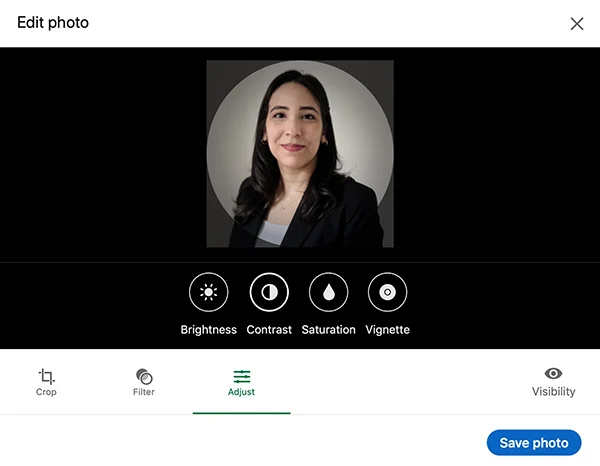
And if you’d prefer to remove it altogether, you can select “Delete photo.” However, in most cases, no photo is worse than a bad one. Profiles without a photo tend to get significantly fewer views and appear less credible at a glance.
Even a decent, imperfect photo is usually better than none, as it signals that your profile is active and trustworthy.
How to Improve Your Photo Before Uploading
Even a good photo can benefit from a little polish before you upload it. Here are a few quick adjustments that can make a noticeable difference in how professional your image looks.
- Crop the picture to focus on your face: Use LinkedIn’s editor or your phone’s built-in editor to trim out unnecessary space and center your face in the frame.
- Modify brightness and contrast: If your photo looks a bit dark or flat, bumping up the brightness and adding a touch of contrast can make it look sharper and more polished.
- Use filters sparingly: A subtle filter can enhance the overall tone of your photo and give it a more cohesive, professional feel. At the same time, heavy filters distort your appearance and make your image look inauthentic.
How to Adjust Profile Photo Visibility
LinkedIn gives you control over who can see your profile picture. This is useful if you want to balance being visible to the right people while maintaining privacy.
You can choose from several visibility settings: your connections only, your extended network (connections of connections), all LinkedIn members, or the public (including people who find your profile through a search engine).
To change this, go to your profile, click your photo, select “Visibility,” and pick the option that feels right for you.
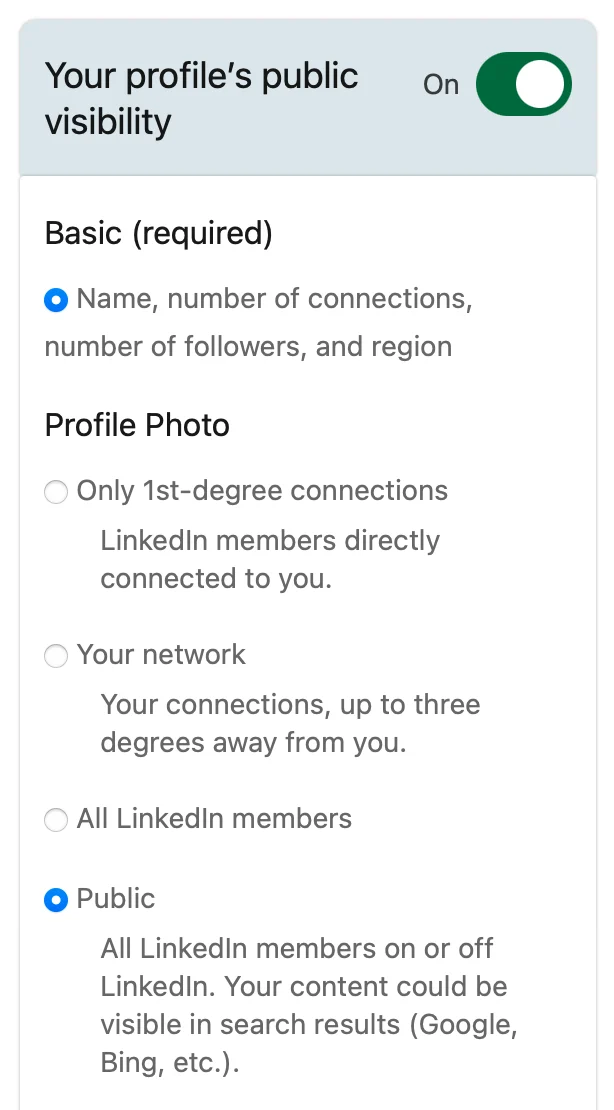
For most professionals, keeping your photo visible to all LinkedIn members is the way to go because it makes your profile more inviting and helps you build trust with people who haven’t connected with you yet.
Restricting it too much can actually work against you, especially if you’re hoping to expand your network or attract new opportunities.
Looking Forward: Increase Your Reach and Network with Content
A strong LinkedIn profile picture helps people trust your profile at first glance. It’s the foundation of a professional image that invites connection and curiosity.
But let’s be honest, you need more than a great photo to grow your professional network and attract new opportunities.
To really stand out on LinkedIn, you need to post and engage consistently. Sharing insights that demonstrate your expertise and commenting on industry trends keep you visible and top of mind.
However, it’s easier said than done for most busy professionals.
That’s where Distribution.ai comes in.
You can use the platform to repurpose your existing long-form content, such as blog posts, whitepapers, guides, podcasts and YouTube videos, into multiple, bite-sized LinkedIn posts.
This streamlines the entire process so you can stay active and build your professional brand without spending hours on content creation.
Ready to grow on LinkedIn with engaging content?
Frequently Asked Questions
1. What is the best LinkedIn profile picture for professionals?
The best LinkedIn profile picture is a clear, recent headshot with good lighting, a simple background, and a warm, genuine expression. Dress in a way that reflects your industry, whether that’s a suit or smart casual, and make sure your face is the focal point of the image.
2. Can I use a selfie as my LinkedIn profile photo?
You can, but it needs to look professional in a business setting. Avoid mirror selfies or anything with a cluttered background. Use your front-facing camera in natural light and hold the phone at eye level or slightly above. If it looks polished and clear, a selfie can absolutely work.
3. How do I make my LinkedIn photo look more professional?
Start with good lighting; natural light near a window is ideal. Crop the image to a head-and-shoulders frame and polish it by adding subtle filters. Wear professional attire and make sure your background is clean.
4. Who can see my LinkedIn profile picture?
You control this through your visibility settings. You can choose to make your profile picture visible to just your connections, your wider network, all LinkedIn members or the general public. For maximum reach and credibility, most users keep it visible to all LinkedIn members.

Promote, repurpose & distribute your content with AI
Write 10x faster, engage your audience, & never struggle with the blank page again.
Start 15-Day Free Trial
Frequently Asked Questions
Author

Promote, repurpose & distribute your content with AI
Start 15-Day Free Trial