


How to Use Instagram Stories to Grow Your Brand in 2026
Learn how to use Instagram Stories in 2026 with proven strategies for brands, creators, and marketers.

Instagram Stories launched back in 2016, and a full decade later, they’re still one of the most powerful tools in any marketer’s toolkit.
Over 500 million people watch Stories every single day, and interestingly, one-third of the most viewed stories come from businesses, which include Instagram Story ads.
Whether you run a software company, an online store, sell a course or you’re building your personal brand, IG Stories can help you connect with your audience in a way that feels more natural and direct than Instagram posts.
Today, brands are using Instagram Stories for nurturing their existing community. Viewers are more likely to even revisit a previous story because it is available for 24 hours, creating a sense of urgency.
Additionally, the Stories that perform well can be saved as Highlights, which keeps existing and newer audiences engaged consistently.
Now in 2026, if you want to use Instagram Stories effectively, you need three things:
- An understanding of Instagram’s latest features and how they affect your content
- Content for your specific audience that addresses their pain points and problems
- Make Stories part of your regular content creation routine
This guide breaks down how to get the above three ingredients to scale your Instagram Story marketing. Let’s dive in.
Instagram Stories in 2026: Key Trends and New Features
Instagram has rolled out several updates that change how you can use Stories in 2026. Here are the most important ones to know about.
Scheduled Stories
You can now schedule Stories ahead of time directly in the Instagram app.
Events like your product launch or campaign content and set them to go live automatically. This enables you to roll out every Story when your audiences are most likely to view and engage with them.
Reshareable Stories
Instagram is testing a feature that lets people reshare your Stories with your permission. It’s basically a repost feature for an Instagram Story, which amplifies reach.
Stories Show Up in More Places
Instagram is making Stories harder to miss. They’re testing a scrollable carousel that appears right in your main feed, on top of the circles at the top of your profile page. This leads more eyeballs toward your content without people actively seeking out your Stories.
AI Creation Tools
Instagram added AI tools directly into Stories. The “Restyle” feature lets you transform photos with a simple text prompt, making it accessible to everyone. It’s a quick way to create content that looks polished without spending hours in a design tool.
Better Interactive Elements
The familiar interactive stickers, such as polls, Q&A, quizzes and emoji sliders, are still here and going strong. Instagram is also testing visible captions stickers and comment threads on Stories, which makes them more accessible and encourages more engagement from viewers.
Cross-Platform Integration
You can now easily cross-post Stories to Facebook and see combined analytics from both platforms. Meta is also connecting Instagram with Threads and other apps, so you can manage all your Story replies and direct messages from different platforms in one inbox. For teams managing multiple accounts, this saves a massive amount of time.
How to Use Instagram Stories: Strategy by Audience Type
A B2B software company has completely different objectives than a fashion brand selling direct to consumers. And both of those are different from a creator building a personal following.
This means your Instagram Story strategy will be unique to you only.
So instead of giving you generic advice, let’s break this down by who you actually are and what you’re trying to accomplish.
For B2B SaaS Companies
If you’re a B2B marketer, figuring out what to share on Instagram Stories can feel like a stretch. But the key is to share more than how much you think is worth sharing. It may have limited reach, but it will nurture the audiences who are most likely to buy from you.
Here are some ways to use Instagram Stories for business growth, from educating your audience to closing them as clients.
Show the Humans Behind Your Brand
Share clips from the office, your team at conferences, after long client meetings or have employees take over your Stories for a day. Sprout Social’s #NoTwoDays campaign had team members share their workday, including meetings, coffee breaks, desk setups, the whole deal.
Try a “Meet the Team Monday,” for example, where someone on your staff answers questions for 24 hours using the question sticker. It’s behind-the-scenes content that humanizes your brand and builds trust.
Turn Your Expertise Into Bite-Sized Content
Pull out the three best points from your latest blog post and turn them into Story slides. Zendesk does this well by converting blog insights into Story-friendly images that are easy to swipe through.
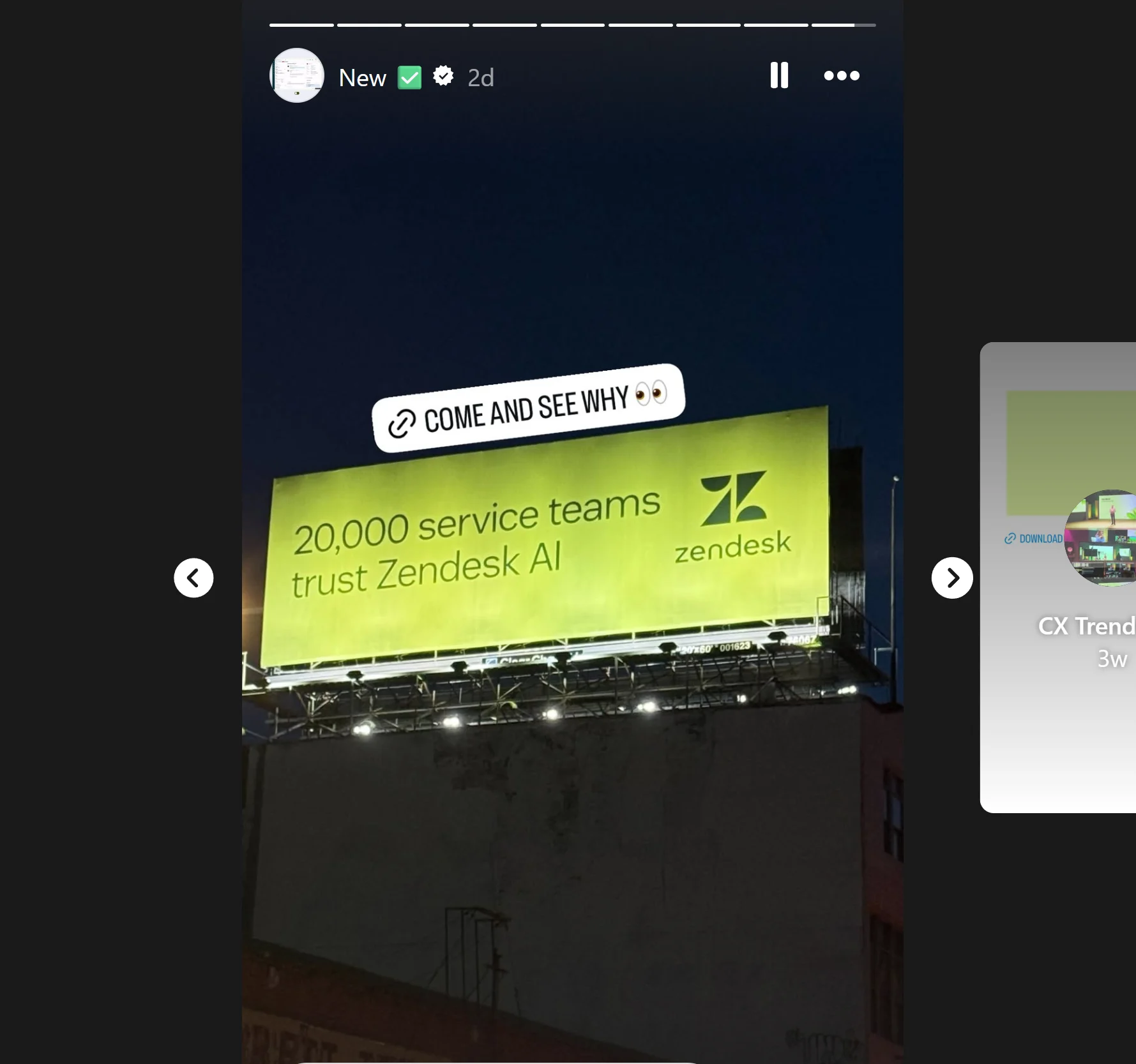

Have your product manager record a few short videos explaining a feature or sharing an industry tip. Use the Q&A sticker for live questions, and link to the full content with a link sticker so interested viewers can dig deeper.
Use Polls and Questions for Market Research
Post a poll like “What’s your biggest CRM challenge: Data Quality or User Adoption?” Then share the results with your commentary or a link to your solution.
You can also crowdsource ideas: “What feature do you wish we had? Drop it in the question box.”
DM people who give thoughtful answers (you can automate this), or feature their response in a follow-up Story. This kind of user-generated content builds community and gives you real product insights.
Share Client Wins and Testimonials
Post before-and-after stats like “Client X cut onboarding time by 50% using our software.” Add a simple graphic or a 15-second video testimonial to make it feel real.
Save these to a “Testimonials” Highlight on your Instagram profile so they live beyond the 24 hours before Stories disappear. You can add bonus tips in a following highlighted story for brand recall.
Promote Events and Webinars
Use a countdown sticker: “3 days until our live demo.” During the event, post speaker clips or key takeaways in real time.
Use the link sticker to drive registrations.
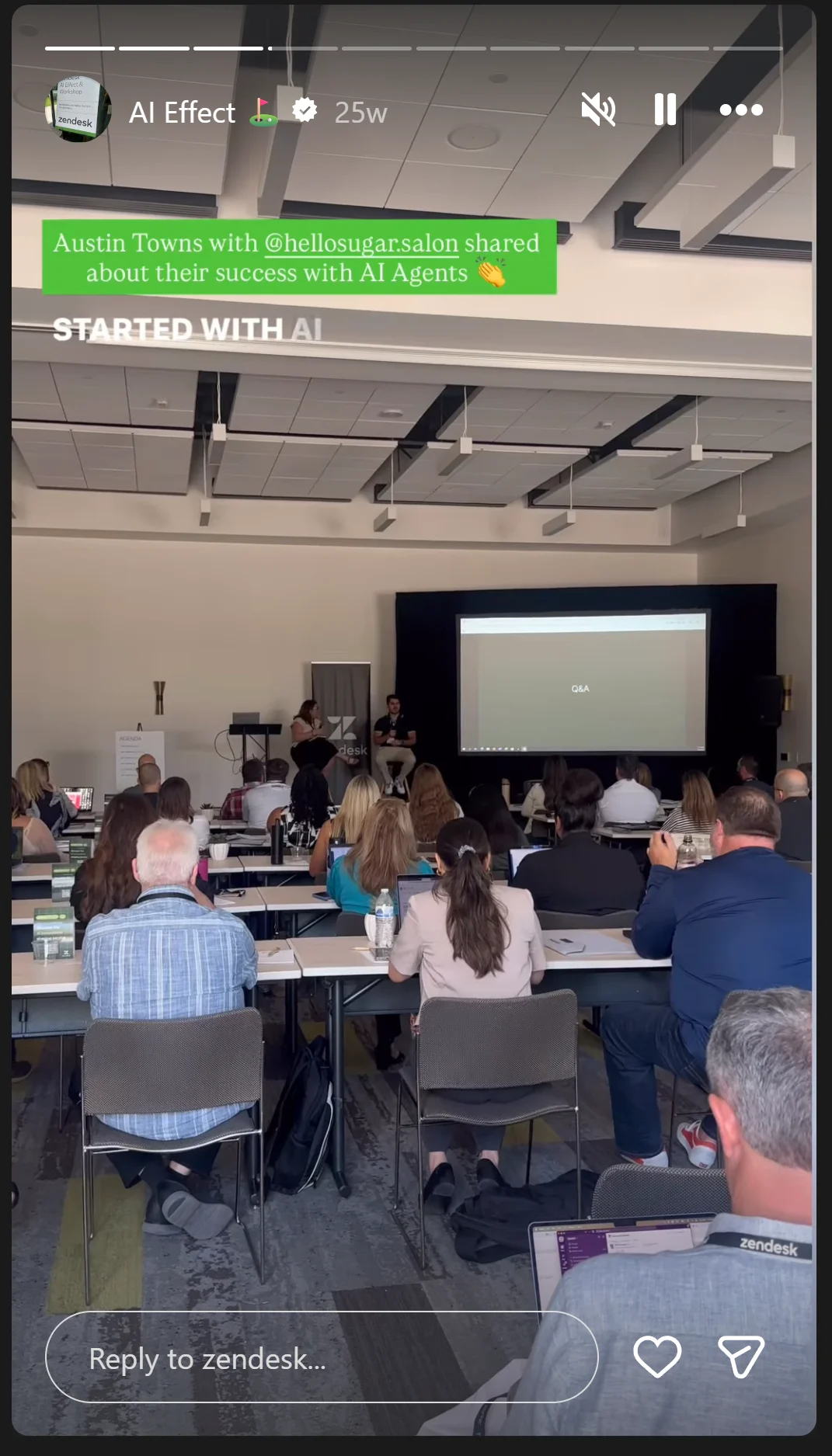
Zendesk shares conference highlights on Stories and links to full recaps. With Partnership Ads, you can even partner with industry creators to amplify your Story content and reach a wider audience.
For DTC Brands
If you’re selling directly to consumers, Stories should be a core part of your Instagram strategy.
DTC brands need Instagram Stories to build hype, test products, interact with their audience and drive sales. The path from viewing to purchasing is literally one swipe. Here’s how to turn followers into customers.
Make It Interactive
Use polls, quizzes and emoji sliders to get your audience involved. Post something like “Which fall look do you love? A or B” with product images side by side.
Or try an emoji slider: “Slide the heart to rate our new flavor.” These Instagram story stickers are simple to use and they boost engagement significantly. The more people interact, the more the algorithm shows your content to others.
Partner With Influencers for Takeovers
Have an influencer run your Stories for a day. Pick someone whose audience matches yours and promote the takeover in advance on both accounts. You get fresh content in a unique style and exposure to their followers, attracting new followers.
Run Story-Only Flash Sales
Post something like “Flash sale! Use the code STORY10 for 10% off: today only.” Add a countdown sticker for urgency and use product stickers so viewers can tap and see pricing immediately.
These exclusive deals reward your most engaged followers and create a sense of urgency that drives link clicks and conversions.
Show Behind-the-Scenes Content
Share clips of your production process, your team packing orders, lunch break conversations or do a founder Q&A. Glossier built a huge following partly by sharing product development teasers on Stories. When launching new products, try quick unboxings or demos – it feels authentic and gives people a reason to keep watching.
Use Story Highlights as Your FAQ Section
Set up Highlights for “How to Use,” “Customer Reviews,” and “FAQ.” Save relevant Stories to the right Highlight so they stay accessible long after the original Stories vanish.
Your Instagram Stories Highlights are a curated storefront that new visitors can tap through and get up to speed on everything they need to know about your brand. You can create as many highlights as you need to cover different topics.
For Creators and Influencers
Stories are how you stay connected between big posts and videos. Your success depends on daily engagement, and Stories are your most direct line to followers, especially when supported by AI tools for instagram.
Here’s how to use Instagram Stories to strengthen your bond with your audience.
Share Behind-the-Scenes Daily Life
Show the stuff that wouldn’t make it into a polished YouTube video or any final content piece, such as bloopers from a photoshoot, your morning routine, your background process and a walkthrough of the farmers market.
Many top creators do a daily check-in on Stories, just talking to the camera in an authentic manner. You can even share photos from your camera roll to keep things casual and real.
Use Q&As and Polls to Connect
Run an AMA (Ask Me Anything) with the question sticker. Post responses throughout the day so your close followers and audience feel heard. You can use polls for quick feedback, like “Which video idea next: A or B?”
If possible, DM people who leave thoughtful responses through an automation tool. Those one-on-one connections through direct messages can turn casual followers into loyal fans.
Moreover, high Story engagement keeps your content more visible in the algorithm, which means even more people see your interesting stories.
Promote Your Content Without Being Salesy
Show how you actually use the product in your daily life by talking to the camera as if you are speaking with a friend. Essentially, keep the flow natural and conversational.
When you drop new content, be it a YouTube video, podcast episode, a live stream or a new blog post, share a 15-second highlight clip with a link sticker. Creators can also increase traffic opportunities by learning how to add link in instagram bio, giving followers another way to access featured content and resources.
And in the caption, explain what the video is about or what value it offers in a few words.
This applies to all kinds of promotional content, whether it is for your offerings or a sponsor’s products.
Stay Consistent Without Burning Out
The algorithm favors regular posting, but quality matters too. It is better to put more effort into Instagram Stories that resonate more deeply rather than targeting a huge content volume.
Additionally, too many stories in a row might nudge your viewers to drop off. You can share 2-3 stories in a row to maintain a healthy scarcity.
Tools That Make Instagram Stories Easier
There’s a rule in content marketing that’s acknowledged worldwide: consistency wins. You need to post regularly to stay visible and build momentum. This way, your audience will continue to look forward to your next story.
At the same time, you also need quality. Quality keeps your close friends and followers on Instagram engaged with your brand by relaying value.
And to do both, you need a system. Tools that help you stay consistent while upholding your audience’s expectations.
Broadly, there are four categories of software solutions that will help make Instagram stories easier.
1. Scheduling Tools
These platforms ensure that you always post your content at the right time, every time, without being online 24/7. Some popular options that enable this hands-free approach include:
- Instagram Native Scheduling: Instagram now lets you schedule Stories directly in the app. Plan your content for the week and set it to post automatically during peak engagement times without being online.
- Later: A social media scheduling platform that supports Instagram Stories. Drag and drop content into a visual calendar and schedule your regular Stories in sequences.
- Hootsuite: Schedule Stories across multiple Instagram accounts, plan campaigns weeks in advance and collaborate with team members on content approval before it goes live.
- Buffer: Similar to Later and Hootsuite, but with a simpler interface. Great for small teams or solo creators who want basic scheduling functionalities.
2. Design Tools
You can use design software to make your Instagram stories more aesthetic to boost visibility and engagement.
- Canva: Thousands of Instagram Story templates at your fingertips. Pick one, add photos, customize colors and text, insert your branding elements and download to publish. You can save brand kits to maintain consistency across all your Stories.
- Adobe Express: Similar to Canva with more advanced design features. Great if you want more control over typography and effects. Also includes animation features for moving text and elements that can increase engagement.
- Instagram Edits: Instagram’s built-in video editing app with trimming, subtitles, background removal, keyframe animations and effects. Everything stays within Instagram’s ecosystem, which streamlines the overall workflow.
- Built-in Story Tools: The drawing tool and stickers are already in Instagram Stories. Layer these creatively and you can make polished content without any external apps. You can add filters, use a solid background, insert a location sticker or overlay text, without leaving the app.
3. Analytics Tools
This category of tools surfaces actionable insights that reveal what works and what doesn’t. You can consider these options:
- Instagram Insights: Free analytics built right into Instagram. See reach, impressions, exits and taps for each Story. You can see exactly where people drop off in your sequences and which Stories get the most engagement.
- Socialinsider: Gives you benchmarks against competitors and industry averages so you can see how your Story performance stacks up and identify gaps in your strategy.
- Rival IQ: Tracks your Stories over time and compares them to competitor accounts. Shows you the best times to post based on when your audience is most active.
- Iconosquare: Detailed analytics on Story completion rates, tap-forwards, tap-backs and exits. Helps you understand exactly how Instagram users interact with your content.
4. Automation Tools
There are certain repetitive and administrative tasks in the Instagram story marketing workflow. Automation platforms do them for you, freeing you for more strategic initiatives, such as creative direction.
- Instagram Saved Replies: Built into Instagram DMs. Save responses to common questions and send them with a few taps instead of typing the same answer over and over.
- ManyChat: Auto-respond when someone swipes up and replies to your Story with specific keywords. For example, if someone types “PRICE,” they automatically get a DM with your pricing info.
- AI Tools (ChatGPT, Claude): Use them to brainstorm Story ideas when you’re stuck or draft captions quickly. You can get dozens of content ideas in seconds based on your niche. Additionally, Claude rank tracking helps you understand how often and how prominently your content appears in AI-generated responses, allowing you to refine your strategy over time.
How Distribution.ai Speeds Up Your Story Creation
One of the biggest challenges with Stories is that they require fresh content daily, which can be resource-intensive. Small marketing teams or solopreneurs may struggle to dedicate several hours to ideation, drafting, designing slides, publishing and analytics.
Distribution.ai offers a robust workaround through its AI-powered content repurposing platform.
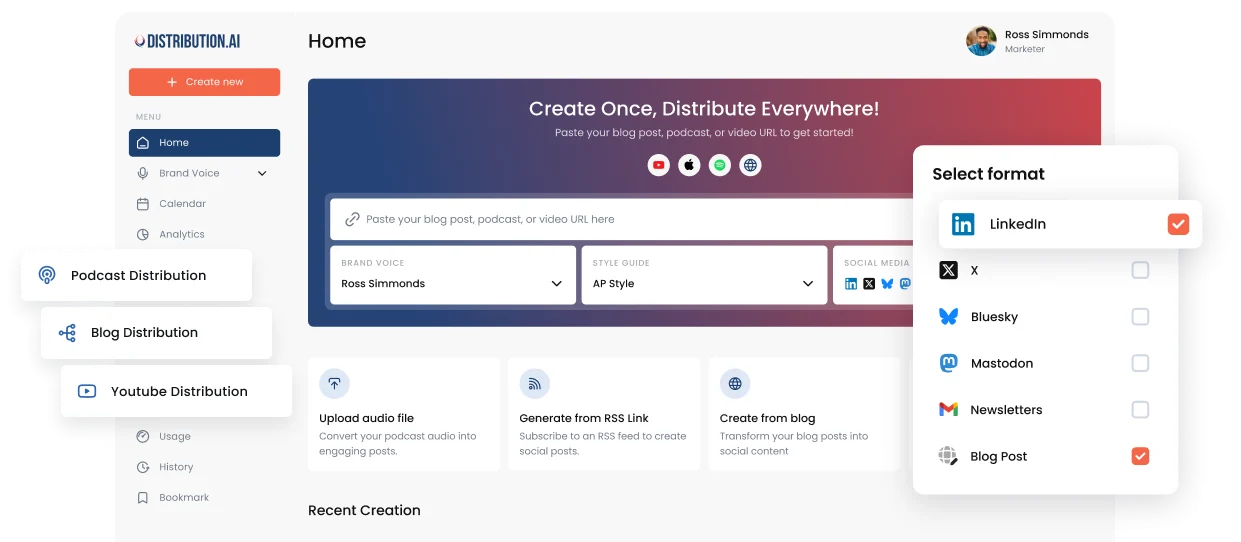
It turns existing long-form content into Instagram-ready assets in minutes, allowing you to post consistently without starting from scratch.
Here’s how it works:
- Upload your existing content: Drop in a URL to your blog post, podcast episode or YouTube video. The AI analyzes your content and breaks it down into bite-sized pieces optimized for different platforms, including Instagram.
- Generate Story ideas instantly: Distribution.ai extracts key points and creates quotable graphics to generate multiple Story concepts from a single piece of content. Upload a 2,000-word blog post and get 10+ Story slide ideas with text overlays and captions already written.
- Maintain your brand voice: The platform learns your brand voice and keeps it consistent across everything it generates. No robotic copy that requires heavy rework.
- Schedule and distribute: Beyond just generating content, the platform includes scheduling and analytics features. You can set posts to go live at the best times and track performance across channels without juggling multiple tools.
- Export to any design tool: Take the generated Story ideas and drop them into Canva or Adobe Express to add visuals. Or use them as-is if they’re already formatted for your needs.
A typical Instagram Story marketing workflow might look like:
- You publish a blog post about “5 Ways to Improve Customer Retention.”
- Upload the URL to Distribution.ai.
- Get 10 Story slides: one intro slide, five slides (one for each tip), three slides with pull quotes and one CTA slide.
- Export to Canva, add your brand colors and photos to polish the content further.
- Schedule them throughout the week.
Just like that, you’ve turned one blog post into a week’s worth of Stories in under 30 minutes.
This is especially useful for B2B companies and DTC brands that already produce long-form content but struggle to repurpose it for Instagram.
You can easily extend the reach of your existing content to get more ROI with this solution.
Ready to scale Instagram Story marketing?
Conclusion
Instagram Stories aren’t going anywhere. Over 500 million people watch them daily, and one-third of the most-viewed Stories come from businesses.
The brands winning in 2026 are the ones showing up consistently with engaging content that their audience actually cares about.
Whether you’re a B2B company building trust, a DTC brand driving sales, an entertainer building a following or a creator growing your community, Stories give you a direct line to your audience every single day.
So stop overthinking it. Pick one strategy from this guide and try it this week:
- Post behind-the-scenes content that shows the real people behind your brand.
- Run a poll or use the question sticker to spark a conversation.
- Share a client win or customer testimonial.
- Schedule three Stories ahead of time instead of scrambling to post in real-time.
Frequently Asked Questions (FAQs)
1. Does posting too many Stories hurt my reach?
No. Instagram’s head, Adam Mosseri, has confirmed that posting multiple Stories won’t hurt your reach. However, viewer drop-off increases after about 3 Stories in a row due to fatigue, so it’s better to spread them throughout the day instead of posting 10 at once.
2. Why are my Instagram Story views so low?
Low Story views usually come down to a few things: you’re not posting consistently, you’re not using interactive stickers, you’re posting when your audience isn’t active, or you have a lot of ghost followers dragging down your engagement rate. Check Instagram Insights to see when your followers are most active and post then or double down on the content types that are already a hit.
3. How often should I post Instagram Stories?
Adam Mosseri recommends a couple of Stories per day. The key thing to remember is that consistency matters more than overall volume. You are better off posting 2 Stories daily over dumping 14 Stories once a week.
4. When is the best time to post Stories?
Check your Instagram Insights under “Audience” to see when your specific followers are most active. For most accounts, mornings (7–9 AM) and evenings (6–9 PM) tend to work well, but your audience might be different. Test a few different time slots and let the data guide you.
5. Can people see when I view their Story?
Yes. Your username shows up on their viewer list. However, they won’t know how many times you viewed it or how long you watched each slide. So feel free to revisit interesting stories without worrying about it.
6. How do I see who viewed my Story?
Open your Story and swipe up, or tap the viewer count at the bottom left side of the screen. Instagram keeps this data available for 48 hours after the Story disappears, so check it while you can to understand who’s paying attention to your content.
7. Do I need to use interactive stickers?
You don’t have to, but you really should, as they can get you more engagement. And the algorithm rewards that by showing your future Stories to more people.
8. Should I post all my Stories at once or space them out?
Space them out. Posting 2 Stories at different times throughout the day keeps you at the front of the Story tray, giving you more visibility than dumping 10 at once. It’s also less overwhelming for your audience because people are more likely to watch and engage when the content plays forward at a natural pace.
9. How do I use Instagram Stories for business?
Post consistently (2–3 Stories per day is a good target), diversify to maintain engagement, use a business account to access Instagram Insights and story analytics and always include clear calls to action like link stickers to drive traffic to your website or landing pages. You can easily maintain consistency by repurposing your existing long-form content with Distribution.ai.
10. How do I use Instagram Stories for marketing?
Start by aligning your Story content with your broader marketing goals, such as building brand awareness or growing your email list. To stay consistent, you can repurpose your existing content with Distribution.ai, such as turning a blog post into a swipeable carousel or pulling key quotes from a podcast episode. Finally, track everything with analytics and double down on what works.

Promote, repurpose & distribute your content with AI
Write 10x faster, engage your audience, & never struggle with the blank page again.
Start 15-Day Free Trial
Frequently Asked Questions
Author

Promote, repurpose & distribute your content with AI
Start 15-Day Free Trial