


Community Management 101: What It Takes and How to Get It Right [With Growth Tactics]
Building an online community? Learn what community management is, why it matters, how to build community management strategy, and community growth tactics.
You may come across communities where people join, scroll, and leave. No conversations, no connection, no real engagement. That isn’t the community you want to build.
A true community is a space where people engage with each other, share experiences, offer support, and feel a genuine sense of belonging. That’s exactly what community management helps you build. It guides conversations, encourages participation, and turns passive followers into active, invested members who trust your brand.
If you want to deepen engagement, strengthen relationships, and grow a community that feels vibrant and alive, you’re in the right place. Here, we’ll break down what community management involves, how to create a community management strategy, growth tactics, and more.
What Is Community Management in Social Media?
Community management in social media is the practice of building, engaging, and nurturing an online community around your brand, product, or shared mission. While social media management focuses on publishing content, community management focuses on people— their conversations, connections, and the concerns they raise.
A strong community management approach typically includes:
- Engaging with members: Showing up consistently in comments, DMs, tags, mentions, answering questions, celebrating wins, and thanking people for their input
- Moderating discussions: Enforcing community guidelines, steering conversations in a positive direction, and preventing misinformation or hostility
- Curating and sharing relevant content: Sharing how-to videos, behind-the-scenes posts, and the right content to encourage discussions and shares
- Collecting and acting on feedback: Identifying patterns, such as recurring questions, emerging concerns, and new feature ideas, to gather real-time feedback
Why is Community Management Important in Social Media Marketing?
Effective community management helps you form stronger connections with your target audience. It helps you know your audience closely and transform passive customers into brand advocates. Here’s why community management is important.
Builds trust and humanizes your brand
People trust brands that show up consistently and respond like real humans. Community management helps you create that presence. When you answer questions, acknowledge feedback, and stay transparent, members feel seen, and that trust compounds over time.
Drives meaningful engagement and advocacy
Active community management encourages members to interact, share experiences, and help each other. It involves real conversations and genuine involvement, which over time makes the most engaged members your brand advocates.
Gives real-time feedback you can act on
A community is a live source of insights. You see what people love, what confuses them, and what frustrates them. These insights can be used to shape features, fix issues early, and validate ideas before building anything. It’s honest, immediate, and better than traditional surveys or interviews.
Reduces support load through peer-to-peer help
A well-managed community becomes self-sustaining a peer-to- peer support system. Members answer each other’s questions, share solutions, and offer guidance based on personal experience. This reduces repetitive support tickets, shortens response times, and gives customers faster answers.
How to Build an Effective Community Management Strategy?
To build an effective community management strategy, follow these steps:
Set clear objectives and success metrics
First, define why your community exists. Are you trying to increase brand loyalty, support customers, improve retention, or gather product insights? Clear goals help your community manager prioritize the right conversations, content formats, and engagement workflows.
Tie each objective to 3–5 metrics so you can measure what matters. For example, engagement rate, sentiment, active engagement, meaningful interactions, response time, member growth, and advocacy signals.
Map your community types and scope
Every brand operates different community types depending on its audience and goals:
- Internal engagement communities: Employees, partners, or internal product teams
- External engagement communities: Customers, users, and brand advocates
- Owned online communities: Your platform, app, or private forum
Each type requires different rules, tone, tools, and workflows. For example, internal communities focus on knowledge-sharing and culture, while external ones focus on support, education, and fostering meaningful interactions. Deciding your scope early helps you avoid diluted efforts and build the right structures from the start.
Understand your audience & choose the right platforms
A community grows when you meet members where they already are. Study their preferences and choose the right platforms. For example, Discord for fast chats, Reddit or forums for longer discussions, LinkedIn for professional networking, or private groups like Facebook Groups or Slack. Choosing platforms based on audience behaviour ensures higher participation and more active engagement.
Define your brand voice
Your brand voice guides how you speak in comments, replies, DMs, and community posts. Decide whether your tone should be friendly, expert, warm, or direct, and make sure every community manager uses it consistently. A consistent voice makes your brand feel familiar and trustworthy in every interaction.
Create clear community guidelines
Set clear rules that community members should follow. Outline acceptable behavior, content boundaries, reporting processes, and moderation standards. Clear rules protect members, reduce conflict, and foster a safe, respectful online community.
Create a content creation & programming plan
Without content, conversations won’t continue. So, plan recurring formats that make participation easy and predictable:
- Weekly discussion prompts
- AMAs with team members or creators
- “Member Spotlight” features
- Polls, challenges, and small rituals
- Educational content and how-tos
- UGC initiatives to boost customer loyalty
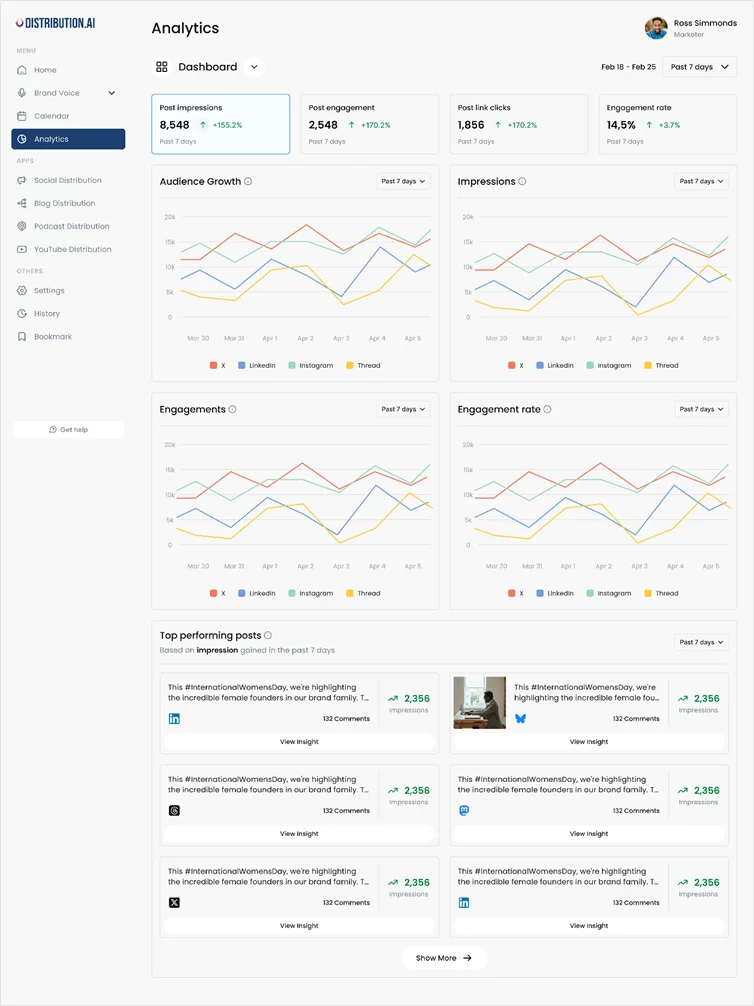
To save your brainstorming and content creation hours, use tools like Distribution AI. Suppose you’ve existing content assets like blogs, videos, and podcasts, you can use the tool to repurpose these can create multiple social media posts. You can even A/B these posts to identify the best versions, schedule them, and auto-publish. Plus, you can track engagement rates, click-through rates, and top-performing content to refine your strategy.
Build engagement workflows
For example, respond to product questions within 24 hours, escalation paths for sca security or legal issues, and handoffs to support or product teams. Assign roles like community manager, moderators, and subject-matter experts to ensure seamless operations and faster responses.
Choose the right tools and infrastructure
Use a mix of platform native tools and software, such as community platforms like Bevy, social listening tools, moderation dashboards, CRM or ticketing integration, and analytics. Make sure you choose tools that support your community management objectives. These tools make day-to-day execution easier and help maintain active community management across all channels.
Implement the strategy
This is where you execute. Once you’ve chosen the platform, set up a team, and got the right tools by your side, start conversations. Post content like updates, educational how-tos, or solutions, reply consistently, run prompts, clarify rules, welcome new members, host events, and apply your brand voice guidelines in real time.
Monitor performance
Once implementation begins, track specific metrics to understand the outcome of your social media efforts. Here are a few:
- Response time: How quickly your team replies to members’ questions and comments
- Engagement rate: How often members interact with your posts and discussions
- Sentiment score: The overall emotional tone of conversations (positive, neutral, negative)
- Active vs. passive members: How many people participate vs just observe
- Member growth: The number of new people joining your community over time
- Advocacy signals (UGC, referrals): Signs that members are recommending you or creating content about your brand
To measure long-term business impact, keep an eye on churn rate, support ticket reduction, retention rates, and a higher NPS or CSAT score.
Iterate and close the feedback loop
Use performance data, member feedback, and discussion patterns to update content formats, workflows, event themes, moderation rules, and onboarding rituals. Share the improvements you make with members to show they matter. This reinforces trust, belonging and boosts brand loyalty.
Scale moderation and governance for sustainable growth
As your community grows, expand governance. For example, add volunteer moderators, implement automation, update guidelines, conduct moderator training, and maintain and crisis management playbook to protect the brand’s reputation.
Actionable Tactics & Best Practices to Build a Thriving Community
Here are some tactics and best practices that can help you improve community management and create a growing community:
Simplify onboarding and welcome members with a simple ritual
The first 24–48 hours decide whether a new member becomes active or goes silent. A guided onboarding removes friction and helps them understand the community’s purpose, expectations, and starting points. It increases early engagement and reduces passive members over time.
How to implement:
Create a pinned welcome post or automated DM with the following:
- A short intro
- 2–3 quick actions to take, and
- Links to guidelines and FAQs
You can also add a weekly “New Member Spotlight” to welcome new members to encourage participation.
Seed conversations with predictable and repeatable threads
Communities need a structure that encourages consistent conversations to stay active. Recurring prompts give members something to react to and create a predictable rhythm that keeps engagement alive.
How to implement:
Build a 4-week content calendar with repeating formats: AMA Fridays, Monday Wins, Poll Wednesday, or Tip Tuesday. Start each thread with a personal or opinion-based prompt and instruct moderators to add the first comment to set the tone and start a meaningful interaction.
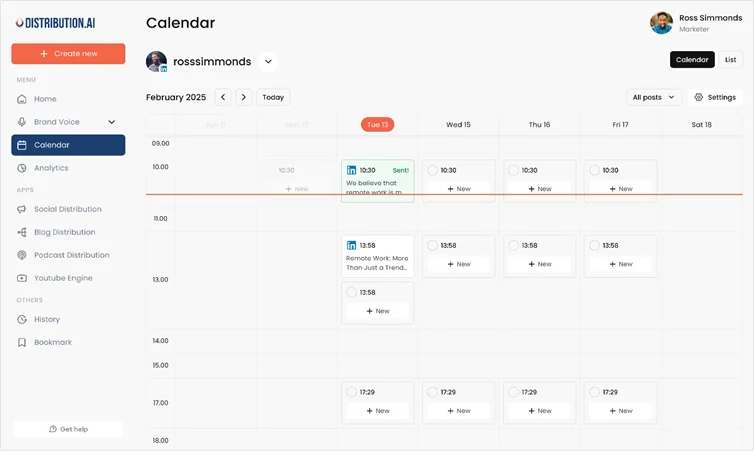
However, make sure you don’t skip posting these prompts. If days get too busy, use scheduling tools and set up your calendar ahead. This ensures you don’t miss out on posting content.
Empower community champions and volunteer moderators
Your most active members already influence discussions. Turning them into community champions expands your capacity, improves moderation quality, and strengthens peer-to-peer support, without bloating your internal team.
How to implement:
Identify top contributors, invite them into a champions program, and assign simple responsibilities, such as welcoming new members or answering FAQs. Provide them with clear scripts, and publicly recognize their contribution through badges or monthly mentions.
Here’s an example of Discord’s Certified Moderator badge:

Host regular, value-first community events
Events act as engagement spikes. It helps you encourage both active and silent members to participate. These events create real-time conversations, build trust, and generate content you can reuse later.
How to implement:
Schedule monthly AMAs, workshops, challenges, or product demos. Collect questions beforehand, moderate the session clearly, and publish a short recap post with highlights and quotes. Repurpose clips into micro-content across platforms.

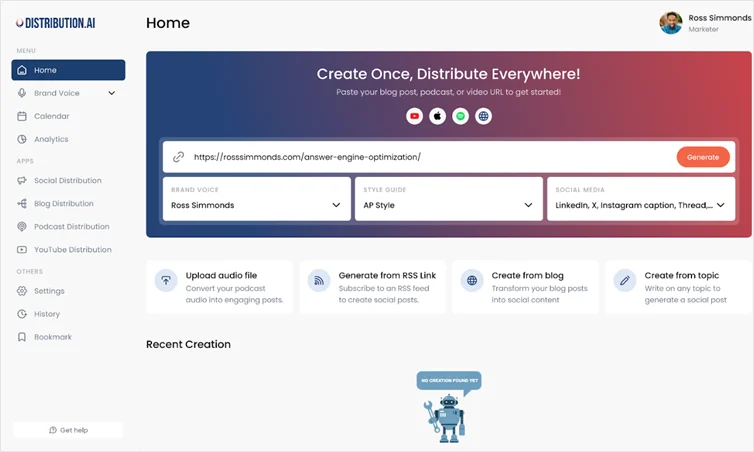
Tools like Distribution AI can help you repurpose long content like blogs, videos, and podcasts into micro-content that you can post across platforms. You simply need to copy-paste the link and generate multiple social media content pieces aligned to your brand voice.
Turn community insights into product and content improvements
Communities produce some of the most honest, unfiltered feedback you’ll ever get. When this is organized and shared properly, it influences roadmaps, messaging, and customer experience in meaningful ways.
How to implement:
- Maintain a rolling document of repeated questions, frustrations, and suggestions
- Log patterns, such as 12 members asked for the product user manual
- Share this in a weekly internal brief and close the loop publicly
Encourage and amplify UGC to build brand advocates
User-generated content fosters credibility and creates natural advocacy. When members share their results, workflows, setups, or experiences, it increases trust more than brand-led content. This often results in more conversions and customer loyalty.
How to implement:
Launch themed campaigns, like 7-day challenge, before/after, or show-your-setup, or how you use our product videos with a dedicated hashtag and small rewards like features or badges. You can also spotlight top contributions every week.
Build a simple crisis and moderation playbook
Every community, no matter how big or small, faces conflict, policy violations, or reputation spikes. Keep a lightweight playbook handy that ensures responses are consistent, fast, and aligned with brand values.
How to implement:
Create a one-pager outlining triggers (sentiment spikes, reports), immediate actions (freeze comments, post a clarifying message), escalation contacts, and pre-approved response templates. Review it quarterly with moderators and make improvements.
Wrapping Up
Community management is about building a space where people feel connected, supported, and genuinely valued. When you set clear objectives, choose the right community types, create thoughtful content, and maintain active engagement, you turn passive followers into loyal members who strengthen your brand’s reputation and drive long-term growth.
If you’re ready to build a thriving community, start by reviewing how you currently engage your audience. Clarify your goals, map the platforms that make sense for your members, put the right systems and workflows in place, and engage consistently with members.
To make that consistency easier, repurpose your best community discussions, AMAs, and long-form content into smaller updates using Distribution AI. It helps you create content without any extra effort and does the heavy lifting of publishing content, too.

Promote, repurpose & distribute your content with AI
Write 10x faster, engage your audience, & never struggle with the blank page again.
Start 15-Day Free Trial
Frequently Asked Questions
Author

Promote, repurpose & distribute your content with AI
Start 15-Day Free Trial