How to Post to Multiple Social Media at Once
Learn how to post to multiple social media at once in under an hour with a simple 4-step workflow built for busy marketers, creators and lean teams.
Your audience is spread across multiple social media platforms, and you need to be active on all of them to maximize brand reach.
However, that is easier said than done.
Everything from creating channel-native content and scheduling posts to tracking performance and engaging with comments and DMs requires time and effort.
If you are already spread thin executing broader digital marketing campaigns like SEO and email, posting on multiple social platforms may seem impossible.
This article tackles that exact problem for B2B marketing teams and solopreneurs or creators who need to scale up their social media strategy across networks without making it a full-time job.
Key Takeaways
- Posting on multiple social platforms consistently is essential for reach, algorithm risk hedging, SEO, and AI search visibility.
- The fastest way to post to multiple social media at once is to repurpose proven long-form content into channel-native posts, rather than cross-posting the same asset everywhere or reposting old content on the same feed.
- When doing so, it is essential to polish each content piece for different platforms, publish at staggered times, and include custom CTAs.
- With Distribution.ai, the full workflow—from defining brand voice and generating platform-native drafts to editing and scheduling—fits in under an hour.
- A built-in editor, shared calendar, and unified KPI dashboard replace the tab-juggling across five platforms, so review, approval, and performance tracking all live in one place.
4 Steps to Post to Multiple Social Media Platforms in Under an Hour
You can create and schedule content for different social media platforms in under an hour with Distribution.ai, an end-to-end social media content marketing solution in four simple steps.
1. Sign up and Define Your Brand Voice
You can sign up for Distribution.ai using your email address, Apple account, Google account, X credentials, and LinkedIn account.
After filling in the basic details related to your social media marketing objectives and brand goals, the solution will prompt you to define your brand voice.
There are three ways you can do that: describe the tone & style, upload an existing content piece or select a preset.
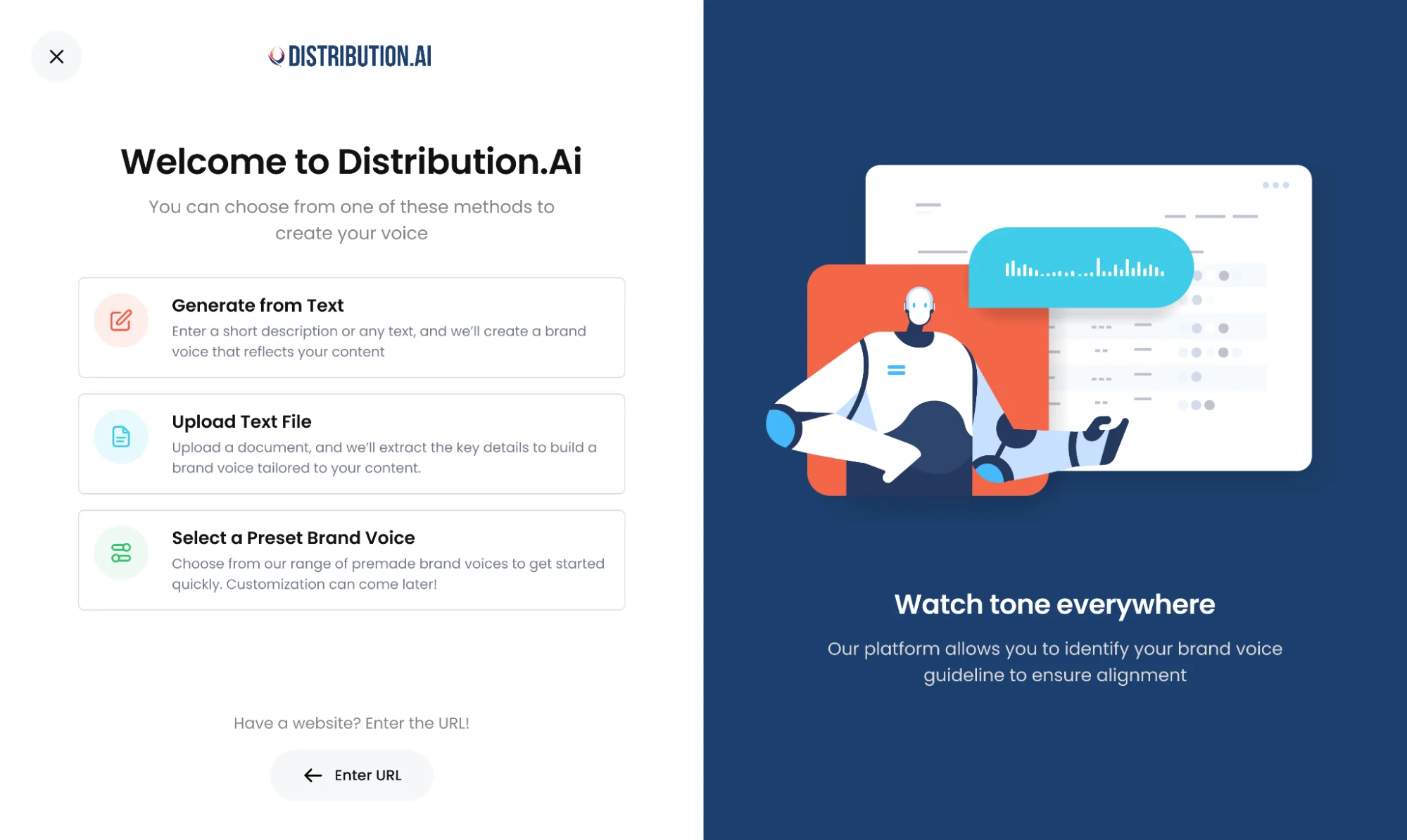
If you already have a content piece, using it to extract the style can be the best idea. It will give the AI social media agent an example to refer to. Describing it, on the other hand, can be hit or miss because terms like “friendly” and “punchy” can be subjectively interpreted.
For brands and creators that are starting out, going with a preset brand voice can be an effective option too.
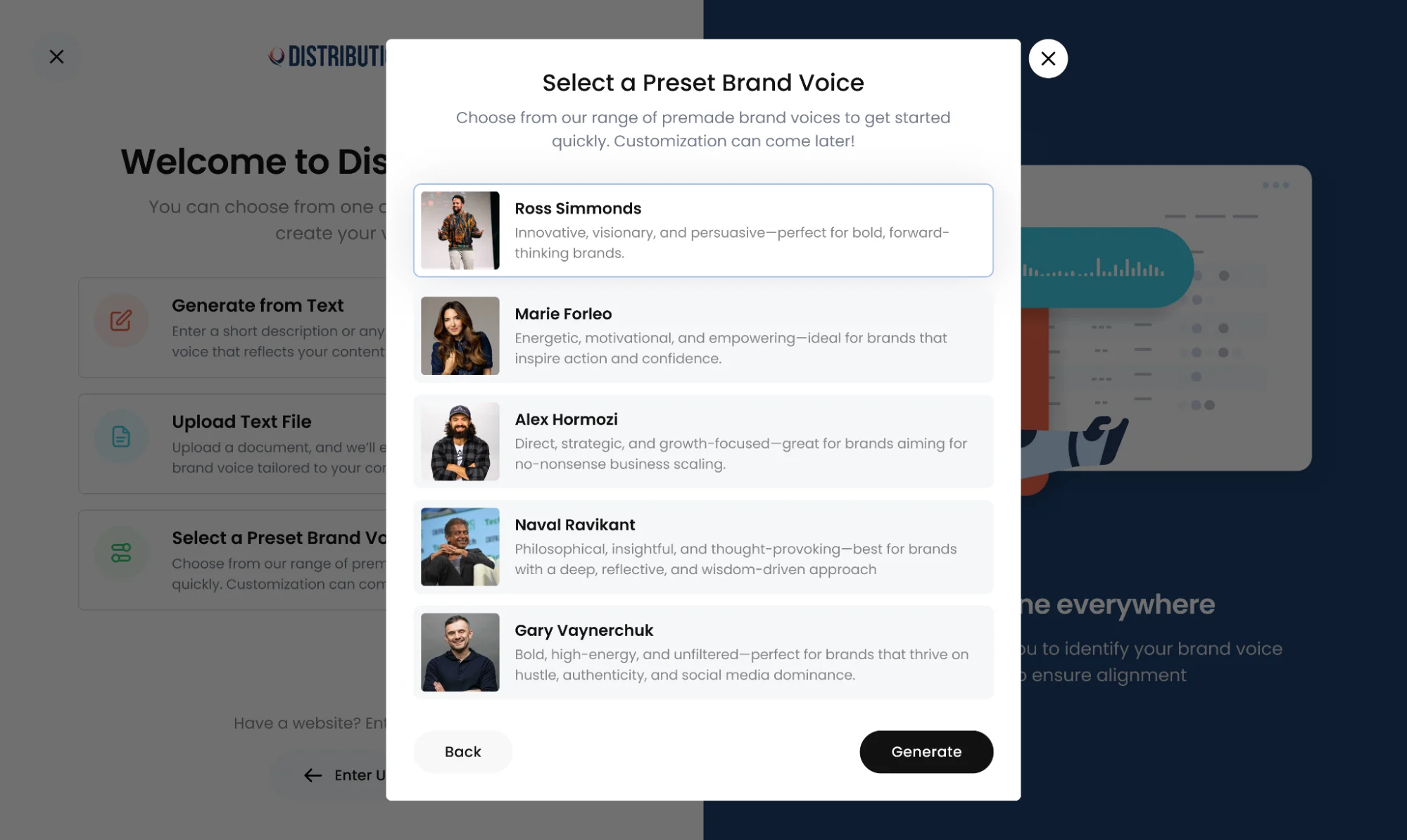
The presets are trained with high-performing content from the creators and influencers whose writing style has already been proven. You can experiment with these options until you eventually discover what sticks best with your future customers.
2. Add a Source, Describe an Idea, Upload a File or Drop a Link
The second step to publishing content on multiple social channels at once is about giving the AI content generator raw material to work on.
You can do it in multiple ways with Distribution.ai.
1. Connecting a Content Source for Automation
The content source could be your blog feed, podcast’s RSS feed or your YouTube channel. You connect it to the content distribution tool, and it automatically fetches the recently published long-form assets.
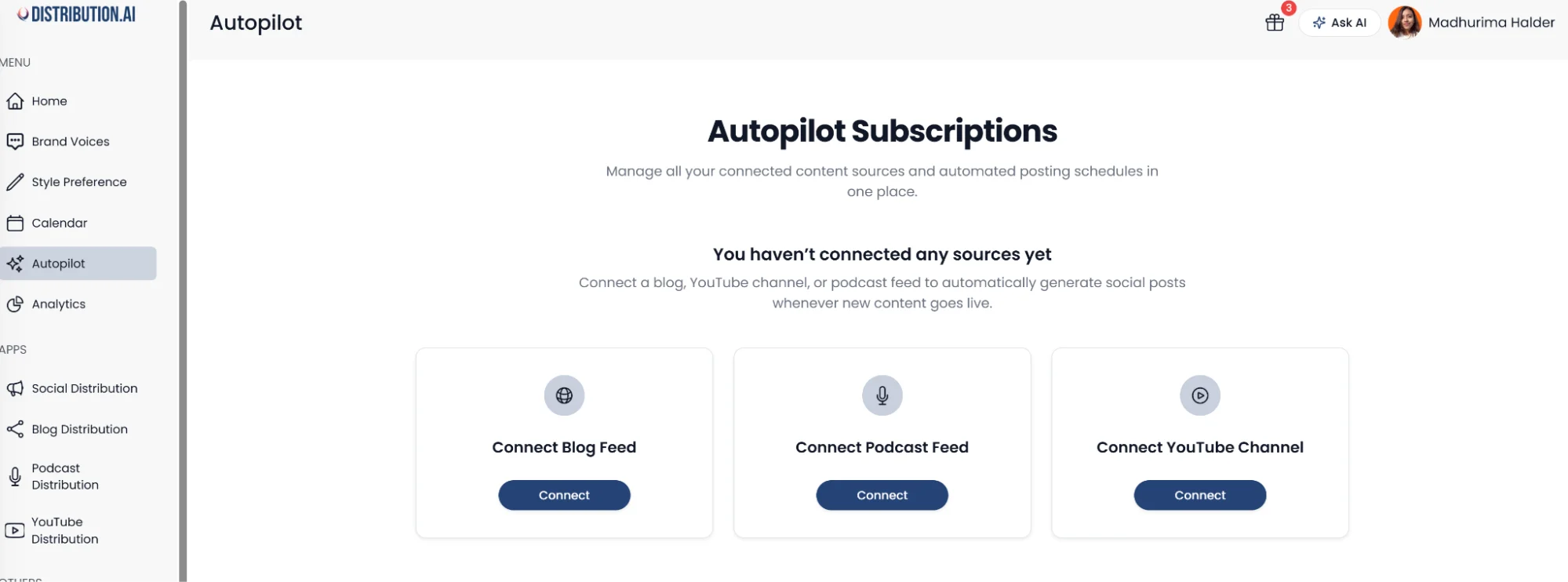
The Autopilot feature can be the most effective for busy marketers and entrepreneurs who want an autonomous social media marketing engine.
The automation will pick the latest pieces, convert them into channel-native posts and schedule them for publication after your approval.
2. Upload an Existing Asset or Paste the Published Link
If you’d rather have a more controlled approach, you can go this route.
Here, you simply drop the link to a content piece sitting in your library and let Distribution.ai do the rest. The existing content piece can be in text or multimedia format. It can be anything, including a blog post, a PDF, an industry report, a webinar, a podcast or a long-form explainer video.
The social media content distribution tool will instantly convert it into multiple short-form assets, such as LinkedIn posts and YouTube Shorts that you can post directly on various networks.
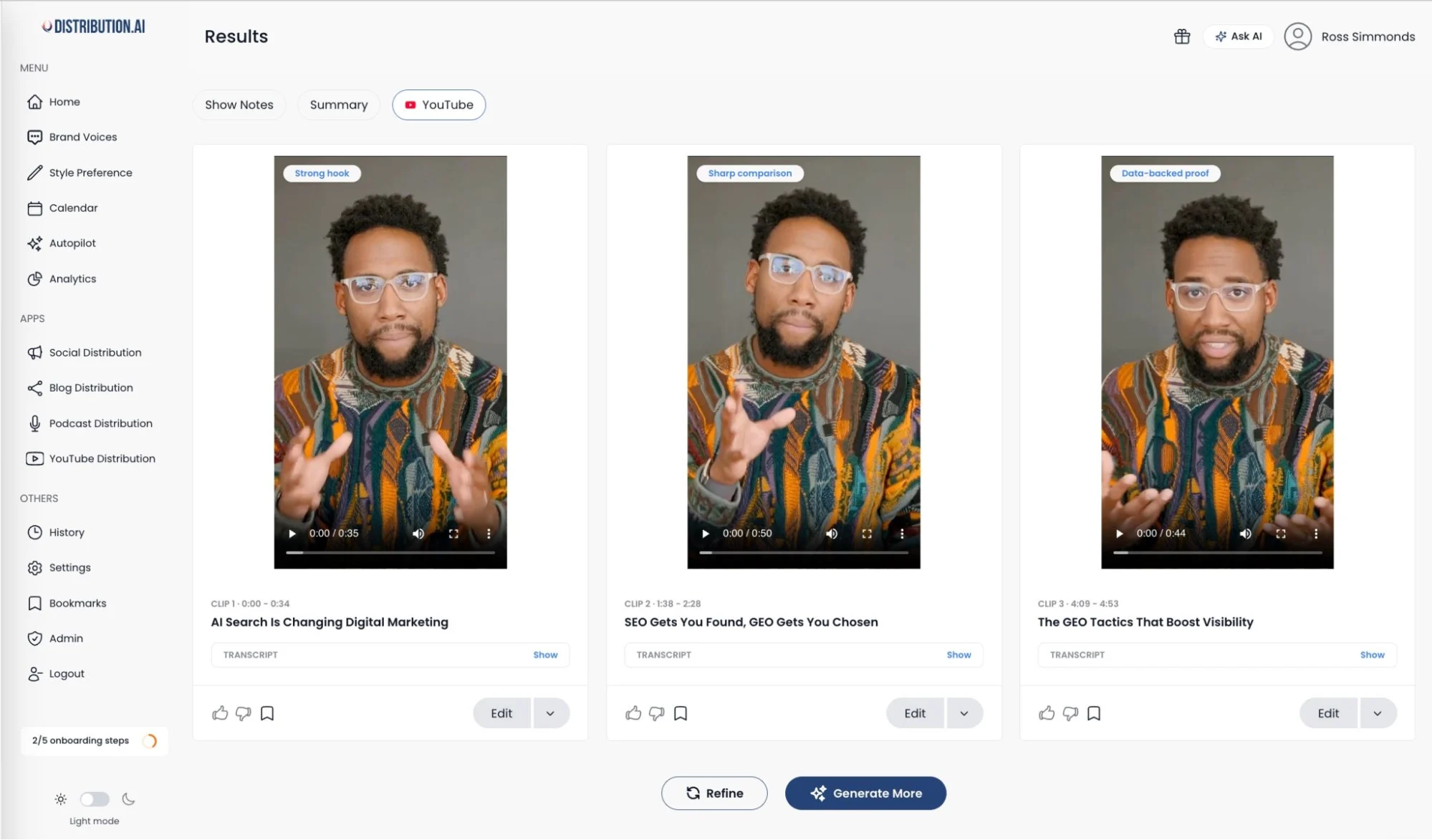
You can edit the repurposed content to polish it further for your target audience or generate more to cover additional angles that your viewers might find valuable.
It is better for B2B brands and creators or influencers who want to extend the shelf life of specific high-performing long-form assets rather than distributing the latest content published through automation.
3. Describe an Idea or Provide Talking Points
The third way to produce content for multiple social media networks so you can post it all at once is to provide the core message to AI. This method is very likely to be suitable for businesses and influencers that are starting from scratch.
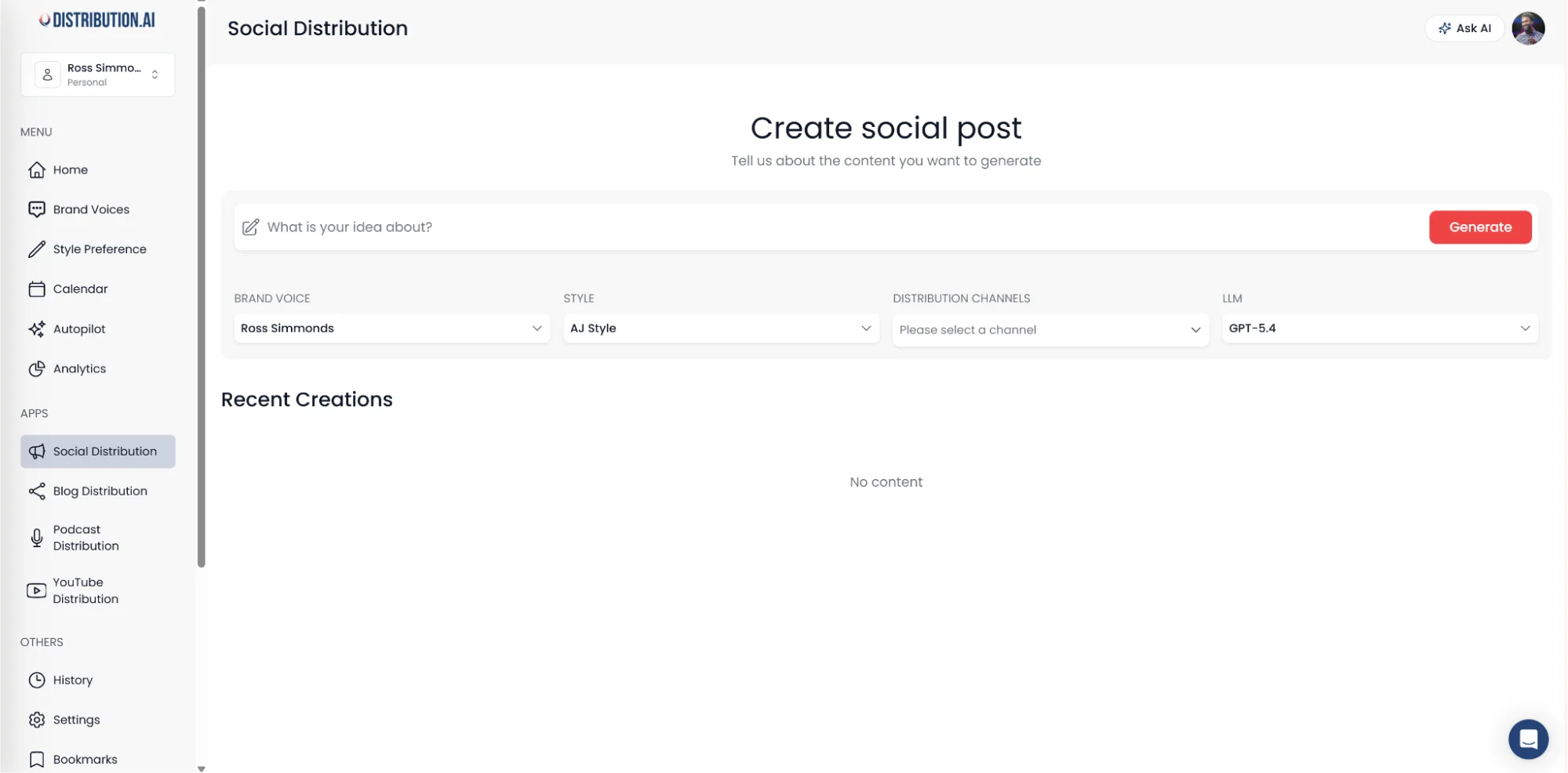
Explain what you would want to cover in your social post and mention the key takeaways. The solution will generate several platform-native content pieces like X threads and Facebook posts in under a minute.
3. Edit, Approve and Schedule Posts
After AI writes your posts or clips viral-worthy moments from long-form videos, it is essential to add a human editorial layer.
This will enable you to ensure content’s freshness, relevance, tone & style consistency and emotionality for best results.
Distribution.ai’s built-in post editor allows you to do this natively, making it one of the best social media marketing suites for teams.
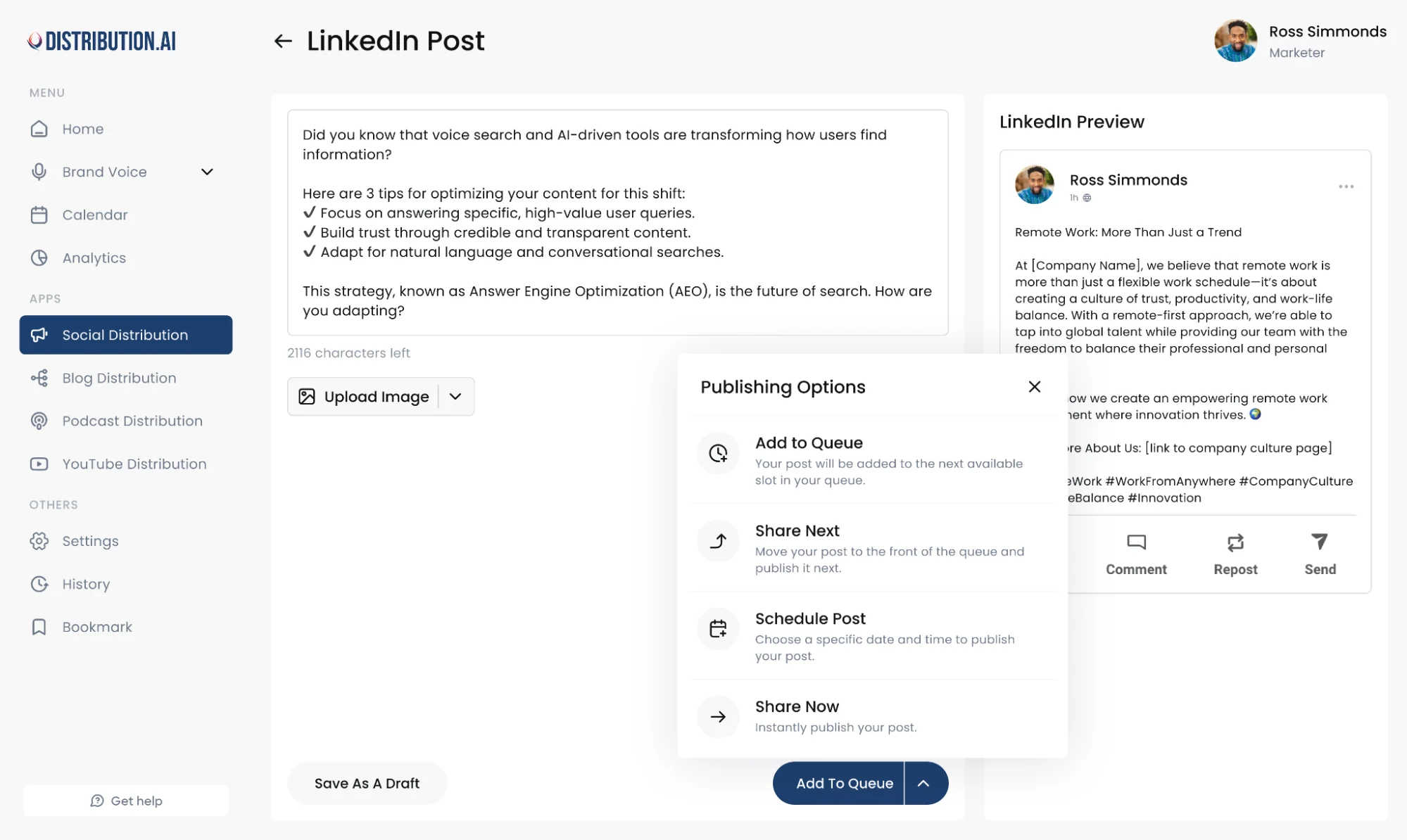
You can add images, update stats, rewrite the hook or provide a newer CTA that supports your current marketing objectives. The built-in editor simplifies team collaboration during the editorial phase of content creation.
Then, after the piece is approved, you can add it to your publishing queue or publish it instantly to go live.
Large teams or agencies with multiple client accounts that create, edit, approve and schedule social media posts in bulk can use Distribution.ai’s social media calendar.
It immediately shows which drafts are still in the review phase at a glance, which saves time when collaborating with multiple stakeholders.
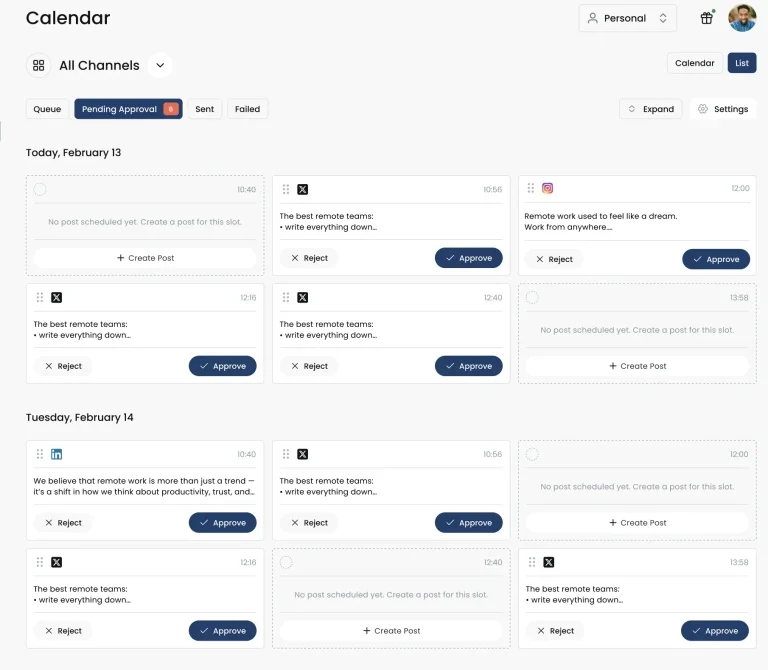
The social media scheduling tool helps you share your text-based posts or vertical videos on all major platforms at optimal times without staying online. This way, you can manage different platforms’ publishing cadence easily and get the most impressions while avoiding burnout.
4. Monitor Key Performance Indicators (KPIs) Across Channels
Social media analytics is the final step that closes the workflow for posting on multiple social media channels at once. It helps you understand which channels give the best results and what content formats fare the best.
Doing it traditionally means opening each social media platform and checking the reports to manually collate the data to extract meaningful insights.
A better alternative is to use Distribution.ai’s unified dashboard where you can track metrics like impressions, engagement, click-through rate and audience growth.
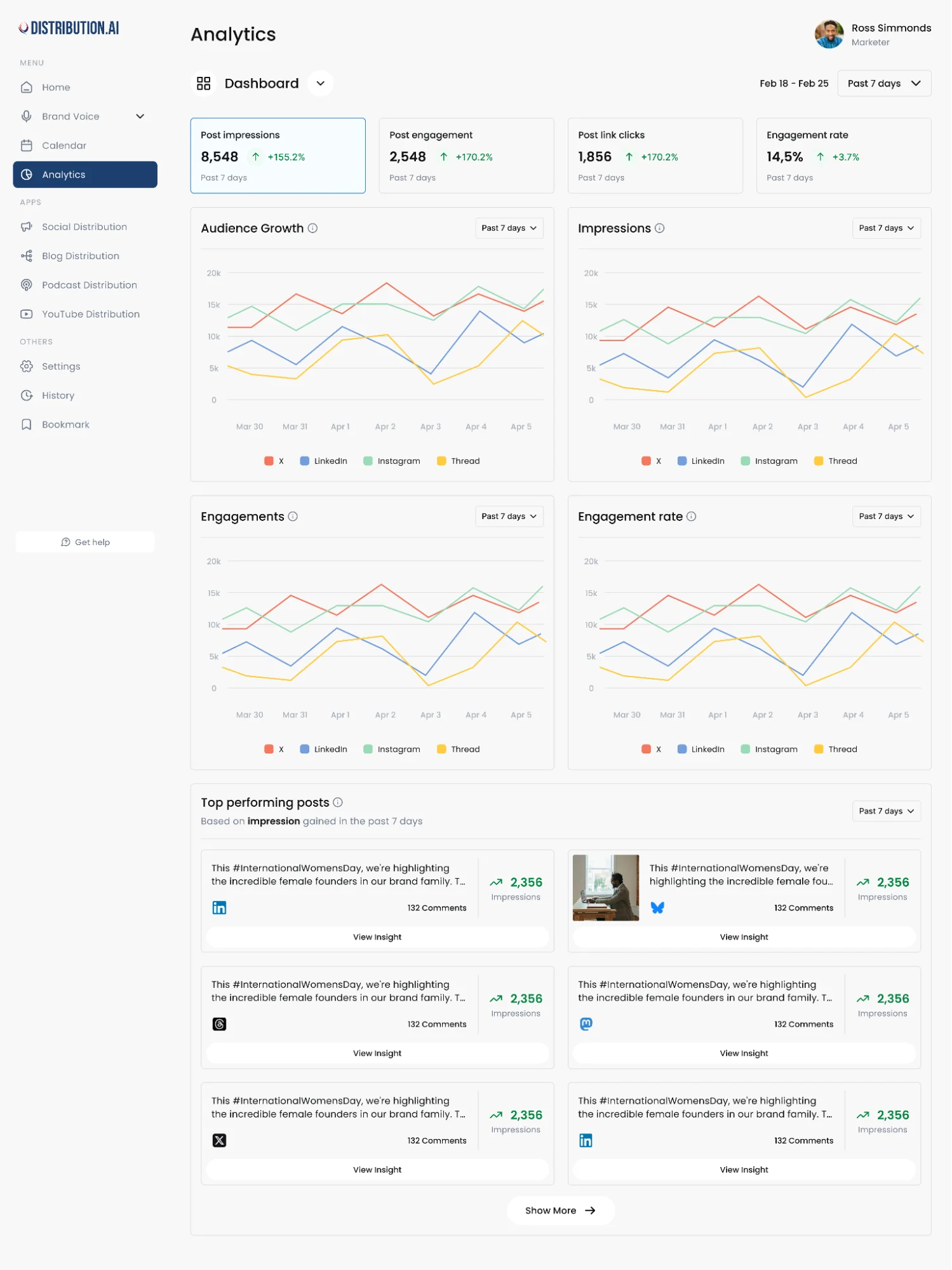
Right below the metrics, you can see the top-performing posts for various platforms with impressions. You can click on the “View insight” button to learn why your audience found those particular content pieces more relevant.
Posting to Multiple Social Media Channels: Cross-Posting vs Reposting vs Repurposing
Posting to multiple social media channels, in terms of marketing effort, translates to publishing content on various networks. Usually, it means creating unique assets for every social media platform and sharing them with your audience at optimal dates and times of the week.
But there are a few adjacent terms that are used in these workflows.
1. Cross-Posting on Social Media
Cross-posting means publishing the same content piece, whether it is a text-based post or a multimedia asset, on multiple channels. For example, you can cross-post a YouTube Short on Instagram, TikTok, X and LinkedIn.
This approach doesn’t require any extra creative work, making it effective for busy creators and marketers who want to share the same message across all the platforms. There are dedicated cross-posting apps like OneUp and Socialync that can help you do it without spending much time.
Marketers and solo content creators can use Distribution.ai’s cross-posting tool to publish immediately.
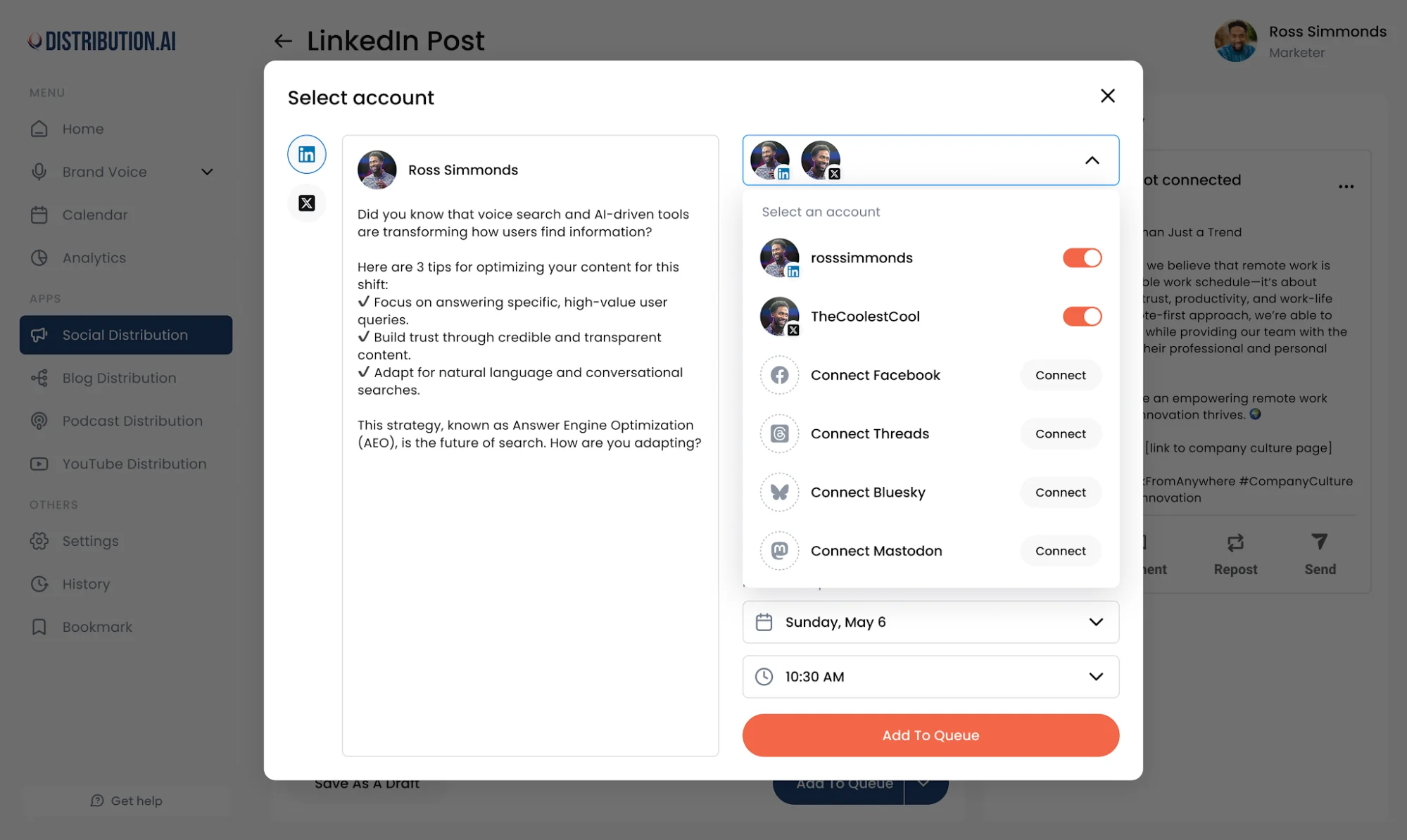
However, if you have significant audience overlap across social channels, it can be better to refrain from cross-posting. Your followers across channels can find your message repetitive if they see the same post on multiple feeds within a few hours or days.
You can consider a cross-posting strategy if you have unique content posted on each channel at different times. For instance, if you posted a YouTube Short months ago, you can cross-post the same to other channels today.
To stay on the safe side, you can start cross-posting effectively with testimonials and user-generated content (UGC). These social proof assets can be shared across channels, such as X, LinkedIn, Google Business Profile and Instagram without boring your audience.
2. Reposting on Social Media
Reposting is resharing or republishing the same asset on the same platform and account. It is a good content distribution strategy for evergreen pieces.
Posts and videos that are valuable to your audience long after they’ve been posted the first time should be reposted to maximize their ROI. The posts that are frequently shared and saved by your audience fall in this bucket.
Try to space out the reposts to avoid appearing repetitive and fatiguing your followers. Begin with seasonal content that can be reposted annually or biannually. Then, based on the repost’s performance, you can scale it up or down.
Social media managers can determine a specific cadence to repost their evergreen assets for each channel. It will allow them to schedule the repost right after they post the content piece for the first time, streamlining the overall process.
3. Repurposing Content for Social Media
Repurposing is the practice of turning one long-form content piece into multiple short-form assets for social media marketing. For instance, you can convert an article on your website into LinkedIn posts or X threads. Similarly, you can convert a podcast into multiple short-form videos.
It is the most effective approach toward posting on multiple social media platforms at once because it involves creating channel-native content from proven assets.
Each content piece will be brand new and will be based on proven assets that your audience already liked.
Compared to cross-posting and reposting, repurposing is a better approach. Your followers, regardless of the platform, will always see brand new content from you. Moreover, the channel-native content format will maximize your chances of reaching a broader audience.
Why You Need to Post on Multiple Platforms Simultaneously
Being consistently active on multiple social media accounts requires more resources than posting on one platform and calling it a day. Here’s why it’s worth it:
- Reach a diverse audience: Every social network has a unique audience who is at a different stage in your funnel. Activity on all of them maximizes brand awareness and visibility.
- Create in different formats and styles: Different formats like carousels, threads, short videos and community posts allow you to share your message in unique ways that cater to different buyer segments.
- Minimizing risk by being on multiple algorithms: Social media network algorithms can be notoriously unpredictable. Your account may get shadowbanned or incorrectly flagged, decreasing awareness.
- Multiple touchpoints for brand recall: A user is more likely to think of your offerings if they see your messaging on multiple platforms in different formats and styles when they are ready to make the purchase.
- Search Engine Optimization (SEO) and search presence: Social media content is now indexed by Google and AI search platforms like Perplexity and ChatGPT. Posting all kinds of assets improves organic Search Engine Results Page (SERP) visibility and AI citations.
Best Practices When Posting On Multiple Social Networks
The tips below will help you balance efficiency when posting on multiple social networks with platform-specific expectations:
- Adapt the tone and formatting: While cross-posting can be useful at times, it is always better to polish the post/video for each social network. Every algorithm and audience has nuanced requirements, such as writing style for written content and aspect ratio for videos, that can increase your content’s visibility if followed properly.
- Stagger publishing times: Don’t mechanically post content on the same days and times of the week for all platforms. Changing up the time makes your brand appear more human and also reduces audience fatigue, especially if they follow you on multiple channels.
- Customize the call to action (CTA): The placement of external links can vary depending on what the platform supports. For instance, Instagram doesn’t support hyperlinked body text, requiring you to go for a link-in-bio or a story link instead. Always tweak captions, especially for image and video content.
- Centralize social media posting with management tools: Doing it all manually can be exhausting. And it goes beyond creating content. Manually scheduling and tracking performance can cost you several hours per week. A social media management solution streamlines the entire workflow and makes posting on multiple platforms easier.
Use Distribution.ai to Post on Multiple Social Platforms Effectively
The biggest challenge when posting to multiple social media platforms is creating channel-native content consistently.
If you are writing posts or creating videos from scratch, it can easily cost you several hours to a couple of days per week. Then, on top of that, there is the downstream process of reviewing, editing, approving, scheduling and KPI monitoring.
Distribution.ai solves this problem for busy marketers and entrepreneurs with its AI-powered content repurposing and social media management tools.
You can produce brand-new social media content in multiple formats for various networks from ideas or existing content pieces in minutes. This includes everything from LinkedIn posts, X threads, Instagram captions and YouTube Shorts.
The solution’s built-in content editor, social scheduler and unified performance tracking dashboard make the downstream process smoother.
Promote, repurpose & distribute your content with AI
Write 10x faster, engage your audience, & never struggle with the blank page again.
Start 15-Day Free Trial
Frequently Asked Questions
Author

Promote, repurpose & distribute your content with AI
Start 15-Day Free Trial