


AI LinkedIn Post Generator
Engage professional audiences with to-the-point, actionable content.
Try it nowFree AI Tool
Describe your video. Pick a voice and set a length. Get a search-friendly YouTube description with key points, chapters and a clear call to action. Free, no sign-up.
Share the topic, the main search phrase you want to rank for, who the video is for and what they’ll learn. Paste your section timestamps if you want chapters.
Around 150 words suits most videos. Go longer for tutorials, courses and podcasts. Short descriptions work for Shorts.
Copy the description into YouTube Studio, add your real links where needed, and publish.
A video is the most expensive asset you make. Distribution means cutting it into clips, posts, threads and newsletters so it keeps working long after upload day.
Distribution.ai repurposes and schedules your videos across every channel.











YouTube and Google both read your description to decide what the video is about and who should see it. Yet most creators write it last, in a hurry, or leave it blank.
A strong description takes 20 minutes to write well. This tool gives you a structured, search-friendly draft in seconds.
Distribution.ai’s YouTube description generator gives you:
The first two lines carry your main search phrase and a clear promise, because that’s all viewers see before “Show more”.
A summary, key takeaways, chapters in 0:00 format and one call to action. Easy to scan, easy for search engines to parse.
From a two-line Shorts description to a 300-word tutorial write-up.
Use the phrase people would type to find the video in the first sentence, written naturally.
Timestamps starting at 0:00 create chapters in the player and can show as key moments in Google. Give the generator your sections and it formats them.
Subscribe, download, book a call. Pick the one that matters most for this video and put it before the link list.
YouTube shows the first three hashtags above the title. More than that rarely helps and can look spammy.
The generator only includes links you give it. Add real URLs in YouTube Studio before publishing.
Write a YouTube description for a tutorial on [topic]. Main search phrase: [phrase]. Viewers will learn [3 key points]. Chapters: [0:00 intro, 1:20 step one, ...]. CTA: [subscribe/download the template].
Write a YouTube description for a demo of [product] showing how [audience] can [outcome]. Main search phrase: [phrase]. CTA: start a free trial at [URL].
Write a YouTube description for a podcast episode with [guest, role] about [topic]. Summarise the 3 biggest takeaways and list chapters: [timestamps and topics].
Write a short YouTube Shorts description for a video about [topic] aimed at [audience]. Two lines max, main phrase: [phrase].

I’ve used chat to repurpose some work and while it works, it takes too much tweaking — especially with getting it to extract themes. Distribution.ai does a great job at sectioning the thoughts, creating punch copy, and I really liked the brand voice.

Lily Ugbaja, Head of Content Marketing
We can now create 10 social media posts for clients in the matter of minutes. This AI is an absolute game changer.

L. Henderson, Senior Reddit Specialist at Scalerrs
We uploaded a blog post it created 10 social posts, we scheduled them over 3 months and the referral traffic skyrocketed.

Taylor Perry, Content Marketing Strategist
Before I used the platform, I was using multiple tools to accomplish what I could do with Distribution.AI. All in one dashboard. Saves time and my LinkedIn profile has been on fire ever since.

Todd Jones, Owner / Brand Storytelling & Content Strategist at Copyflight
*No credit card required
YouTubers who would rather spend the time on the next video.
B2B and SaaS marketers publishing demos, webinars and tutorials.
Podcasters uploading full episodes with chapters.
Agencies managing channels for several clients.
Educators and coaches turning lessons into searchable videos.
Engage professional audiences with to-the-point, actionable content.
Try it now
Attract buyers by sharing your brand’s stories and educational posts.
Try it now
Turn any photo, carousel or Reel into a caption people stop for.
Try it now
Hook-first TikTok captions with hashtags that fit your niche.
Try it now
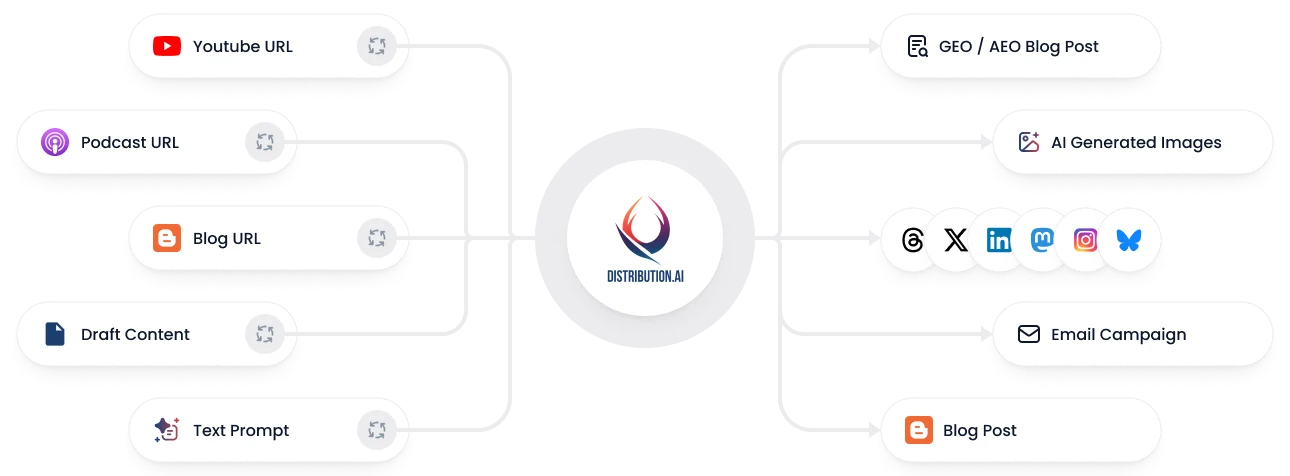
Convert any blog, podcast, video, or draft into a coordinated set of posts, campaigns, and channel-native assets without rewriting everything from scratch.
*No credit card required
Write 10x faster, engage your audience, & never struggle with the blank page again.
Start 15-day free trial*No credit card required