


AI LinkedIn Post Generator
Engage professional audiences with to-the-point, actionable content.
Try it nowFree AI Tool
Describe your photo, carousel or Reel. Pick a voice and set a length. Get a scroll-stopping Instagram caption with hashtags in seconds. Free, no sign-up.
Tell the generator what the photo, carousel or Reel shows, who it’s for and what you want people to do after reading. One or two specific sentences beat a paragraph of generic context.
Go short and punchy for product shots and Reels. Go longer for carousels, behind-the-scenes stories and educational posts. Toggle hashtags and emojis on or off.
Copy the caption, adjust the hook to sound like you, and publish. Not quite right? Generate again for a fresh angle.
One great caption is a start. Growing on Instagram takes a steady stream of on-brand posts, published at the right times and measured so you know what to repeat.
Distribution.ai turns one idea into weeks of captions, schedules them and tracks what works.












The caption is where a scroller decides to stop, save or keep moving. Writing a good one every day is hard, especially when you manage more than one account.
Generic chatbots tend to produce captions that sound like everyone else’s, with the same openers and a wall of hashtags. You end up rewriting most of it.
Distribution.ai’s Instagram caption generator is built for one job:
Every caption opens with a line written to earn the “more” tap, because only the first 125 characters show in the feed.
Polite, witty, enthusiastic, friendly, informational or funny. Keep every post consistent with how your brand already sounds.
Dial from a one-liner for a Reel to a 150-word story for a carousel. Hashtags land on their own line so the caption stays readable.
Instagram cuts captions at about 125 characters. Put the surprising stat, bold claim or question in that window.
Saves and sends are strong ranking signals. Captions that teach a quick tip or give a checklist get saved more than captions that only describe the photo.
Three to six relevant hashtags outperform thirty random ones. Mix one broad tag with niche tags your buyers actually follow.
Reels want short captions that support the video. Carousels can carry longer, structured captions. Single photos sit in between.
Comment, save, share or visit the profile. Pick one. Multiple asks split attention and lower response.
We sell [product] for [target customer]. Write an Instagram caption for a photo of [what the photo shows] announcing [launch/new colour/restock], highlighting [one key benefit], and asking people to [comment/save/visit the profile].
Write a short Instagram Reel caption for a video showing [what happens in the Reel]. The hook should tease [the payoff at the end]. Audience: [who]. Goal: [follows/shares/saves].
We’re a [type of business] helping [audience]. Write an Instagram caption for a carousel with [number] tips on [topic]. Summarise the value in the first line and ask people to save it for later.
Write a warm Instagram caption for a behind-the-scenes photo of [team/process/workspace] at [company]. Share [one small story or detail] and invite followers to [ask a question in the comments].

I’ve used chat to repurpose some work and while it works, it takes too much tweaking — especially with getting it to extract themes. Distribution.ai does a great job at sectioning the thoughts, creating punch copy, and I really liked the brand voice.

Lily Ugbaja, Head of Content Marketing
We can now create 10 social media posts for clients in the matter of minutes. This AI is an absolute game changer.

L. Henderson, Senior Reddit Specialist at Scalerrs
We uploaded a blog post it created 10 social posts, we scheduled them over 3 months and the referral traffic skyrocketed.

Taylor Perry, Content Marketing Strategist
Before I used the platform, I was using multiple tools to accomplish what I could do with Distribution.AI. All in one dashboard. Saves time and my LinkedIn profile has been on fire ever since.

Todd Jones, Owner / Brand Storytelling & Content Strategist at Copyflight
*No credit card required
Small business owners who post between serving customers.
Social media managers writing captions for several brands every week.
Creators and influencers who want fresh angles on the same niche.
eCommerce and DTC teams captioning product shots, drops and promos.
Agencies and freelancers who need fast first drafts their clients will approve.
Engage professional audiences with to-the-point, actionable content.
Try it now
Attract buyers by sharing your brand’s stories and educational posts.
Try it now
Hook-first TikTok captions with hashtags that fit your niche.
Try it now
Search-friendly video descriptions with chapters and a clear CTA.
Try it now
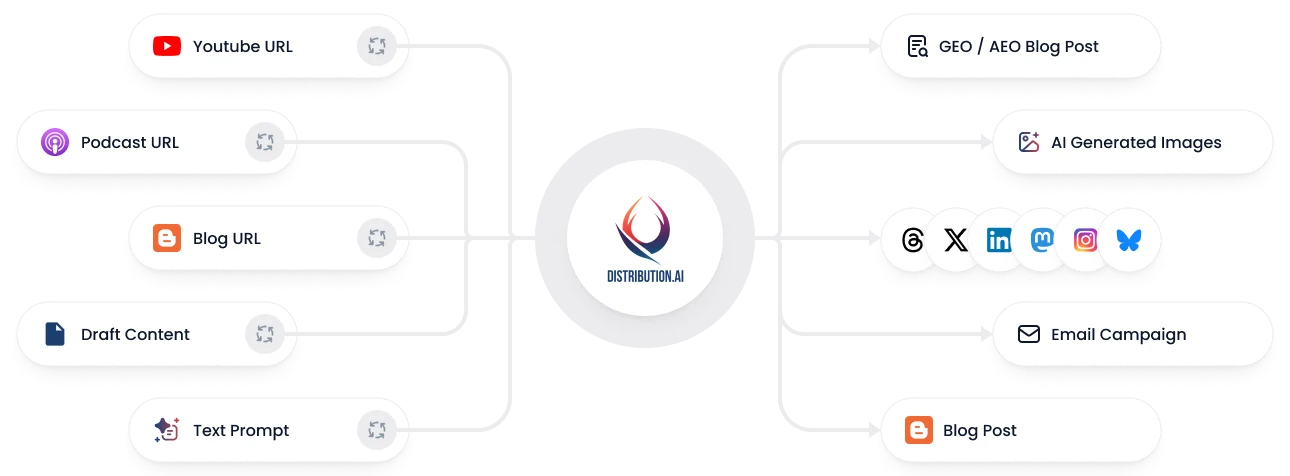
Convert any blog, podcast, video, or draft into a coordinated set of posts, campaigns, and channel-native assets without rewriting everything from scratch.
*No credit card required
Write 10x faster, engage your audience, & never struggle with the blank page again.
Start 15-day free trial*No credit card required