


How to Repurpose Podcast Content for Maximum Reach: 7 Ways that Work [With Examples]
Discover the different ways to repurpose podcast content into multiple formats, such as blog posts, social media content, videos, and more valuable resources.
So, you’ve recorded a great podcast episode, now what?
Most podcasters publish the audio and move on, but the real opportunity lies in turning that single episode into multiple content formats. Repurposing makes your ideas accessible to people who prefer reading blog posts, watching short videos, or browsing social feeds instead of listening to a full episode.
Since the most challenging part, that is, creating the podcast, is already done, you can reuse that content to reach wider audiences without starting from scratch. This guide walks you through practical ways to repurpose podcast content and shows how you can streamline your podcast marketing workflow using the right tools.
Why Repurpose Podcast Content?
By turning one episode into multiple formats, you can increase its perceived value. It helps you connect with new audiences wherever they’re active. Here are more reasons why you should repurpose podcasts:
- Reach diverse audiences: Around 67% of people in the US have listened to a podcast in their lives, but formats like blog posts or videos reach those who don’t tune in. Repurposing gets your message in front of readers, skimmers, and video lovers, too.
- Expand content lifespan: Instead of dropping an episode that disappears in a podcast feed, repurposing lets your content resurface as blogs, videos, or social posts. This keeps it fresh and discoverable—for search engines and audiences alike.
- Boost SEO and organic reach: Repurposed blog posts, show notes, and infographics add more entry points for search engines—helping your content rank for new keywords and driving organic traffic over time.
- Maximize return on effort: Repurposing allows you to get more mileage from one episode—multiplying its reach without producing new content from scratch.
How to Build a Workflow for Repurposing Podcast Content?
Repurposing podcast content becomes 10× easier when you follow a structured workflow. Instead of creating content from scratch every time, you generate content from one source and distribute it across multiple channels.
Here’s a simple framework you can follow for every podcast.
Step 1: Identify which podcast episodes to repurpose
Choose the episodes you should repurpose. Here’s a quick guide:
- High-engagement episodes with strong listener retention, spikes in downloads, or great comments
- Evergreen episodes that stay relevant beyond the week of publishing. For example, AI in social media, how to start a business, video editing, mindful practices, etc.
- Episodes packed with key takeaways, such as tips, frameworks, step-by-step advice, or guest insights.
These episodes naturally produce more written content and social-friendly assets that attract potential listeners across multiple platforms.
Step 2: Generate a transcript and highlight the best moments
Your podcast transcript is the foundation of repurposing content. It helps you:
- Pull out shareable quotes
- Mark timestamps for short clips
- Extract segment summaries and bullet points
- Create accurate show notes
Treat the transcript as a searchable document. Scan it for strong opinions, memorable lines, stories, and moments that could become standalone content.

Pro tip: Highlight 3–5 content-heavy sections in the transcript. These often turn into your best-performing social posts.
Step 3: Create content buckets before repurposing
Organize your transcript into buckets that map easily to different formats. A content bucket system sorts the episode into strategic themes. For example:
- Educational content (how-to breakdowns, frameworks, tips)
- Entertaining content (stories, behind-the-scenes content)
- Thought leadership (opinions, insights, predictions)
- Community content (FAQs, valuable feedback answered)
- Promotional content (newsletter teasers, CTA snippets, bonus material)
Step 4: Build a content calendar around your episode
Once the buckets are ready, organize your assets inside a content calendar. A typical repurposing timeline can look like:
- Day 1: Blog post + show notes
- Day 2: Short video clip / Reels / YouTube Shorts
- Day 3: Quote graphic
- Day 4: Carousel post (PDF for LinkedIn)
- Day 5: Email marketing newsletter
- Day 6: Behind-the-scenes content or lead magnet
- Day 7: Second clip or internal links to previous episodes
This ensures consistent publishing across multiple platforms while also driving organic traffic and audience growth.
Tools like Distribution AI not only automate repurposing but also let you schedule posts for publishing. This ensures your posts go live at peak engagement times, no matter how busy your day gets.
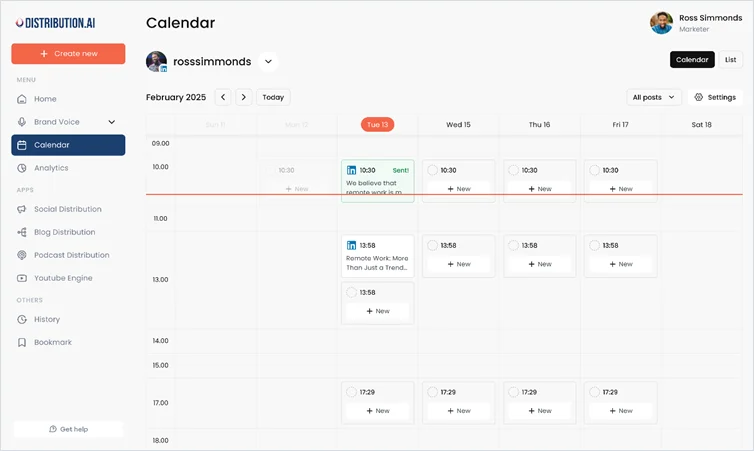
Step 5: Repurpose podcast content into multiple formats
Based on the content calendar, start repurposing your podcast content. You can turn the discussion into blog posts, social media posts, video clips, carousels, infographics, and more. This step mainly involves executing the plan and repurposing the content into multi-format assets.
Step 6: Add context, polish, or bonus insights to avoid duplication
Next, polish your repurposed content and tailor it to different platforms. For example, relate it to a current trend or industry insight for X and LinkedIn, add bonus material like cheat sheets, templates in blog posts, add an image for Instagram, and more. These small edits improve originality and help your repurposed content avoid repetition.
Step 7: Publish across multiple channels
Once your assets are ready, share them across multiple platforms. Share the short clips on YouTube or TikTok, text posts on LinkedIn and X, quote graphics on Instagram, and send newsletters summarizing the episode. This omnichannel distribution helps you reach a wider audience and also builds awareness among potential listeners.
Step 8: Measure results and refine for the next episode
The last step is to measure how the repurposed content performs. Find out:
- Which formats drive the most organic traffic
- Which clips get the highest watch time
- Which posts get saves, shares, or comments
This feedback loop helps you refine your next repurposing cycle and figure out which formats most of your audience prefers.
7 Ways to Repurpose Podcast Content
1. Convert your podcast episodes into videos
One of the fastest ways to expand your reach is to convert your podcast into video content. Why? YouTube is the world’s second-largest search engine with 2.53 billion users. So, putting your content there is a no-brainer. You have a couple of options:
- Record yourself on video while doing the podcast (instant video podcast). This could be as simple as a webcam recording. Upload the full conversation to YouTube or Vimeo for people to watch and listen.
- Create short video clips from the episode. For example, pick a 30-second highlight or a key question-and-answer exchange. Add a title card or subtitles and share it on social media platforms as a teaser.
Here’s an example:
Cleo Abram, video producer at Vox, runs her YouTube podcast. In a recent episode, she had Sam Altman on her show talking about the launch of ChatGPT 5. She repurposed the podcast and shared it on Instagram as a teaser to the YouTube video.

2. Turn episodes into insightful blog posts
Converting an entire podcast episode into a polished blog post can take your content even further. Suitable for non-listeners, your blogs can reach audiences who prefer searching for topics and reading content. Blogs boost your SEO and make the content discoverable through search engines. Plus, it reaches people with hearing impairments.
Tools like Distribution AI enable you to repurpose your podcast into a standalone blog post. Here’s how you can do it.
- Upload your podcast. Simply take your favorite podcast and upload its audio to your Distribution AI Podcast repurposing tool dashboard.
- Start with the transcript or notes. Pull out the key talking points, stories, or tips discussed in the episode. This forms your outline.
- Rewrite in a blog-friendly format. Write an introduction using the AI Podcast tool that hooks the reader, organize the main ideas into sections with subheadings, and add a conclusion or call-to-action.
- Optimize for SEO. Since you’re already covering a topic in depth, make sure the blog post targets a relevant keyword. Add a descriptive title, sprinkle in keywords naturally, and link to any resources mentioned. This way, the post can rank in search and lead people to your podcast.
You can also share the blog on platforms like Medium or turn it into social media posts tailored to platforms like LinkedIn, X, Facebook, and more. With Distribution AI, you can simply paste the podcast link and generate social posts, show notes, complete transcripts, blogs, and emails in one go.
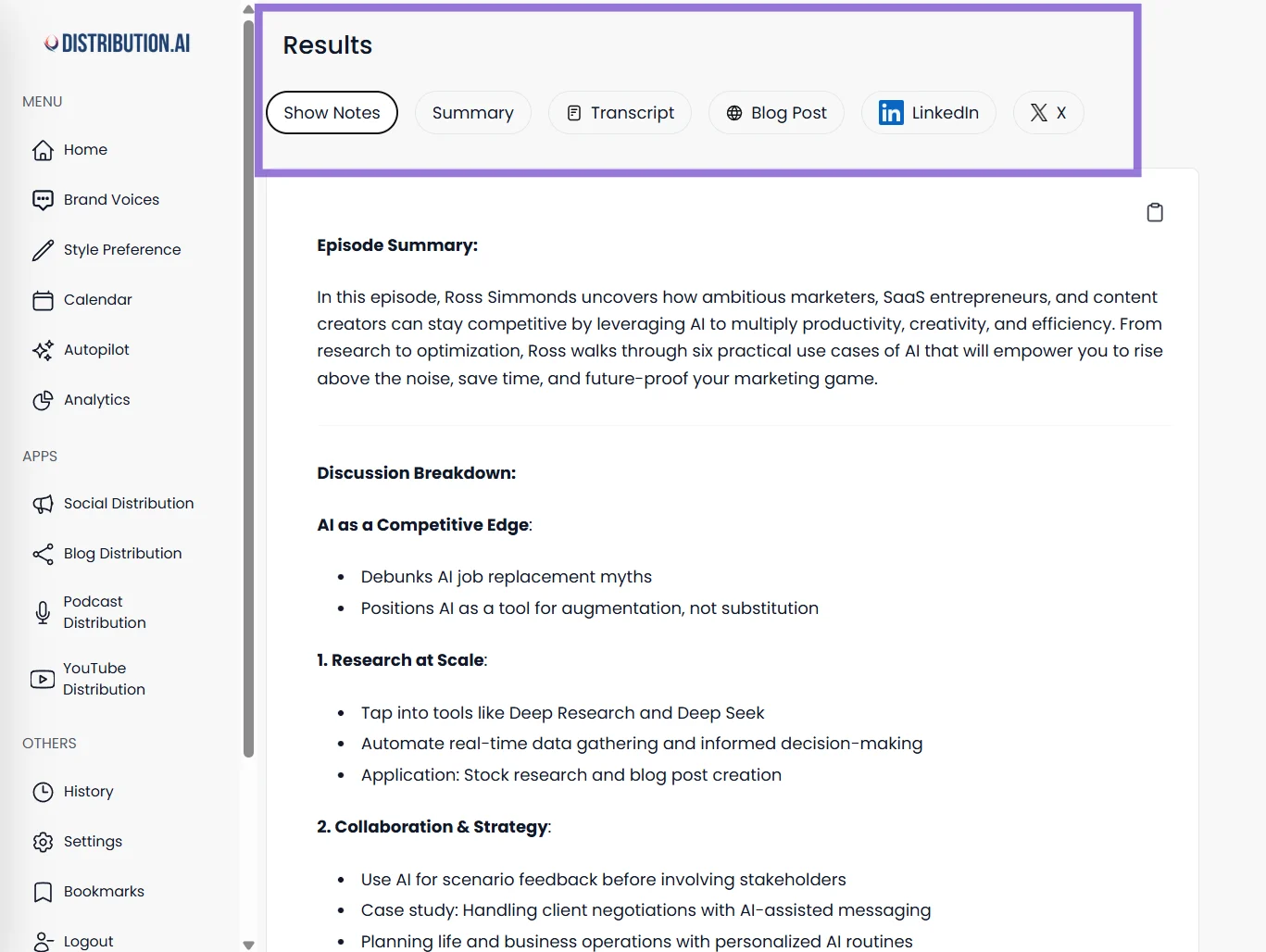
3. Design infographics out of your best episodes
Another content strategy for podcast repurposing is to create infographics based on data, tips, or step-by-step insights discussed in your episode. Using tools from the best ai presentation generators can help you quickly turn these podcast insights into polished, visually clear infographic designs. You can turn that podcast conversation into eye-catching and shareable infographics, visually summarizing complex topics or statistics.
For example, if your podcast episode talked through “10 Tips for Starting a Small Business” or discussed survey results, you can design an infographic highlighting those key points. Use charts, icons, and bold text to make it engaging and share on platforms like LinkedIn, Pinterest, and Instagram, or blogs.
4. Make audiograms to promote your podcast
Audiograms are audio clips turned into videos, usually with a waveform animation and captions over a static image.
They have become a staple for podcast marketing because they’re super shareable. Essentially, you highlight a short, compelling snippet of your episode (30–60 seconds) and create one video file that can play on social platforms.
Since you can’t post audio files on social platforms, audiograms are best for visual-centric feeds like Instagram, Facebook, Twitter, or LinkedIn. Plus, they’re great for visual learners who prefer watching videos to reading posts or listening to podcasts.
For example, content creator Tim Ferriss often uses audiograms to share bite-sized highlights from “The Tim Ferriss Show.” Instead of pushing out entire new episodes, he teases high-value quotes or moments in short clips—helping him grab attention on Instagram, Twitter, and LinkedIn, and driving listeners back to the full episode.
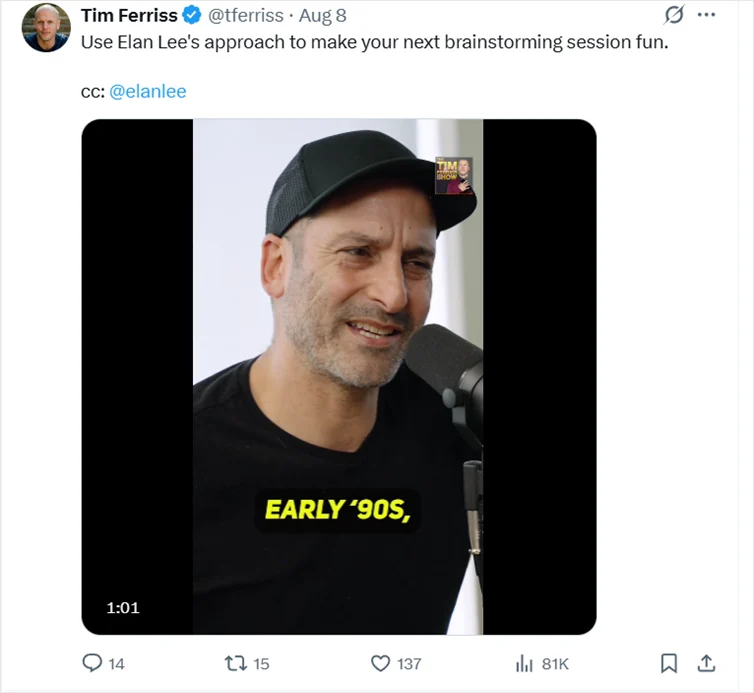
To create an audiogram, pick a quote or an intriguing moment from your podcast, such as a guest’s spicy take, a great one-liner, or a quick tip.
Use tools like Headliner, Wavve, or Descript to create audiograms. Upload your audio snippet, add a waveform animation and caption text, and brand it with your colors or logo.
5. Design quote graphics
Every podcast has its quotable moments, like a witty quote, a memorable phrase, or a statistic that packs a punch.
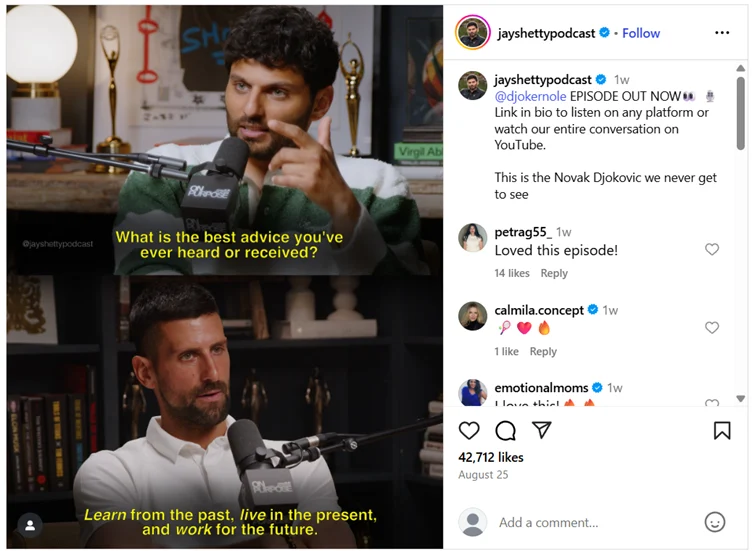
Quote graphics turn those moments into visual content. Think of them as digital quote cards: Typically, an image (with maybe your podcast artwork faintly in the background or a relevant stock photo) overlaid with a short quote in bold text.
These are excellent for platforms like Instagram, Facebook, and Pinterest. The quote should be intriguing or insightful enough to spark curiosity or to resonate such that people feel compelled to like and share it.
Here’s a great example. Jay Shetty, a podcaster and content creator, often uses graphics from his podcast episode with a quote to promote the episode on Instagram.
6. Share carousel posts on Instagram and LinkedIn
Repurpose a podcast by creating an Instagram or LinkedIn carousel post that walks viewers through key points or quotes from the episode, slide by slide. It’s one of the best social media engagements you can do for your targeted audience.
For instance, on LinkedIn, you might create a 5-page PDF upload (LinkedIn treats PDFs as swipeable carousels) titled “5 Lessons from [Guest] on [Topic].”
- Slide 1: The title with an eye-catching image or big text.
- Slides 2-5: Each slide highlights one major lesson or quote with a short explanation or takeaway.
Instagram supports up to 10 images per carousel, so you could do something similar there using image formats.
Pro tip: Tag your guest profiles (if you have one) when you post the carousel. Often, guests re-share a LinkedIn or Instagram carousel that features them. This will help you boost audience growth and increase brand awareness.
7. Write detailed show notes
Show notes are essentially a blog-post-like summary of each episode that you publish on your website (or the podcast’s hosting page), boosting discoverability so more people listen to the podcast.
They generally include a quick recap of the episode, key topics or points covered, and links to anything mentioned (resources, guest info, etc.).
Here’s why you should repurpose podcasts as show notes:
- They boost your Search Engine Optimization presence by adding text to accompany your audio on the web.
- They provide value to listeners who might want to recall something from the episode or dig deeper.
If potential new listeners find your show notes via Google search results and like what they read, they might hit ‘Play’ and listen to the full episode. And if a regular listener visits your site, the show notes can prompt them to explore older episodes or related content (especially if you hyperlink between episodes).
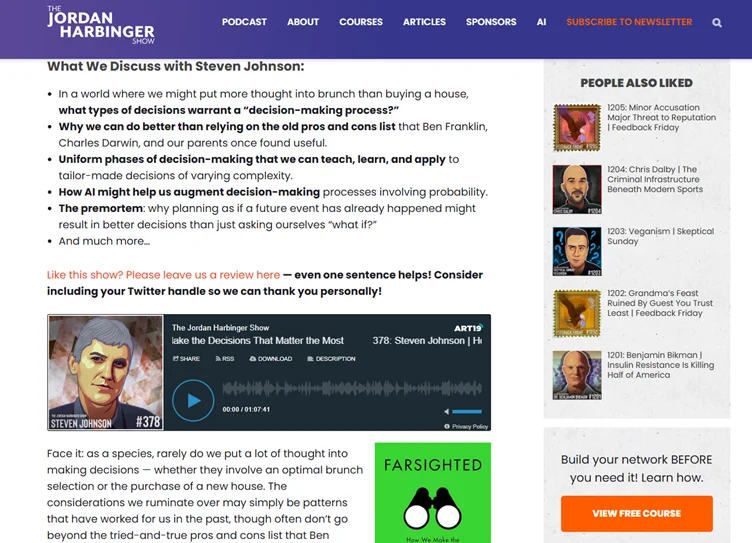
Here’s an example of The Jordan Harbinger Show that publishes show notes on the website to promote the podcast episodes.
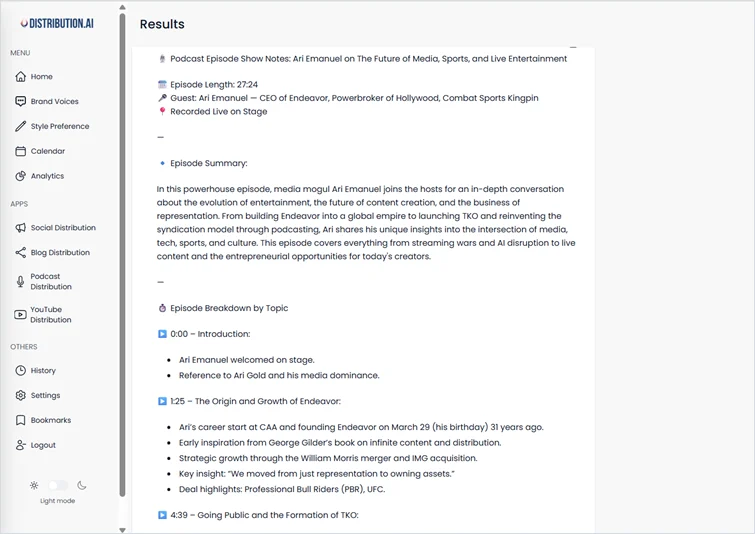
To create show notes quickly, you can either do it manually by jotting down the outline, writing a summary or intro, listing timestamps, and including links and CTAs. Or you can use a tool like Distribution AI to generate show notes within minutes.
Best Practices for Repurposing Podcast Content
Here are some best practices to follow when repurposing your podcast content:
- Give guests ready-to-share assets: Make it easy for guests to promote the episode. Send them a small “share pack” with video snippets, downloadable guides, a quote graphic, and 1–2 caption options. When everything is done for them, guests are far more likely to repost and amplify your reach.
- Use your transcript as the master source: Transcripts serve as your source document. Highlight timestamps, quotes, and strong points directly in the transcript so you can turn them into clips, blog paragraphs, show notes, or carousels without relistening.
- Create templates and batch your repurposing: Instead of designing from scratch each time, build a small set of templates for clips, carousels, and quote graphics. Then batch-edit multiple episodes at once. This keeps your branding consistent and speeds up your workflow.
- Add fresh context when reposting older episodes: If you want to resurface an older episode, add a short intro, updated note, or fresh angle so it feels relevant again. It prevents the content from feeling repetitive and helps it perform better on social platforms.
- Space out reposts to avoid audience fatigue: Don’t re-share episodes too soon. Set a cooldown period (like 6–12 months) before repurposing the same material again. This lets you reuse evergreen content strategically.
Wrapping Up
Transforming one podcast episode into multiple content formats is one of the easiest ways to grow your reach without producing new material. Repurposing keeps your ideas alive for longer, improves consistency, and helps you show up on the channels your audience already uses.
Start with a couple of methods that fit your workflow, then expand as you go. And if you want to speed things up, tools like Distribution AI can automate tasks such as generating blog posts, creating social posts, and drafting email content—so you can focus on strategy and audience engagement.
So, start treating your podcast episodes as content assets that can give you more mileage than you can imagine. Reuse them strategically and let AI do the heavy lifting.
Frequently Asked Questions
What is a repurposed content podcast?
A repurposed content podcast is simply when you take your podcast audio and rework it into other formats so it can live beyond the audio file. Instead of treating an episode as just the tip of your content output, you turn it into blog posts, social images, Instagram Reels, episode summaries, and content that can be shared across other channels. This approach helps you reach new listeners who may never come across the original audio and gives your ideas a better chance of gaining traction across platforms.
Is repurposing content illegal?
Repurposing your own podcast content is not illegal. Most podcasters treat repurposing as a smart extension of their content strategy because it allows them to reuse what they already created. Legal issues only arise when someone repurposes copyrighted material they don’t own or don’t have permission to use. As long as you have rights to the original podcast audio, you can repurpose it into written content, video content, or social media posts without any restrictions.
What is an example of repurposed content?
A common example is converting a single podcast episode into multiple pieces: a short clip for Instagram Reels, a mini article for your website, a set of social images, and a short email update. This allows your episode to show up on different platforms and gives the same message multiple chances to drive traffic back to the podcast.
What are the best formats to repurpose podcast episodes into?
Podcasters usually get the most value by converting episodes into video clips, Instagram Reels, blog posts, episode summaries, audiograms, carousels, and content upgrades like mini-guides or checklists. These formats help your content appear in search results, social feeds, and inboxes, giving your ideas more visibility. Using different formats also helps you show up consistently across multiple channels without having to record new content every time.
How do you ensure consistent branding when repurposing podcast content?
Consistent branding comes from using the same tone, colors, fonts, and content structure across each format. Whether you’re creating content for social images, blog posts, or video snippets, keeping a unified look reinforces your identity. AI tools can help maintain this consistency by following preset brand guidelines, making every piece of repurposed content feel like part of the same brand experience, even when shared on other channels.
How can you add value to repurposed episodes?
You can add value by going beyond the original recording. Include key takeaways, behind-the-scenes context, or a quick recap that clarifies the main point of the episode. You can also introduce timely updates or link to previous episodes to create deeper connections. Adding content upgrades like checklists or templates gives your audience something extra and often drives engagement and valuable feedback.
How to squeeze 5 social media posts out of every podcast episode (without burning out)?
The easiest way is to pull the strongest ideas directly from your podcast audio or transcript and rewrite them as standalone content. Turn a memorable quote into a social image, convert a short insight into a Reel, write a brief summary as a text post, and highlight one takeaway as a short paragraph for other channels. You can even create a “greatest hits” post that references insights from previous episodes. Additionally, you can use tools like Distribution AI to repurpose your content assets to automatically generate and publish posts across social media platforms.
How often should podcast content be repurposed?
Repurposing works best when you reuse content soon after the episode goes live and then bring back evergreen episodes every few months. Many creators revisit older recordings and give them fresh context or updated commentary so they feel relevant again. This steady rhythm keeps the podcast visible, helps you gain traction with new listeners, and ensures your best episodes continue to drive traffic long after the original publish date.

Promote, repurpose & distribute your content with AI
Write 10x faster, engage your audience, & never struggle with the blank page again.
Start 15-Day Free Trial
Frequently Asked Questions
Author

Promote, repurpose & distribute your content with AI
Start 15-Day Free Trial